
Top Reasons to Choose ReactJS for Progressive Web App development 

Join our Newsletter!

Featured Posts

Support Is One Click Away

Home

Top Reasons to Choose ReactJS for Progressive Web App development 

ReactJS for Progressive Web App development

Top Reasons to Choose ReactJS for Progressive Web App development 

Creating applications that are fast, dependable, and smooth on all devices is important for every company today, right? So, when you think of building something like that, ReactJS for Progressive Web App development may be a wise option for you. It allows you to create applications that give the experience of a native application without the cost or intricacy. There are many modern companies already using this approach to enhance performance and keep users invested with consistent user experiences.

ReactJS offers speed, flexibility, and user-centric features that are perfectly aligned with progressive web app goals. ReactJS has reusable components and fast rendering, making it easy for developers to build responsive and high-performance apps. PWAs built with ReactJS are responsive and load fast, work offline, and allow a smooth mobile experience that users will enjoy. In this blog, we will examine the top reasons why ReactJS is great for developing PWAs.

Looking to engage users with fast and seamless web applications? At Mindpath, we offer ReactJS development services where our experts help you create user-focused Progressive Web Apps that give users a smooth digital experience.

Understanding the Fundamentals of PWAs

Progressive Web Apps (PWAs) are modern web applications that function like mobile apps. With a PWA, you can open it in a web browser, but it behaves like a real app on your phone or computer. They are designed to function seamlessly across all devices (smartphones, tablets, or desktops), which is nicer than having separate mobile websites, apps, and desktop apps.

Progressive Web Apps are created using HTML, CSS, and JavaScript. They are fast to load; they work when users are offline and can send push notifications. They also allow access to certain phone functionality, such as the camera or location. PWAs can help businesses save time and money since they must build one app that can work everywhere.

Looking for specialists who can handle complex front-end challenges in your business? Learn why partnering with an expert React Development Company is a smart move.

Advantages of Using ReactJS for Progressive Web App development

Using ReactJS for PWA development is a great choice for creating secure and fast web applications. With the growing ReactJS trends, developers hope that they can deliver seamless and user-friendly experiences. Here is how ReactJS is perfect for your PWAs.
Advantages of Using ReactJS for Progressive Web App development

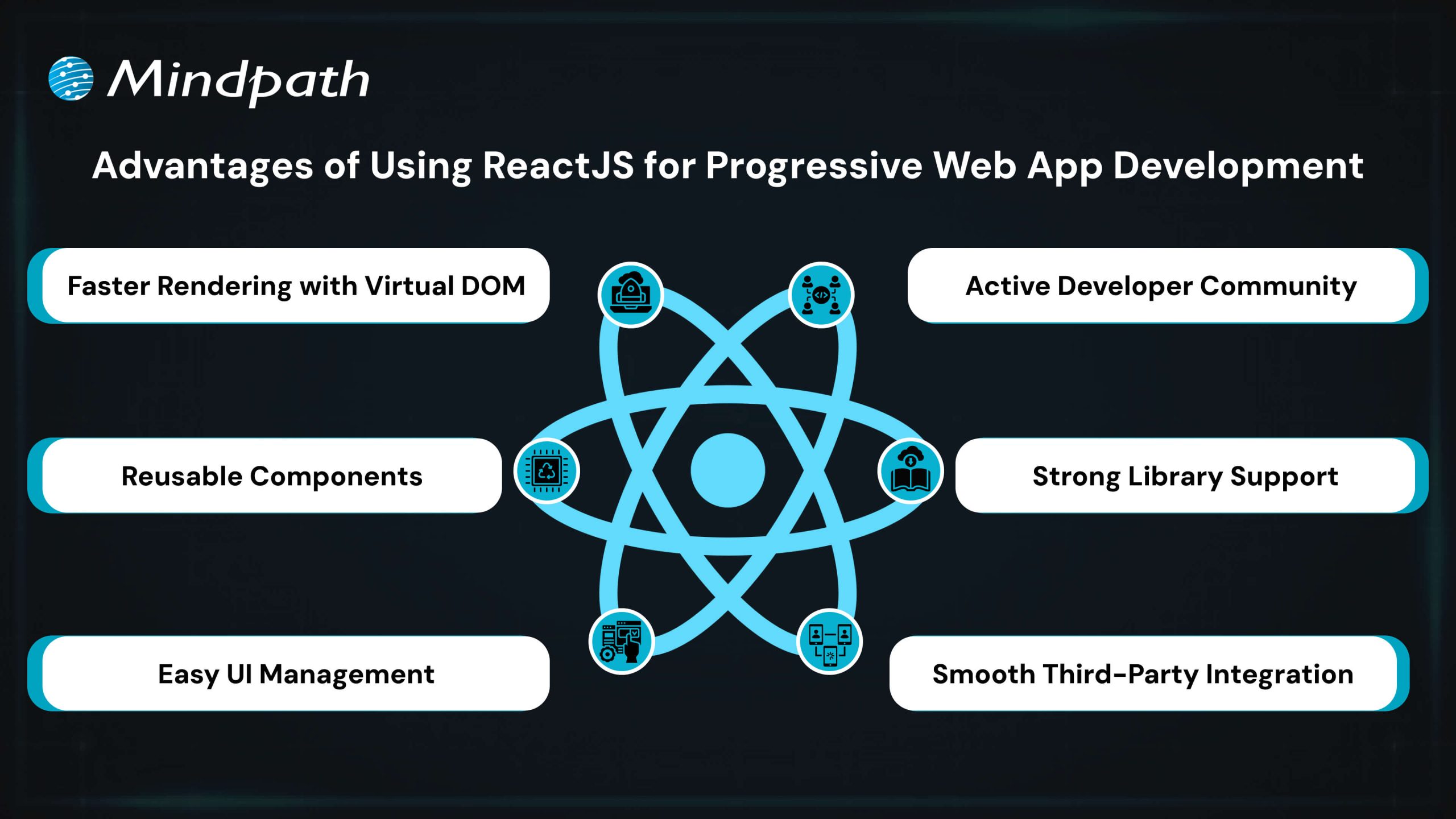
1. Faster Rendering with Virtual DOM

React uses a Virtual DOM to update only the parts of the page that change. This speeds up performance and ensures a smooth user experience. It’s ideal for building fast and responsive ReactJS PWA solutions.

2. Reusable Components

React’s component-based structure allows developers to reuse code across the app. This makes it easier to manage the app and scale it as it grows. It’s a key reason why teams choose ReactJS for progressive web app development.

3. Easy UI Management

React follows a declarative style for creating user interfaces. This makes it simple to manage and update interactive elements in the app. It helps deliver a smooth and engaging ReactJS progressive web app experience.

4. Active Developer Community

React has a strong global community that shares solutions, tools, and tutorials. This support helps developers solve problems faster and stay updated. It also contributes to the future of ReactJS in modern web development.

5. Strong Library Support

React has many libraries like React Router and Redux that simplify routing, data flow, and offline features. These tools help developers add advanced features to PWAs with less effort. They make building a PWA with React more efficient and reliable.

6. Smooth Third-Party Integration

React works well with tools needed for Progressive Web Apps, such as service workers and web app manifests. These tools help enable offline access, background syncing, and “Add to Home Screen” functionality. This makes it easier to implement full PWA capabilities when building with React.

Want to keep your large React app fast and responsive as it scales? Discover the best practices for optimizing React performance for large applications.

Steps to Set Up a React PWA

Getting started with React is a smart move when building modern web apps that work offline and feel like native apps. If you’re planning to use React for progressive web app development, here are the key steps to set it up properly.
Steps to Set Up a React PWA

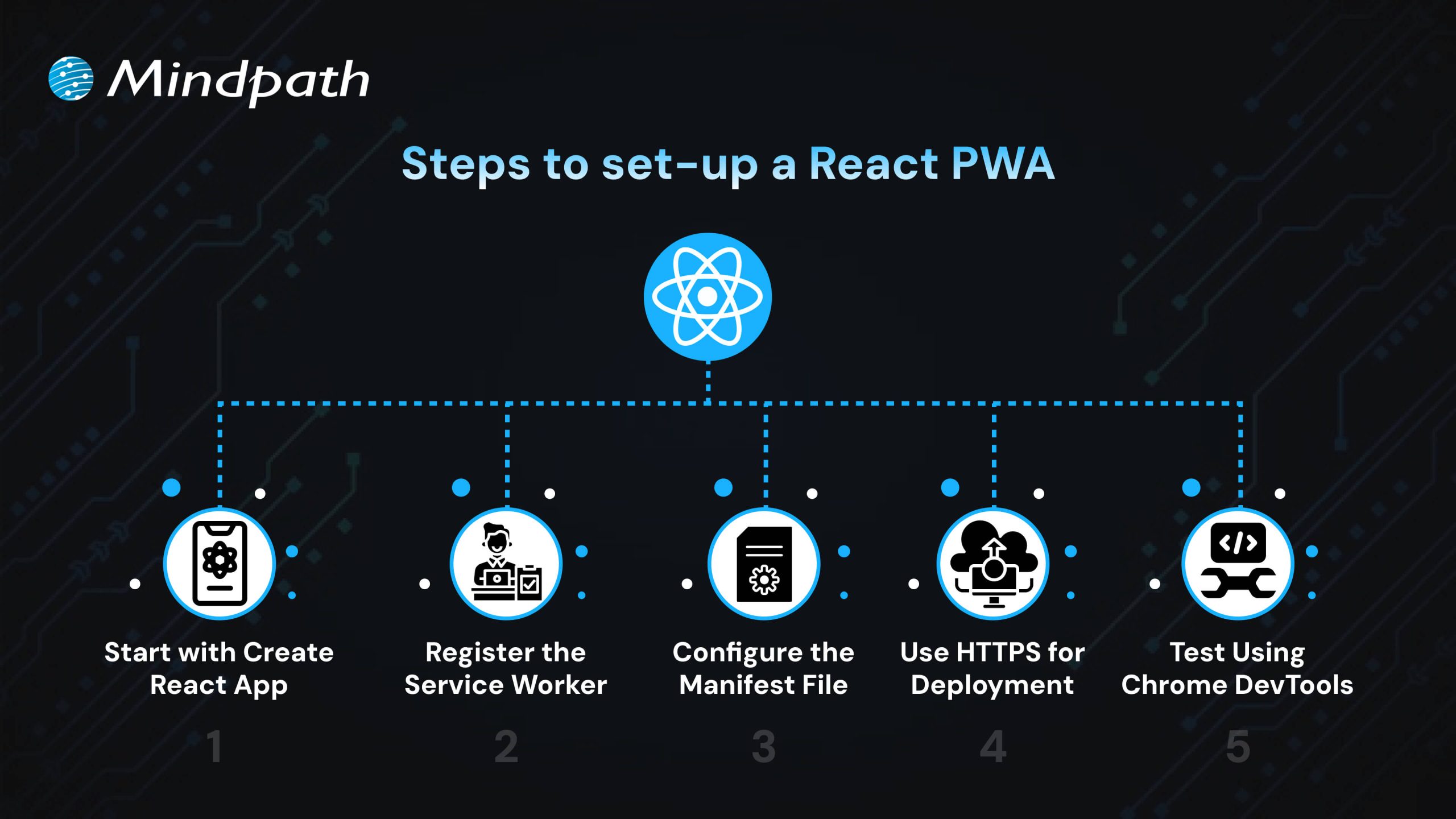
1. Start with Create React App

The easiest way to begin is by using Create React App, which includes built-in support for PWAs. It sets up a basic structure with everything needed for ReactJS PWA development, including service workers and a manifest file. CRA also optimizes the build process, making your app production-ready. This setup ensures you have a strong foundation to build a scalable and responsive PWA.

2. Register the Service Worker

To activate offline support, register the service worker by calling ‘serviceWorkerRegistration.register()’. This enables background caching, which is key to building a progressive web app with React that works without an internet connection. A registered service worker allows the app to cache assets and serve them even when the network is unavailable. It also helps improve performance by reducing server requests, ensuring a better user experience in the future of web development.

3. Configure the Manifest File

Update the manifest.json file in the public folder to define your app’s name, icons, theme color, start URL, and display mode. These settings control how your app appears when installed on a device. A properly configured manifest ensures your PWA looks and feels like a native app. This also helps in enabling features like splash screens and full-screen display, supporting the growth of progressive web apps with React development.

4. Use HTTPS for Deployment

For security, PWAs must be served over HTTPS. Local development through CRA handles this, but for live deployment, ensure your server uses a valid HTTPS setup. A secure context is required for service workers and features like push notifications. Using HTTPS also improves user trust and SEO performance.

5. Test Using Chrome DevTools

Use Chrome DevTools to inspect and test your PWA setup. You can verify service worker status, cached files, and manifest settings. Lighthouse audits can also help you improve your app based on best practices for React for progressive web app development. Testing ensures your PWA meets performance, accessibility, and usability standards.

Seeking a development approach that reduces complexity while enhancing functionality? Read why React Web Development is ideal for modern projects.

Ready to Build a Powerful PWA with ReactJS?

ReactJS offers all the essential tools to build fast, reliable, and interactive web apps that feel like native experiences. Its reusable components, strong ecosystem, and smooth performance make it a top choice for modern applications. Choosing ReactJS for progressive web app development is a future-focused decision that brings real value to your business.

At Mindpath, we deliver expert ReactJS development services tailored to your goals. We build responsive, scalable, and feature-rich PWAs with smooth offline access and high performance. Our experienced team uses the latest tools and trends to create apps users love. Partner with Mindpath and bring your next ReactJS PWA to life with speed and quality.

Related Post

Discover the top 8 benefits of Node.js for web development, from seamless scalability to cost reduction. Elevate your web app performance with Node.js today!
Discover the key factors influencing software development costs and how to optimize your budget. Learn how Mindpath can help.

Related Post

ReactJS and AI

Have you ever wondered how you can make your React applications even smarter? What if you could combine the power of Artificial Intelligence with React to create more intuitive and dynamic user experiences? In this blog, we’ll explore how integrating AI with React can take your front-end development to the next level, making your apps smarter, faster, and more engaging.  

Combining React with Artificial Intelligence (AI) is transforming front-end development. When combined with AI, React, which is recognized for its speed and flexibility in creating user interfaces, improves application intelligence. This connection allows developers to create dynamic, data-driven experiences that anticipate user desires, automate procedures, and offer personalized interactions. As AI continues to alter sectors, incorporating its capabilities into React apps is crucial for remaining competitive in creating smart, intuitive, and adaptable frontend solutions. 

Let’s dive in to explore the benefits of combining React and AI for front-end development! 

Benefits of Combining React and AI For Front-end Development

1. Real-Time Decision Making

The combination of React with AI enables frontend apps to make intelligent judgements instantaneously, directly within the user interface. This capacity is especially valuable in situations when prompt and precise replies are required. For example, an e-commerce platform can identify and respond to suspicious activity while the user is still interacting with it, assuring real-time security. Similarly, an application can analyze user emotions via text or graphics and tailor its replies or propose actions based on the user’s requirements.  This connection enhances application intelligence by allowing them to interpret data, analyze trends, and deliver answers in real time. Users benefit from a seamless experience in which choices are made automatically in the background, improving security, engagement, and personalization without disrupting the flow of interaction. 

2. Visual and Text Recognition

Integrating AI with React enables frontend apps to recognize images and respond to voice instructions, resulting in a more engaging and intuitive user experience. AI-powered technologies incorporated directly into React components enable apps to seamlessly analyze photos and understand spoken language, resulting in smoother and more engaging interactions. For example, a user can upload a photo, and the system can recognize objects, words, or patterns in the image, delivering quick insights or actions depending on the input. Similarly, users can employ voice commands to explore the program, run searches, and operate other features while remaining hands-free. These features are essential for accessibility, since they allow people with impairments to engage with the software easily. This combination not only improves usability, but it also creates new opportunities for applications in fields such as e-commerce, healthcare, and education. Visual and speech recognition driven by AI and React improves how customers interact with digital platforms, making the experience richer, smarter, and more inclusive.   

3. Predicting User Behavior

Combining AI with React enables apps to anticipate user needs and make proactive suggestions, making the experience smoother and more engaging. By analyzing user behavior and trends, AI systems can forecast future actions or preferences, providing relevant material or actions before the user ever requests them. 

For example, an e-commerce website can provide things based on a user’s browsing history, whereas a media app can suggest movies or music depending on their likes. With React components constantly changing in real time, these ideas show smoothly inside the interface, ensuring that customers receive timely and personalized advice. This predictive feature improves user happiness by reducing effort and providing just what the customer requires. It turns programs into intuitive tools that seem one step ahead, resulting in a smooth, intelligent, and highly engaging experience. 

4. Smart Form Handling

Frontend application forms get smarter and more adaptable when AI is integrated with React. These forms can analyze user input patterns and dynamically modify their structure to make appropriate suggestions or simplify data entry. AI algorithms work in the background, learning from past user inputs to provide intelligent auto suggestions while reducing repetitive typing. 

For example, if a user repeatedly submits the same information, such as an address or email, the form might anticipate, and auto-fill fields based on previous entries. Forms can be modified in real time by rearranging parts or offering context-specific alternatives to improve the user experience. This clever handling of forms not only saves time but also enhances accuracy and user satisfaction. By reducing the effort required to input data, applications become more user-friendly and efficient, making the overall interaction smoother and more enjoyable.

5. Personalized Experiences

When React and AI work together, frontend apps can deliver highly personalized experiences that adjust to each user’s preferences and behavior. AI analyses user interactions in real time, learning their preferences, dislikes, and behaviors. This information is then utilized to dynamically customize the content, layout, and interface, ensuring that each user’s trip is unique and entertaining. 

For example, an e-commerce platform can provide items depending on a user’s browsing history or previous purchases. Similarly, a news app can prioritize articles about topics that the user frequently reads. With React components that update in real time, these personalized modifications display quickly, improving the user experience without interruptions. 

Dynamic personalization not only improves user happiness but also enhances engagement by offering material and features that seem tailored to them. This clever flexibility converts programs into engaging, user-centric platforms that keep users returning for more. 

Also Read: Step By Step Guide To Choose React Development Company

How Can Mindpath Help?

Mindpath leverages the power of React and AI to create intelligent, user-friendly frontend apps. Our team of professionals develops solutions that are tailored to your users’ demands, making your app more engaging and effective. We can help you include real-time decision-making, visual and speech recognition, smart forms, and personalized experiences into your application. Whether you want to forecast user activities, give fast suggestions, or build dynamic designs, we’ll make your app stand out. Mindpath is a dependable partner who knows the newest technologies and works to develop front-end solutions that actually connect with your target audience. 

Final Thought!

Integrating AI with React elevates frontend development, enabling smarter, more intuitive applications. By combining React’s flexibility with AI’s capabilities, you can enhance user experiences with real-time decision-making, visual and voice recognition, predictive behavior, and dynamic personalization. At Mindpath, we harness the power of these technologies to create intelligent, user-friendly applications tailored to your needs. With our expertise in React and AI, we help you build engaging, efficient, and personalized solutions that connect with your audience and drive success. 

Ready to elevate your front-end development?

Partner with Mindpath to create intelligent, AI-powered React applications that engage and delight your users.

Learn how combining React and AI enhances front-end development, offering smarter, personalized user experiences and dynamic features.
Unlocking Cyber Security

Ever wondered how secure your business really is in today’s digital age? What if we tell you that there are better ways to protect your digital assets from emerging threats? As cyber-attacks become more sophisticated, it’s essential to stay ahead of the curve. In this blog, we’ll explore effective strategies to enhance your business’s cyber security. 

Cybersecurity refers to protecting your computer systems and data against cyber-attacks. These risks include hackers attempting to steal or destroy your data, malware that locks your files until you pay a fee, and attacks that interrupt your business. With so many gadgets and more skilled hackers, it is essential to employ numerous levels of security. This includes employing tools to detect and resolve issues, as well as ensuring that your people and procedures are prepared to respond. Cybersecurity is all about integrating smart technology and behaviors to keep your digital world safe. Cybersecurity is essential because it protects us from online threats that might lead to catastrophic consequences, such as identity theft or data loss. Our everyday lives rely on secure systems like power plants, hospitals, and banking. If these systems are not secured, they can harm everyone. 

So, let’s dive in to explore the ways in which we can increase cyber security! 

Ways to Increase Cyber Security

1. Regular Updates

To keep your computers safe, update them on a regular basis. This includes desktop computers, laptops, and mobile devices. Keep your operating systems and web browsers up to date to guard against emerging threats. Check for updates to any software on your computer, including security programs. Cloud-based software often updates automatically, so you don’t have to worry about it. If the employees use mobile devices for work, make sure they maintain their software up to date, particularly security programs. This helps keep all your gadgets safe. 

2. Training Employees

Make sure your staff are aware of your company’s security plan. Begin by developing a cybersecurity policy that specifies best practices and processes for keeping information secure. This policy ought to specify what procedures to take if there is a security breach. Encourage staff to adopt strong, unique passwords for all accounts and devices. They should use different passwords for their PC, mobile devices, and corporate accounts. Whenever possible, enable two-factor authentication. This provides an additional security layer by needing a second device or code to complete the sign-in procedure. This helps to safeguard your accounts even when passwords are stolen. Additionally, provide regular training for your employees on cybersecurity. This helps them stay informed about the latest threats and best practices. 

3. Limiting Access

Make sure that only authorized individuals have access to company computers and accounts. Even trustworthy people should not access information or equipment that they are not authorized to use. For example, do not allow a customer to use a work laptop to search something up. Different workers may require varying degrees of access depending on their positions. Ensure that staff do not reveal their account details. For example, an accountant should never share their accounting software password with a salesman. When feasible, build unique logins for each employee. This enables you to restrict and limit what each individual may access depending on their function, therefore improving overall security.

4. Securing Wi-Fi

If your business’s Wi-Fi is not sufficiently safeguarded, it might pose a security concern. Make sure your Wi-Fi is password-protected so that only employees have access to it. Ideally, keep the WiFi password secret from employees. If you need to provide Wi-Fi connectivity to customers, create a separate network exclusively for them. This guest network should be separate from the network of your company to avoid unauthorized access to important files and data. Keeping these networks distinct helps secure your company’s information from potential security attacks. 

5. Create Backups

To avoid data loss, back up your computer’s information on a regular basis. If files are stolen or go missing, maintaining a backup allows you to restore them. Make sure that all vital data is backed up. For example, if you have vendor information on your desktop, keep a copy on the cloud. Both copies should be encrypted and password-protected to prevent unauthorized access. This way, if something goes wrong, you’ll still have access to vital data. 

6. Create Mobile Action Plan

Mobile devices may be a security issue, especially if they hold sensitive information or provide access to your business network. To reduce these dangers, ask users to password lock their devices and encrypt their data. Encourage them to use security programs to protect their information, particularly while accessing public networks. In addition, create explicit protocols for reporting missing or stolen devices. This allows you to respond swiftly to security breaches and guarantees that your data and network are protected. 

7. Passwords and Authentications

Ensure that staff use unique passwords for each account and update them every three months. To improve security, use multi-factor authentication (MFA), which needs more than just a password to access accounts and typically includes a second form of verification, such as a code texted to a mobile device. Additionally, check with providers who handle sensitive data, such as banking services, to determine if they provide MFA for your accounts. This extra step helps to secure your information from unauthorized access. 

Increase Your Cyber Security at Mindpath

At Mindpath, we make it easier to safeguard your company from cyber-attacks. We assist you in increasing your security by using strong passwords, keeping software up to date, and implementing additional levels of protection such as multi-factor authentication. Our staff guarantees that your data is safe and secure, providing you peace of mind while enabling you to concentrate on your company. Let us assist you in keeping your digital world safe! 

Wrapping Up!

Cybersecurity is more essential than ever in today’s digital environment. You can significantly boost your company’s cyber security by applying the measures we’ve covered, which include frequent updates, complete staff training, restricted access, secure Wi-Fi, dependable backups, a mobile action plan, and strong password restrictions. Our web development services are devoted to assisting you in navigating these challenges with ease. Our team is committed to providing you with the resources and assistance you require to safeguard your digital assets and keep your peace of mind. 

Ready to fortify your business against cyber threats?

Connect with Mindpath for top-notch security solutions tailored to your needs.

cloud computing trends

Have you been following the newest cloud computing trends? It seems that every day, there is something new to change how we store, share, and secure data. Perhaps you’ve been wondering if your business is missing out on smarter ways of working, or worried about staying ahead of the game in this digital world. Whatever your thoughts are, there is one thing for sure: cloud technology is not just for tech giants anymore; it is shaping the way we all connect, create, and grow.

As we move to 2026, these cloud trends will continue to open bigger opportunities for businesses, no matter how big or small. With faster, many times AI-driven services, greener cloud solutions, a flexible and secure future is more promising than ever. Being aware of what is next will enable you to make an informed decision about the future and give you a competitive edge. If you’re wanting to find out more about where the cloud is headed, continue reading. In this blog, you will learn what’s coming next.

Looking to build scalable, secure cloud applications that drive business growth? Mindpath offers expert cloud development services to help you design and optimize cloud solutions tailored to your needs

Understanding Cloud Computing

Cloud computing is simply the storing and accessing of data and programs over the internet instead of your computer’s hard drive. It is considered internet-based computing, allowing businesses and individuals to use servers, storage, and software that is also provided by cloud providers. One of the benefits is that maintenance is limited, which means there are lower costs associated with users storing files, documents, images, etc. Cloud computing offers flexibility in keeping important data secure and available.

It works through remote servers hosted online that store, manage, and process data rather than relying on local hardware. Users can access these resources whenever they need and scale them up or down as their needs change. This makes it easy to save money on physical infrastructure, increase efficiency, and keep operations running smoothly with more reliability and speed.

The market for this technology keeps expanding rapidly as more businesses adopt cloud solutions. According to Grand View Research, the global cloud computing market size was around USD 752.44 billion in 2024 and is projected to reach USD 2,390.18 billion by 2030. This growth is mainly driven by the rise of big data, artificial intelligence, and machine learning, which all depend on powerful and scalable cloud infrastructure.

Curious how modern cloud apps run without servers? Explore our blog on Serverless Architecture in Cloud Computing to see how serverless solutions are shaping the future of cloud trends.

What are the Latest Trends in Cloud Computing?

Staying updated with cloud computing trends 2026 can help your business stay competitive and ready for what’s next. Companies everywhere are paying close attention to the current trends in cloud computing to boost efficiency and security. Here are some key developments you should watch for in the coming year.

Cloud computing trends

1. Rise of Multi & Hybrid Cloud

Many companies now use a multi-cloud strategy and hybrid cloud approach to run workloads across different cloud providers and their own data centers. This setup lets them combine the strengths of public and private clouds while keeping sensitive data secure. Using multi and hybrid cloud solutions also gives businesses more flexibility and better control over risks.

2. Automation

One of the latest trends in cloud computing is using automation to make systems work faster and more efficiently. Good automation helps teams deliver better results, reduce downtime, and improve overall quality. With better AI tools and user-friendly platforms, cloud providers are making automation easier for everyone to use.

3. AI/ML Capabilities

Better AI and machine learning are becoming the next big thing in cloud computing. Many providers now offer smart tools that help businesses use advanced analytics and automation. These cloud computing trends make it easier to build intelligent applications and boost efficiency without needing deep technical skills.

4. Cloud Cost Management

Managing expenses is a big part of the future of cloud computing as more businesses move to the cloud. New tools and services help companies track and control their spending more easily. These cost management features make it simple to budget, monitor usage, and find ways to save money.

5. Edge Computing

Edge computing is one of the cloud latest trends bringing data processing closer to where it’s created. This helps reduce delays and cuts down on the amount of data that needs to travel long distances. By doing this, businesses can work faster and use their networks more efficiently.

6. Low-Code and No-Code Services

One of the growing cloud services trends is using low-code and no-code tools to build apps faster. These solutions help people create software without needing advanced programming skills. Such cloud computing trends save time and lower development costs for businesses.

7. Open-Source Cloud Solutions

One of the growing cloud computing trends is the move toward open-source cloud solutions. These solutions give businesses more control and flexibility to adjust their cloud setup as needed. Open-source options can also help companies save money compared to traditional cloud providers.

8. Cloud-Native Applications

Building cloud-native applications is an important part of the future of cloud computing. These apps are made to run smoothly on cloud systems and use all the benefits the cloud offers. More tools are now available to help businesses create and launch these apps quickly and easily.

9. Focus on DevSecOps

DevSecOps brings security into every step of software development instead of adding it later. This approach helps teams find and fix issues early, keeping systems safe. Many cloud providers now offer tools that make it easier for businesses to build secure applications from the start.

10. Green Computing Initiatives

One of the important cloud computing trends is the push for greener solutions. Providers are using renewable energy and building energy-efficient systems to cut down on carbon emissions. These efforts help businesses meet their sustainability goals while using cloud services.

Struggling with speed, collaboration, or automation in DevOps? Our DevOps Challenges and Solutions blog explains how modern businesses address these issues.

Which Industries are Adopting Cloud the Fastest?

Many industries are moving to the cloud to work faster and serve their customers better. Companies see cloud solutions as a way to cut costs and stay flexible in a changing market. Let’s look at which sectors are adopting cloud the fastest right now.

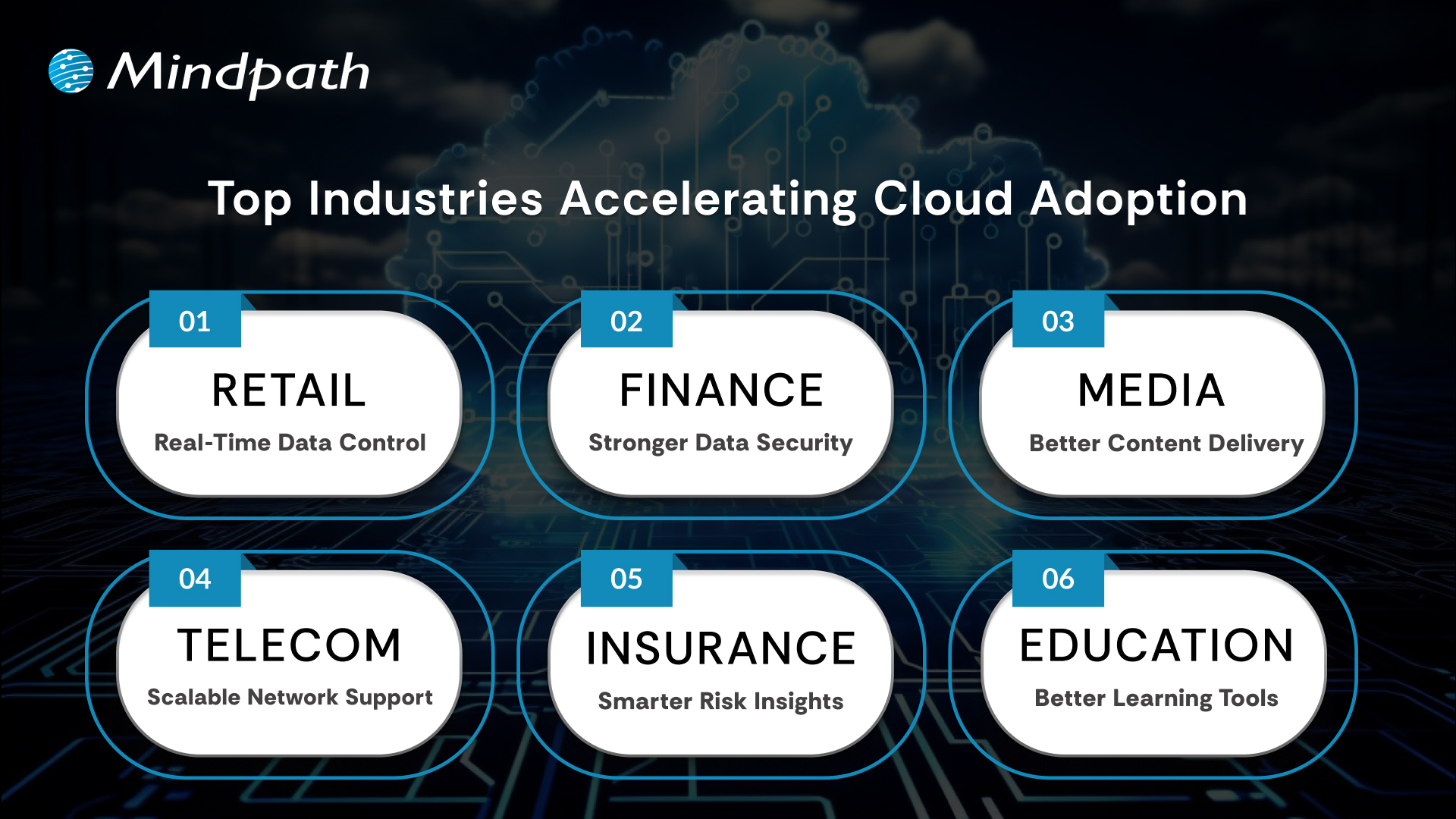
Top Industries Accelerating Cloud Adoption

1. Retail: Real-Time Data Control

Retailers use the cloud to manage sales, stock, and customer data in one system. Real-time updates improve supply chains and marketing campaigns. This boosts profits and keeps work going smoothly.

2. Financial: Stronger Data Security

Banks and financial firms trust the cloud for secure data storage and better protection. They can handle tasks like billing and client help more easily. Better security helps them grow safely.

3. Media: Better Content Delivery

Media companies use the cloud to create, store, and share content worldwide. Teams can work together from different places and finish faster. They handle big audiences without spending more.

4. Telecom: Scalable Network Support

Telecom companies use cloud solutions to manage networks and huge data. This helps them handle changing demands and roll out 5G and IoT services. Cloud computing trends keep people connected and ready for new tech.

5. Insurance: Smarter Risk Insights

Insurance companies use the cloud for flexible data and cost savings. They analyze big data to predict risks and detect fraud early. This helps them stay competitive with better customer service.

6. Education: Better Learning Tools

Schools adopt the cloud to manage tight budgets and get new technology. Teachers and students can share lessons and resources in one secure place. This makes learning flexible and improves teamwork.

Looking for ways to optimize your cloud strategy? Explore our Multi-Cloud Strategy blog to see why businesses are spreading workloads across multiple clouds.

Is Your Business Cloud Ready for 2026?

Staying on top of cloud computing trends can help any business unlock new opportunities, save money, and stay secure. As you’ve seen, trends like automation, AI, green computing, and smart cost management are shaping the way companies grow and compete. Keeping an eye on what’s next means you’re always ready to adapt and make smarter technology decisions.

At Mindpath, we help you stay ahead with trusted cloud computing services designed to match your goals. Our team can support your move to the cloud, help manage costs, and keep your data secure. We focus on delivering solutions that fit your business needs today and tomorrow. Connect with us and see how we can make your cloud journey easier.