
AI First | Future-Proof | Agile
Gen AI-First
Software Solutions
That Boost ROI
Future-proof your business with smarter strategies and seamless automation.
Embrace what’s next with Mindpath.
Our Growth Path
GenAI-Powered Solutions That Go Beyond Simple Integration
We leverage cutting-edge tools to create an AI-first roadmap for businesses and help them prepare for the challenges and opportunities of a dynamic tech environment.
GenAI-Powered Solutions That Go Beyond Simple Integration
We leverage cutting-edge tools to create an AI-first roadmap for businesses and help them prepare for the challenges and opportunities of a dynamic tech environment.
GenAI for Development
At Mindpath, we leverage cutting-edge Generative AI tools, including Cursor AI, Github Copilot to craft solutions that are not just robust but also future-ready.

Artificial Intelligence Development
At Mindpath, we leverage cutting-edge AI tools, including Curser AI, Github Copilot to craft solutions that are not just robust but also future-ready.
Low Code/No-Code Development
Low-Code/No-Code development is the future. We are backed with tools like n8n, make.com and more to develop and deliver automated workflows that are the backbone of any project.
Prompt Engineering
Our team of AI experts curate meticulous prompts that optimize the AI interactions and deliver world-class results. We fine-tune models to meet industry-specific requirements and deliver solutions that create an impact.
AI Agents Development
We revolutionize customer service experience for your business with bespoke AI agents. Our AI agents and bots resolve customer queries, give prompt assistance and enhance customer experience.

Our Mission: Delivering Benchmark-Level Custom Software Development
At Mindpath, we join forces with organizations to build benchmark-level custom software development solutions. Our approach puts our customers and their pain points at the very center of our development process. We believe in delivering solutions that not only simplify processes but also add value in the long term.
Our Execution Framework
Ideation
Our ideation and brainstorming process has one objective: listen and listen! We listen to your pain points, your journey, and your needs and come up with a roadmap that guides you to a perfect application development solution.
Innovation
Based on problem identification, we distribute the solutions into smaller, achievable milestones before beginning the development process. We maintain transparency & clear communication throughout.
Delivery
Our solutions not only solve your current business pain points, but can also grow as your business expands. Once we deliver, we don’t just stop there. Rather, we support you post-deployment in maintaining and enhancing operations.
Projects We've Built. Results We've Delivered.
Real-world solutions that drive innovation, solve challenges, and deliver measurable business impact.

Co-op Taxi: Streamlined Bookings via Messenger and SMS Bot
We streamlined Co-op Taxi’s bookings with Messenger and SMS bots, enabling app-free rides, instant fare estimates, and 30% more bookings.
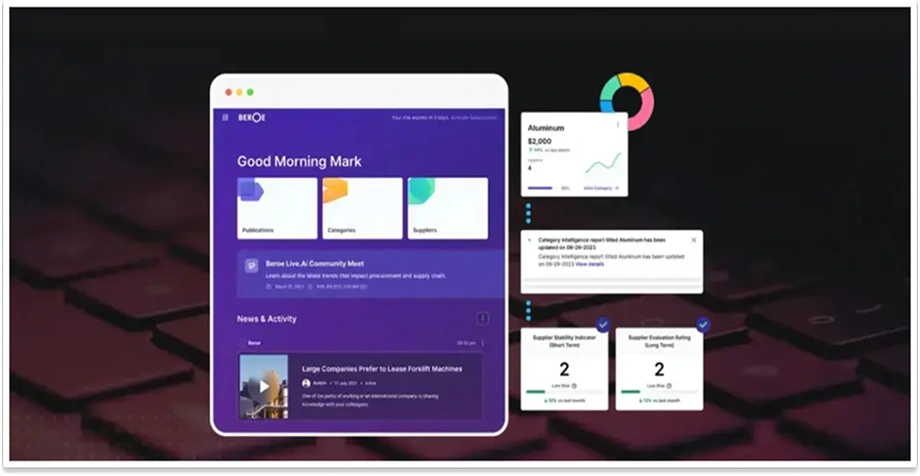
ABI: AI Bot for Seamless Multi-Channel Procurement Intelligence
We built Beroe’s ABI AI bot across Slack, Teams, and WhatsApp, delivering real-time procurement insights and 30% higher user engagement.
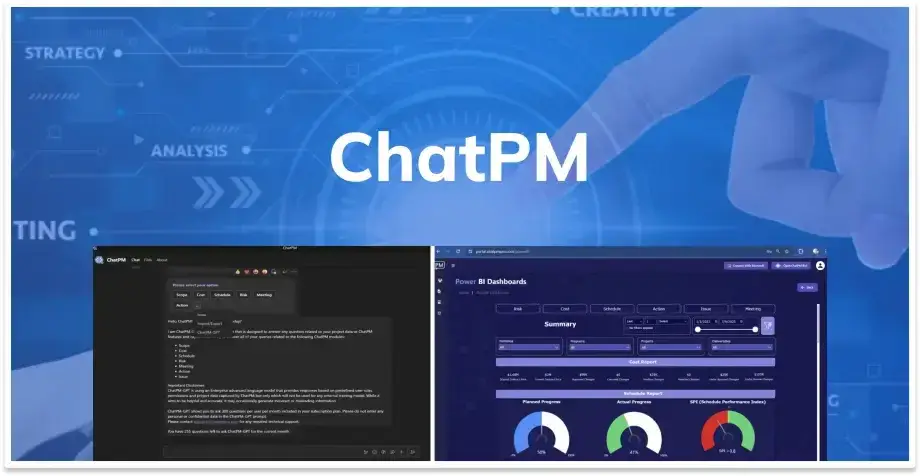
ChatPM: AI-Powered Virtual Project Management Assistant
We built ChatPM’s MS Teams bot with Power BI dashboards and ChatPM-GPT, delivering instant project insights and real-time visual reporting.

myCityHunt: Custom Scavenger Hunt Platform for City Exploration
We built myCityHunt from scratch, delivering riddle-based city tours, smart maps, and a scalable backend that earned a 4.4 user rating.

Automating Teamwork Fencing’s Job Management with Make.com
We migrated Teamwork Fencing from Zapier to Make.com, automating ServiceM8 and Google Sheets syncing with duplicate-free records.

The Ornament King: Immersive WordPress Shopping Experience
We redesigned The Ornament King’s WordPress website with secure payments, email marketing, and inventory integration, boosting engagement by 50%.

Airpet: Custom WordPress Website for Pet Transport Services
We transformed Airpet’s digital experience with a custom WordPress site, event calendar, seamless booking, and real-time updates.

John Eades: Custom Coaching Website for Industry Leaders
We built John Eades a custom WordPress website with interactive quizzes and assessments, boosting user engagement by 45% and organic traffic by 50%.

Naviga CMS: AI-Driven Content Management System for Journalists
We built Naviga CMS’s AI-powered plugin with real-time grammar and headline suggestions, a Kanban dashboard, and flexible workflows for faster journalism.
Technologies We Work With




What Makes Mindpath the
Right Choice for Your
Business
At Mindpath, we are fueled by an AI-first approach that helps us deliver solutions that are simpler, steadier, and aligned with the volatile market conditions. We have a proven track record of 12+ years in delivering future-ready solutions. Your digital transformation journey matters to us as much as it does to you.
What Makes Mindpath the Right Choice for Your Business
We AIM At Achieving Results That Speak for Themselves
- Anticipate the business requirements accurately and come up with relevant solutions.
- Innovate with a pool of cutting-edge technologies, including AI/ML, Generative AI, DevOps and more.
- Maintain support post-deployment to ensure your digital transformation goes on uninterrupted.


Feedback that Matters
Founder, The Bench Consulting
Owner, Phinederland
CEO, IT Co
Technologies
Tech Insights

Key Takeaways
- 01
Human approval at critical decision points helps balance AI automation with business accountability. - 02
Risk-based approval rules direct human attention toward decisions with serious consequences. - 03
Clear interfaces and contextual information help reviewers evaluate AI recommendations efficiently. - 04
Defined ownership, deadlines, and escalation paths prevent approval delays from disrupting workflows. - 05
Audit trails and performance metrics support transparency, compliance, and continuous improvement.
Human-in-the-loop AI provides that balance by introducing human review at critical decision points. Instead of checking every AI action, teams can focus their attention on decisions that require judgment, accountability, or additional verification. In this blog, we examine how businesses can design effective approval workflows that keep automation efficient while ensuring important decisions remain under human oversight.
Ready to Build Smarter AI Workflows?
Mindpath offers AI agent development services to integrate human oversight, automate business processes, and build reliable AI-powered workflows.
Understanding the Human-in-the-Loop AI Model
HITL AI is an approach to automation in which human reviewers assess specific AI-generated outputs before those outputs trigger important actions. The model allows AI to handle repetitive tasks, analyze information, and generate recommendations while people retain control over decisions that require judgment or accountability. For businesses, this creates a structured way to use AI capabilities without handing over every decision to an automated system.
HITL differs from human-on-the-loop AI, where people primarily monitor automated systems and intervene when problems arise. In fully autonomous workflows, AI completes defined tasks without routine human approval. The appropriate model depends on the risk involved and the level of control a business needs.
A typical HITL workflow follows a clear sequence:
- AI generates an output:
The system analyzes information and proposes an action or decision. - A human reviews the result:
The reviewer checks the recommendation, supporting evidence, and relevant business rules. - The decision is confirmed or corrected:
The reviewer approves, rejects, or modifies the output before the workflow proceeds.
For example, an AI system may prepare a supplier payment for processing, but a finance manager must verify the amount and approve the transaction before funds are released. This approach keeps routine work efficient while reserving critical decisions for human judgment.
Identifying Where Human Approval Is Necessary
Deciding where to introduce human oversight: AI requires a clear understanding of the risks within each workflow. Reviewing every AI-generated output can slow operations, while allowing every decision to proceed automatically can expose businesses to avoidable errors. The goal is to identify specific decision points where human judgment adds meaningful value.
1. Assess the Risk of Each Decision
Evaluate the potential consequences of an incorrect AI output. Financial losses, operational disruptions, and customer impact may justify mandatory human approval.
2. Protect Sensitive Information
Identify workflows that process confidential customer details, financial records, or proprietary business data. Human review can help verify that sensitive information is handled according to established policies.
3. Consider Regulatory Requirements
Review applicable laws, industry standards, and internal governance policies before automating decisions. Certain processes may require documented approval, additional verification, or specific human involvement.
4. Evaluate the Cost of Errors
Determine the financial and operational impact of mistakes at each workflow stage. Prioritize human intervention where an incorrect decision could create expensive rework, contractual disputes, or lasting business damage.
5. Separate Routine Tasks from Critical Decisions
Allow AI to handle predictable, low-risk activities that follow established rules. Reserve human approval for exceptions, unusual requests, and decisions that require contextual understanding.
6. Define Clear Approval Thresholds
Establish measurable conditions that determine when an AI action requires human review. For example, a finance workflow could automatically process transactions within approved limits while routing unusually large payments to a manager for authorization.
Designing an Effective AI Approval Workflow
A well-designed human-in-the-loop AI workflow gives reviewers the information they need to make accurate decisions without adding unnecessary complexity. The interface should make AI recommendations easy to understand, highlight potential risks, and provide clear options for approving or correcting outputs. A thoughtful design also reduces review fatigue and helps teams maintain consistent decisions as automation expands.
1. Present AI Outputs Clearly
Display recommendations, relevant data, and proposed actions in a structured format. Reviewers should understand what the system suggests without searching through multiple screens.
2. Provide Relevant Context
Include the information and evidence behind each AI-generated recommendation. Context summaries help reviewers assess decisions without manually reviewing every detail.
3. Display Confidence Indicators
Use confidence scores to indicate how certain the AI system is about its output. Treat these scores as supporting signals rather than guarantees of accuracy and combine them with risk-based review rules.
4. Enable Simple Approval Actions
Provide clear options to approve, reject, edit, or escalate a recommendation. Straightforward controls help reviewers complete decisions efficiently and correct outputs when necessary.
5. Highlight Potential Risks
Flag unusual patterns, missing information, policy conflicts, and other issues that require closer attention. Visual alerts help reviewers prioritize decisions that may have significant consequences.
6. Maintain a Clear Review History
Record the original recommendation, reviewer decision, and any changes made before execution. Accessible records support accountability, troubleshooting, and continuous improvement across the workflow.
Keeping Human Review from Becoming a Bottleneck
Human review can slow automated processes when approval requests pile up; responsibilities are unclear, or decisions wait too long for attention. A well-planned human-in-the-loop AI system should account for these delays during workflow design. The aim is to keep the AI approval workflow moving efficiently while ensuring that critical decisions receive the attention they require.
1. Group Similar Requests
Combine routine, low-risk approval requests into batches when individual review is unnecessary. This helps reviewers process similar decisions efficiently without compromising essential checks.
2. Set Clear Review Deadlines
Assign reasonable time limits for different types of approval requests. Clear deadlines help teams prioritize pending decisions and prevent avoidable delays.
3. Route Requests by Risk Level
Direct high-impact decisions to experienced reviewers and routine cases to appropriate team members. Risk-based routing helps allocate review time where it matters most.
4. Automate Escalation Paths
Forward overdue requests to designated backup reviewers or managers. Defined escalation rules prevent stalled approvals from disrupting the wider workflow.
5. Assign Clear Ownership
Specify who is responsible for reviewing, approving, and escalating each type of request. Clear accountability reduces confusion and prevents approval tasks from being overlooked.
6. Establish Safe Fallback Procedures
Define what happens when reviewers are unavailable, or an approval deadline expires. High-risk actions should remain on hold until authorized, rather than proceeding automatically without the required approval.
Building Accountability, Trust, and Continuous Improvement
Reliable AI workflows require clear ownership, transparent decisions, and regular performance reviews. Human oversight helps businesses identify errors, question questionable recommendations, and maintain control over automated actions.
A structured approach also makes it easier to demonstrate compliance, build stakeholder confidence, and improve workflow performance as business requirements change.
1. Maintain Detailed Audit Trails
Record AI recommendations, approval decisions, timestamps, and reviewer actions. These records help businesses investigate errors and demonstrate compliance with internal policies.
2. Define Roles and Responsibilities
Establish clear responsibilities for reviewers, workflow owners, and technical teams. Everyone involved should understand who can approve decisions and who handles exceptions.
3. Train Human Reviewers
Teach employees to recognize inaccurate outputs, potential bias, and missing context. Regular training helps reviewers make informed decisions rather than accepting AI recommendations without scrutiny.
4. Monitor Approval Patterns
Track approval rates, rejection frequency, and instances where reviewers modify AI-generated outputs. These patterns can reveal recurring system weaknesses and opportunities for improvement.
5. Measure Workflow Performance
Evaluate review times, error rates, and the frequency of escalations. Comparing these metrics over time helps determine if human oversight is improving accuracy without creating unnecessary delays.
6. Refine Approval Rules Regularly
Review workflow performance and adjust approval thresholds as system reliability and business needs evolve. Use reviewer feedback and documented outcomes to strengthen controls while preserving operational efficiency.
Ready to Build Smarter AI Workflows?
Human-in-the-loop AI helps businesses balance automation with accountability by placing human approval at critical decision points. Clear review processes, risk-based controls, and regular performance monitoring improve decision quality while keeping workflows efficient. Starting with one workflow allows teams to measure results and expand oversight strategically.
At Mindpath, we help businesses design and integrate AI-driven workflows aligned with their operational needs. Our AI development services support intelligent automation, human approval mechanisms, and reliable system integration, helping businesses improve efficiency while maintaining control over important decisions.
AI agents can solve complex tasks, analyze information, and support business decisions, but what happens when they forget important details between interactions? Without a reliable way to retain information, even a capable agent can lose track of previous instructions, repeat mistakes, or deliver inconsistent results. AI agent memory helps bridge this gap by giving agents access to relevant information beyond the immediate interaction.
Key Takeaways
- 01
Short-term memory helps AI agents manage active conversations and current task requirements. - 02
Long-term memory preserves useful facts, preferences, and decisions across multiple sessions. - 03
Context management techniques help agents work within token limits without losing essential information. - 04
Efficient retrieval and memory pruning improve accuracy, response speed, and computational efficiency. - 05
Secure memory architecture requires access controls, retention policies, and reliable memory updates.
Memory becomes especially important when agents handle ongoing workflows, adapt to user preferences, or make decisions based on previous outcomes. The right memory architecture helps them maintain context, retrieve useful knowledge, and complete tasks more consistently. In this blog, we’ll explore how short-term memory, long-term storage, and context management work together to make AI agents more capable and reliable.
Ready to Build Smarter AI Agents?
Mindpath offers AI agent development services to help businesses build intelligent AI solutions with efficient memory management and seamless integration.
The Three Core Layers of AI Agent Memory
AI agents rely on different types of memory to retain information, follow instructions, and make decisions. Each layer serves a distinct purpose, and understanding these differences helps developers build systems that handle complex tasks more reliably.
1. Short-term memory
This layer holds information needed for the current interaction or task. It includes recent messages, active instructions, and intermediate results. For example, a customer support agent can use short-term memory to track a customer’s issue throughout a conversation without asking for the same details repeatedly.
2. Long-term memory
This layer preserves useful information across interactions. It can store user preferences, previous decisions, and relevant facts in external databases. When an agent needs information from an earlier session, it can retrieve the appropriate details instead of starting from scratch. This is particularly valuable for long-running workflows and personalized services.
3. Procedural memory
This layer stores instructions, rules, and established methods for completing tasks. It helps an agent follow a defined process, such as validating a customer request, checking available records, and escalating unresolved issues.
Together, these layers form the foundation of AI agent memory. Short-term memory supports immediate reasoning, long-term memory provides continuity, and procedural memory guides execution.
How Context Management Works in Practice
AI agents operate within a context window that limits how much information they can process at once. As conversations and tasks grow, managing this information becomes essential to prevent important details from being lost.
Developers use these techniques to manage context effectively:
- Sliding windows: Retain recent messages and remove older, less relevant exchanges.
- Conversation summarization: Condense lengthy conversations while preserving key decisions and instructions.
- Retrieval-augmented generation (RAG): Retrieve relevant information from external sources and add it to the active context.
- Token prioritization: Give important instructions and task-related information priority within the available context window.
- Context compression: Reduce the amount of text the agent processes while preserving essential details.
These techniques help long-term memory AI agents retrieve relevant information without loading entire conversation histories into every request.
How Do AI Agents Store and Retrieve Long-Term Memories?
AI agents use external storage to retain useful information across sessions. LLM memory systems help them save relevant facts, retrieve past interactions, and apply stored knowledge when a task requires it.
The process typically involves these steps:
1. Memory Selection
Identify useful information, such as user preferences, important decisions, and recurring instructions.
2. Embedding Generation
Convert selected text into numerical representations called embeddings, which capture semantic meaning.
3. Memory Storage
Save information in vector databases, relational databases, or knowledge graphs based on the data and retrieval requirements.
4. Semantic Search
Find stored information based on meaning and relevance, even when a new query uses different wording.
5. Metadata Filtering
Narrow retrieval results using details such as dates, user IDs, categories, or access permissions.
6. Memory Updates
Add new information, revise outdated facts, or remove details that are no longer useful.
7. Context Integration
Insert relevant retrieved memories into the agent’s active context to support its response or next action.
Balancing Memory Accuracy, Speed, and Cost
An effective agent memory architecture must retrieve useful information quickly while keeping stored memories accurate and relevant. Poor memory management can increase processing costs, slow responses, and lead to decisions based on outdated information.
1. Retrieval Latency
Use efficient indexing and targeted searches to reduce the time needed to retrieve stored memories.
2. Irrelevant Results
Apply metadata filters and relevance thresholds to prevent unrelated information from entering the agent’s context.
3. Outdated Information
Add timestamps, expiration rules, and update mechanisms to keep stored facts current.
4. Hallucination Risks
Verify retrieved information against trusted sources before using it for important decisions.
5. Memory Pruning
Remove duplicate, irrelevant, or low-value memories to reduce storage and retrieval overhead.
6. Memory Decay
Lower the priority of information that becomes less useful over time, while preserving important long-term facts.
7. Computational Costs
Balance retrieval frequency, storage requirements, and model processing needs against the value of retained information.
8. Response Quality
Retrieve only the information needed for the current task to maintain relevant, consistent responses without unnecessary processing.
Best Practices for Designing an Effective Agent Memory Architecture
A reliable memory system needs clear rules for storing, retrieving, updating, and protecting information. Use this checklist when designing an AI agent memory architecture.
1. Separate Memory Type
Keep working context, persistent facts, and procedural instructions distinct to improve retrieval and task execution.
2. Store Relevant Information
Prioritize useful preferences, decisions, and recurring details instead of saving every interaction.
3. Include Episodic Memory
Record important events, actions, and outcomes to help agents handle similar situations more effectively.
4. Define Retrieval Rules
Use relevance scores, metadata filters, and access permissions to retrieve appropriate information.
5. Protect Sensitive Data
Apply encryption, authentication, and role-based access controls to safeguard stored information.
6. Set Retention Policies
Define how long memories remain stored and when outdated or unnecessary information should be deleted.
7. Control Memory Updates
Validate new information before replacing existing records to prevent conflicting or inaccurate memories.
8. Maintain User Isolation
Ensure one user’s stored information cannot appear in another user’s conversations.
Common AI Agent Memory Design Mistakes
Poor memory management can make AI agents inconsistent, inefficient, and difficult to trust. Avoid these common mistakes during implementation:
1. Storing Too Much Information
Save relevant facts and decisions instead of retaining every conversation.
2. Ignoring Outdated Memories
Use timestamps and update rules to prevent agents from relying on old information.
3. Skipping Retrieval Validation
Check retrieved facts for relevance and accuracy before using them in decisions.
4. Ignoring Memory Limits
Apply summarization and context prioritization to prevent important information from being pushed out.
5. Overlooking Data Security
Enforce access controls and user isolation to prevent unauthorized information sharing.
6. Failing to Manage Duplicates
Identify repeated records and consolidate them to improve retrieval efficiency.
7. Using Unclear Memory Rules
Define when agents should store, retrieve, update, or delete information to maintain consistent behavior.
Ready to Build Smarter AI Agents?
Effective AI agent memory combines short-term context, long-term storage, and procedural knowledge to support consistent decisions and reliable task execution. By managing retrieval, accuracy, and security, businesses can build agents that retain relevant information, adapt to changing needs, and handle complex workflows with greater confidence.
At Mindpath, we help businesses build intelligent AI agents through AI consulting, agent development, and data engineering services. Our team designs scalable memory architectures that support your business goals, strengthen data governance, and improve agent reliability across real-world applications.
Traditional procurement often involves fragmented supplier data, lengthy approval cycles, manual paperwork, and limited spending visibility. These inefficiencies can increase operational costs and slow business decisions. AI for procurement is changing how organizations manage these activities by bringing automation, predictive insights, and intelligent data analysis into everyday procurement operations.
Key Takeaway
- 01
AI helps procurement teams automate repetitive tasks and make faster purchasing decisions. - 02
Intelligent supplier discovery and bid comparison improve sourcing efficiency and supplier selection. - 03
AI-powered contract analysis helps identify compliance issues and important contractual terms. - 04
Spend analysis AI reveals spending patterns, unusual expenses, and potential cost-saving opportunities. - 05
Predictive analytics helps businesses manage supplier risks and anticipate supply chain disruptions.
As supply chains become increasingly complex, businesses need faster ways to evaluate suppliers, control spending, and manage procurement risks. AI helps procurement teams make informed decisions while reducing repetitive work and improving operational efficiency. In this blog, we’ll explore what AI for procurement means, its key benefits, and 10 practical use cases across the procurement lifecycle.
Ready to Make Procurement Smarter?
Mindpath offers AI consulting services to help businesses develop AI-powered solutions tailored to their operational needs.
What Is AI for Procurement?
AI for procurement refers to the use of artificial intelligence to automate purchasing activities, analyze supplier data, and support procurement decisions. It combines technologies such as machine learning, natural language processing, predictive analytics, and generative AI to help teams manage procurement tasks more efficiently.
Key applications include:
- Machine learning: Identifies spending patterns, evaluates supplier performance, and predicts potential supply chain risks.
- Natural language processing: Extracts key details from contracts, supplier documents, invoices, and purchase requests.
- Predictive analytics: Forecasts demand, estimates price fluctuations, and identifies potential procurement disruptions.
- Generative AI: Summarizes contracts, answers procurement queries, and assists with supplier communications.
- Intelligent automation: Processes purchase orders, validates invoices, and reduces repetitive administrative work.
Unlike traditional rule-based automation, AI can identify patterns across large datasets and support decisions that require contextual analysis. When integrated with existing procurement and ERP systems, it helps connect sourcing, purchasing, contract management, and spend analysis within a more informed workflow.
Key Benefits of AI in Procurement
AI helps procurement teams improve efficiency, control spending, and make informed purchasing decisions. By reducing manual work and analyzing procurement data, businesses can gain better control over their purchasing operations.
1. Better cost control
Identify unnecessary expenses, compare supplier pricing, and uncover opportunities to reduce purchasing costs.
2. Faster sourcing decisions
Use AI in sourcing to identify suitable suppliers, evaluate bids, and compare supplier capabilities more efficiently.
3. Reduced manual workload
Automate repetitive activities such as purchase order processing, invoice matching, and document verification.
4. Improved supplier management
Evaluate supplier performance, monitor delivery reliability, and identify potential risks before they affect operations.
5. Greater spending visibility
Apply spend analysis AI to categorize expenses, identify spending patterns, and highlight potential savings opportunities.
6. Stronger compliance
Monitor purchasing activities, check contract requirements, and flag transactions that may violate procurement policies.
7. Proactive risk management
Analyze supplier data and market conditions to anticipate disruptions and support timely decisions.
10 Practical Use Cases of AI in Procurement
AI is changing how businesses manage procurement activities, from identifying suppliers to monitoring spending and managing supply chain risks. The following use cases show how organizations can apply AI to improve efficiency, accuracy, and purchasing decisions.
1. Intelligent Supplier Discovery
Finding reliable suppliers requires evaluating multiple factors, including pricing, product quality, certifications, and delivery capabilities. AI analyzes supplier databases, market information, and historical records to identify potential vendors that match business requirements.
- Supplier identification: Find suitable suppliers based on purchasing requirements and capabilities.
- Market analysis: Compare supplier pricing, availability, and market trends.
- Capability assessment: Evaluate certifications, delivery history, and supplier performance.
2. Automated Bid Comparison
Comparing multiple supplier quotations manually can delay sourcing decisions, especially when proposals contain different pricing structures and contract terms. AI extracts relevant details and presents them in a consistent format, helping procurement teams evaluate bids more efficiently.
- Price comparison: Identify differences in product costs, discounts, and additional charges.
- Term evaluation: Compare delivery schedules, payment conditions, and contract requirements.
- Bid assessment: Highlight pricing inconsistencies and missing information across supplier proposals.
3. Predictive Supplier Risk Assessment
Supplier-related risks can affect production schedules, product availability, and procurement costs. AI evaluates financial records, delivery performance, market developments, and external risk indicators to identify potential problems before they disrupt business operations.
- Financial monitoring: Identify signs of supplier financial instability.
- Delivery tracking: Detect recurring delays and inconsistent fulfillment patterns.
- Risk alerts: Flag potential disruptions based on changing market and supplier conditions.
4. AI-Powered Contract Analysis
Procurement contracts often contain lengthy clauses, compliance requirements, renewal conditions, and pricing agreements. AI for procurement helps teams review these documents by extracting important information, summarizing terms, and identifying clauses that require further attention.
- Clause extraction: Identify payment terms, renewal dates, penalties, and obligations.
- Compliance checks: Flag clauses that may conflict with internal procurement policies.
- Contract summaries: Generate concise summaries to support faster reviews and approvals.
5. Automated Purchase Order Processing
Creating and processing purchase orders involves repetitive data entry, verification, and approval activities. AI automates several steps by extracting information from purchase requests, checking order details, and identifying missing or inconsistent information.
- Data extraction: Capture product details, quantities, prices, and supplier information.
- Order validation: Check purchase requests against predefined procurement rules.
- Approval support: Route purchase orders to the appropriate personnel for authorization.
6. Intelligent Invoice Matching and Reconciliation
Matching invoices with purchase orders and delivery records can consume significant time, particularly when businesses process large transaction volumes. AI compares these records, identifies discrepancies, and helps finance teams resolve payment-related issues.
- Invoice matching: Compare invoice details with purchase orders and delivery records.
- Discrepancy detection: Flag differences in quantities, pricing, and payment amounts.
- Duplicate identification: Detect repeated invoices before payments are processed.
7. AI-Powered Spend Analysis
Understanding where procurement budgets go is essential for controlling expenses and identifying savings opportunities. Spend analysis AI examines purchasing transactions, categorizes expenses, and identifies patterns that may remain difficult to detect through manual reporting.
- Spend categorization: Group transactions by supplier, department, category, or business unit.
- Anomaly detection: Identify unusual spending patterns and unexpected cost increases.
- Savings identification: Highlight duplicate purchases, excessive spending, and opportunities for supplier consolidation.
- Spending forecasts: Analyze historical purchasing data to estimate future expenditure.
8. Automated Vendor Onboarding
Bringing new suppliers into a procurement system requires collecting documents, verifying business details, and checking compliance requirements. AI simplifies this process by extracting information, validating submitted records, and identifying incomplete applications.
- Document verification: Extract details from tax records, certifications, and registration documents.
- Information validation: Identify missing or inconsistent supplier information.
- Compliance screening: Flag records requiring additional checks before supplier approval.
9. Supply Chain Disruption Prediction
Unexpected supply chain disruptions can affect inventory availability, delivery schedules, and business continuity. AI analyzes internal and external data to identify early warning signals and help procurement teams prepare alternative sourcing plans.
- Market monitoring: Track commodity prices, geopolitical developments, and market changes.
- Disruption forecasting: Identify potential delays using supplier and logistics data.
- Alternative sourcing: Help teams evaluate backup suppliers and procurement options.
10. Supplier Performance and Sustainability Monitoring
Supplier evaluation needs to continue after onboarding to ensure consistent quality, reliable deliveries, and responsible business practices. AI monitors supplier performance data and sustainability indicators to support ongoing evaluations.
- Performance tracking: Monitor delivery timelines, product quality, and order fulfillment.
- ESG monitoring: Evaluate available environmental, social, and governance information.
- Supplier scoring: Compare vendors using performance metrics and predefined business criteria.
- Continuous alerts: Identify declining performance and potential compliance concerns.
How to Choose the Right AI Procurement Tools?
Selecting the right technology is important for getting measurable value from procurement automation. Businesses should evaluate their existing processes, data requirements, and operational goals before investing in AI procurement tools.
Consider these factors when evaluating available options:
1. Integration capabilities
Check compatibility with existing ERP, accounting, inventory, and supplier management systems.
2. Automation features
Look for capabilities such as invoice processing, contract analysis, supplier evaluation, and purchase order automation.
3. Data security
Evaluate encryption, access controls, data privacy policies, and compliance requirements.
4. Analytics and reporting
Choose tools that provide spending insights, supplier performance reports, and predictive analytics.
5. Scalability
Ensure the platform can handle growing transaction volumes, additional suppliers, and changing procurement requirements.
6. Ease of adoption
Consider user-friendly interfaces, employee training requirements, and the level of technical support available.
7. Customization
Check whether workflows, approval rules, and reporting features can be adapted to business requirements.
The right selection should address specific procurement challenges while fitting existing workflows and supporting future business growth.
Ready to Transform Your Procurement Operations with AI?
AI for procurement helps businesses improve sourcing, strengthen supplier relationships, automate routine tasks, and gain better spending visibility. From supplier discovery to spend analysis, these applications support faster decisions, better cost control, and more efficient procurement operations across the business.
At Mindpath, we help businesses develop AI-powered solutions through AI consulting, custom AI development, and intelligent automation services. Our team builds tailored solutions that align with procurement workflows, improve operational efficiency, and support long-term business goals.
Building a new product requires founders to balance business goals, limited budgets, investor expectations, and launch deadlines. Without a clear plan, development costs can rise quickly, and delays can push a product launch further away. Understanding MVP development cost early helps founders prioritize essential features, allocate resources wisely, and make informed decisions before development begins.
Key Takeaways
- 01
MVP development cost depends on product complexity, features, platform, and technical requirements. - 02
Clear feature priorities help founders control budgets and avoid unnecessary development expenses. - 03
A realistic MVP development timeline supports better planning and resource allocation. - 04
Choosing the right development team helps maintain quality and delivery efficiency. - 05
Post-launch maintenance and improvements should be included in the overall budget.
The total investment depends on product complexity, platform requirements, integrations, team structure, and testing needs. A realistic budget and timeline can help prevent scope creep and set achievable expectations. In this blog, we cover MVP development costs in 2027, estimated timelines, key pricing factors, and practical ways to plan your budget.
What Is an MVP, and Why Does It Matter for Startups?
A minimum viable product (MVP) is an early version of a product with enough core functionality to test a business idea with real users. In MVP app development, the goal is to validate demand and gather feedback before investing in a full-scale product.
An MVP helps startups make better decisions through these key benefits:
1. Validate Assumptions
Gather real user feedback to understand whether the product solves a genuine problem.
2. Prioritize Features
Identify which functionalities users need most before expanding the product.
3. Reduce Investment Risk
Test market demand before committing significant resources to unproven ideas.
4. Attract Investor Interest
Use early user feedback and validation results to strengthen funding discussions.
5. Improve Product Usability
Identify friction points and refine the user experience based on actual usage.
6. Accelerate Time to Market
Launch essential features sooner and begin learning from real customers.
7. Support Informed Decisions
Use user behavior and feedback to guide future development priorities.
An MVP differs from a prototype, which primarily demonstrates a concept or user flow. A fully developed product offers broader functionality, while an MVP focuses on essential features that deliver core value. Its success depends on meaningful user insights and usability, not the number of features it includes.
How Much Does It Cost to Build an MVP in 2027?
The MVP development cost in 2027 depends on the product’s complexity, required features, and technical requirements. A basic product requires less development effort, while applications with multiple user roles, advanced integrations, or complex business logic need a larger investment. The following MVP development pricing ranges provide an initial budgeting reference.
| MVP Type | Indicative Cost (USD) | Typical Scope |
|---|---|---|
| Basic MVP | $10,000–$25,000 | Core features, simple workflows, limited integrations |
| Mid-Complexity MVP | $25,000–$60,000 | Multiple user roles, APIs, dashboards, complex workflows |
| Complex MVP | $60,000–$120,000+ | Advanced integrations, complex business logic, demanding security or scalability requirements |
These figures are indicative planning estimates, not fixed quotes or universal market averages. Actual costs vary by development location, team experience, technology choices, product requirements, and engagement model.
Certain requirements can increase the budget considerably. AI-enabled functionality, real-time processing, regulated data handling, and multiple third-party integrations often require additional engineering, testing, and security measures.
Before approving a quote, founders should confirm what the estimate covers, including UI/UX design, quality assurance (QA), project management, deployment, and post-launch support. Comparing proposals against the same scope helps identify hidden expenses and establish a more realistic budget for development costs.
MVP Development Timeline: How Long Does It Take to Develop an MVP?
A typical MVP takes 6–14 weeks to develop, while complex products may require 16–24 weeks or longer. The timeline depends on feature complexity, platform requirements, integrations, team size, and testing needs.
| Development Phase | Estimated Duration | Key Activities |
|---|---|---|
| Discovery and Planning | 1–2 weeks | Requirements, core features, project scope |
| UI/UX Design | 1–3 weeks | Wireframes, user journeys, interface design |
| Core Development | 3–7 weeks | Frontend, backend, essential features |
| Testing and Refinement | 1–2 weeks | Quality checks, bug fixes, usability testing |
| Deployment and Launch | 1 week | Production setup, release, performance monitoring |
These are indicative estimates, and some phases can overlap. Changing requirements, delayed approvals, and integration challenges may extend delivery. Defining milestones early helps founders manage the MVP development cost, avoid unnecessary delays, and maintain product quality.
How to Reduce MVP Development Cost Without Sacrificing Quality
Founders can control development expenses by making informed decisions before and during development. These strategies help keep the project focused while maintaining functionality, security, and usability.
1. Prioritize Essential Features
Build only the features needed to solve the primary user problem. Defer secondary functionality until user feedback justifies further investment.
2. Validate Before Coding
Use customer interviews, wireframes, and clickable prototypes to test assumptions before committing to expensive development work.
3. Choose the Right Platform
Select web, native mobile, or cross-platform development based on user needs and product requirements.
4. Reuse Proven Tools
Use established APIs, authentication services, and managed cloud infrastructure where appropriate to reduce development effort.
5. Avoid Premature Scaling
Build for current requirements while keeping future expansion in mind, rather than investing in unnecessary infrastructure.
6. Define Clear Requirements
Establish deliverables, milestones, and approval processes before you hire MVP developers to minimize costly scope changes.
7. Plan a Realistic Schedule
A well-defined MVP development timeline helps coordinate resources and reduce delays without rushing testing or compromising quality.
Should You Hire MVP Developers or Choose an MVP Development Company?
Choosing the right development model depends on your budget, technical expertise, project complexity, and need for ongoing support.
| Development Model | Key Advantages | Potential Limitations | Best Suited For |
|---|---|---|---|
| Freelance Developers | Flexible hiring and lower initial overhead | Requires coordination across different specialists | Small, clearly defined MVPs |
| In-House Team | Greater control and long-term product knowledge | Recruitment, salaries, and ongoing management costs | Startups building products continuously |
| MVP Development Company | Coordinated expertise in planning, design, development, and testing | Engagement costs vary by scope and service level | Founders seeking end-to-end development support |
Before choosing a partner, evaluate technical expertise, relevant experience, pricing transparency, project milestones, source-code ownership, and post-launch support.
The right development model helps founders balance delivery quality, available resources, and MVP development cost while keeping product goals and future development needs in focus.
Plan Your MVP Budget and Launch Timeline with Mindpath
Planning your MVP development cost and timeline starts with clear priorities, realistic budgets, and the right development approach. Focus on essential features, validate your idea with real users, and account for ongoing maintenance. These decisions help founders reduce unnecessary spending while building a reliable product for future growth.
At Mindpath, we provide MVP development services to help startups turn ideas into market-ready products through strategic planning, design, development, and testing. As an experienced MVP development company, we help founders build focused products aligned with their goals.
Drop us a line
Frequently Asked Questions
1. Why should I choose Mindpath as my technology partner?
2. What services does Mindpath offer?
- AI and Generative AI: consulting, AI agents, custom LLMs, RAG, MLOps, and AI integration.
- Software and Product Engineering: web, mobile, SaaS, MVPs, and legacy modernization.
- Cloud, DevOps and IT Services: managed cloud, CI/CD automation, IT consulting, and staff augmentation
3. Can you integrate AI and new technology into my existing systems?
4. Which industries do you serve?
5. How does your development process work?
- Ideation: We listen to your challenges and shape the right roadmap.
- Innovation: We break the solution into achievable milestones and keep you informed at every step.
- Delivery: We launch a solution that scales with your business and support it after go-live.