



Types of Software Development: What Every Business Should Know

Join our Newsletter!

Featured Posts

Support Is One Click Away

Home

Types of Software Development: What Every Business Should Know

types of software development

Types of Software Development: What Every Business Should Know

Picture a scenario in which you are running a growing business, and things are moving at a fast pace. At this point, your customers will expect more; teams will need better tools, and competition will just be a click away. You must keep in mind that the real game changer isn’t just having software but rather, its choosing the right kind of software. For this, understanding the types of software development can make a huge difference.  

Behind every great digital solution, there lies a specific type of development which is tailored to a specific need. Understanding the key categories of software development enables businesses to make smarter, confident investments while choosing the right technology teams to partner with for the future. So, if you are interested in knowing about the software development types, then this blog will guide you perfectly. We will explore the major kinds of software development, which every business should know to make smarter investments and drive meaningful growth. 

To begin with, let us first have a basic understanding of software development. 

Are manual operations draining time and resources from your business growth? At Mindpath, we offer end-to-end software development services to automate processes and enhance efficiency.

What is Software Development?

Software development refers to the act of creating, designing, testing, and maintaining applications or systems that run on devices or computers. It combines the imaginative and creative process with the technical process of building software that can help your business work smarter and serve your clients better. Developers take your ideas and combine programming languages, libraries and frameworks to develop working software that solves real problems. 

There are many benefits of custom software development for businesses. It can increase productivity via automation and lower costs by streamlining processes. It also increases customer satisfaction through user-friendly overall features and allows companies to stay ahead of competitors by providing innovative solutions. Software can also be customized to provide better management of growth within the business and can enhance data cybersecurity protocols and processes while supporting better collaboration across teams.  

What are the 5 Principles of Software Development?

Strong software development relies on key principles that guide the process and ensure reliable, high-quality results. These principles help teams build software that is efficient, adaptable, and easy to maintain over time. 

1. Working in Iterations

Working in short cycles allows teams to test, adjust, and improve regularly. This keeps the software flexible and ready for change. 

2. Reuse Components

Building with ready-to-use parts speeds up development and keeps the software consistent. It also makes updates and maintenance much easier. 

3. Set Quality Standards

Setting clear quality standards from the start helps catch problems early. It ensures the final product meets expectations and works reliably. 

4. Plan Architecture First

A strong foundation starts with early architectural planning. It helps avoid confusion, improves decisions, and sets the direction for smooth development. 

5. Control Changes Effectively

A clear system for handling changes keeps the project stable. It helps teams adapt without causing confusion or risk to the software. 

Curious why software development prices can vary so much? Explore the factors behind software development costs before your next project and avoid common budgeting mistakes.

What are the Different Types of Software Development?

Software development comes in many forms, each designed to meet specific business or user needs. Understanding these different types helps businesses choose the right solutions for their goals and growth. 

1. Frontend Development

Frontend development is a software development type that focuses on the part of an application users see and interact with. It involves creating user interfaces that are smooth, responsive, and visually clear. Frontend developers work with tools and technologies like React, CSS, JavaScript, and Flutter. Their goal is to ensure a great user experience on both web and mobile platforms. 

2. Backend Development

Backend development focuses on the parts of an application that users don’t see. It includes building servers, databases, and the internal logic that powers the software. Backend developers use technologies like Java, Python, and Django to make sure everything runs smoothly. They connect the front end with data and functions to keep the application working behind the scenes. 

Must Read: Role of Front-end and Back-end

3. API Development

API development is about creating connections that let different software systems talk to each other. Developers build APIs to help applications share data and work together more easily. This is useful for adding features like payment systems, login tools, or maps from other services. API development makes software more flexible and able to work with a wide range of platforms. 

4. Cloud Computing Development

Cloud computing development is the software development process of building applications that run on platforms like AWS, Microsoft Azure, or Google Cloud. It helps businesses store data, manage services, and scale their systems more easily. Cloud developers set up secure and flexible environments tailored to company needs. This process supports smooth operations and better performance without relying on local servers. 

5. Database Development

Database development focuses on building systems to store, manage, and organize data. Developers work with different types like SQL for structured data and NoSQL for more flexible, unstructured data. Some databases are made to handle huge amounts of information, often used for big data and real-time analytics. The goal is to keep data accurate, secure, and easy to access when needed. 

6. DevOps

DevOps engineering combines development and operations to build and deliver software more efficiently. It focuses on teamwork, automation, and continuous improvement throughout the project. DevOps engineers use skills like coding, testing, and scripting with languages such as Python, Java, and PHP. One big advantage is that quality checks continue even after the software is launched. 

7. Full-Stack Development

Full-stack development covers both front-end and back-end work to create complete, user-friendly software. A full-stack developer understands how to build smooth interfaces and also manage server-side systems that power the application. They often use a wide range of software development tools to deliver reliable and efficient results. Teams can also achieve this by having front-end and back-end developers work closely together. 

8. Mobile Development

Mobile development focuses on creating apps for smartphones and tablets. Developers may specialize in building for Android using Kotlin or Java, or for Apple devices using Swift or Objective C. Some also work on hybrid apps that run on multiple platforms, which need special skills. Mobile developers handle coding, design, and maintenance to make sure apps work well on different screen sizes and devices. 

Wondering what makes a software engineer truly effective in driving business success? Discover and understand the top qualities of a good software engineer that set top developers apart.

Which Type of Software Development Fits Best for Your Business Needs?

Understanding the various types of software development helps businesses choose the right solutions to grow and succeed. Each type plays a unique role in creating software that meets specific goals, improves efficiency, and enhances user experience. Knowing these types allows smarter decisions and better investments in technology. 

At Mindpath, we provide expert software development services tailored to your business goals. Our skilled team works with you to build reliable, efficient, and user-friendly software solutions. Partner with us to get the right development support and technology expertise for your next project. 

Frequently Asked Questions

1. How can a business decide which type of software development it actually needs?

The right choice depends on business goals, user needs, and the type of problem being solved. For example, customer-facing platforms may require strong frontend development, while data-heavy systems need robust backend and database support. A clear understanding of priorities helps in making the right decision.

2. Is it necessary to invest in multiple types of software development for one project?

In most real-world projects, multiple types of development work together. For example, a mobile app may need frontend, backend, API, and database development. Combining these ensures the software functions smoothly, delivers a good user experience, and supports long-term scalability and performance.

3. How does choosing the wrong type of development impact a business?

Selecting the wrong approach can lead to performance issues, higher costs, and delays in delivery. It may also limit scalability or create integration challenges later. Making an informed choice early helps avoid rework and ensures the software aligns with long-term business goals.

4. Can a business switch to a different type of software development later?

Yes, but it often requires time, effort, and additional cost. Migrating systems or restructuring architecture can be complex depending on the existing setup. Planning the right development approach from the beginning reduces the need for major changes later and ensures smoother growth.

5. How important is scalability when choosing a type of software development?

Scalability is critical, especially for growing businesses. The chosen development approach should support increasing users, data, and features without affecting performance. Considering scalability early ensures the software remains reliable and efficient as business demands evolve over time.


Related Post

Discover the top Node.js trends shaping digital technology in 2024, from AI and TypeScript to IoT and cloud computing. Explore how Node.js drives innovation!
How much does hiring a ReactJS developer cost? Learn about factors affecting rates, and how to find the best talent within your budget.
Unlock the benefits of modernizing legacy systems, from increased productivity to growth, with Mindpath’s expert solutions.

Related Post

React vs Vue

The software development industry keeps evolving incredibly with new technologies and innovations, breaking down traditional precedents. At the same time, software applications have become more complicated as businesses seek better ways to come up with successful products. The React vs Vue debate plays a major role in determining the difference between success and failure for your new software solutions. You might have many questions about the need to focus specifically on these two frontend development tools. Let’s dive in to get answers to all your questions.

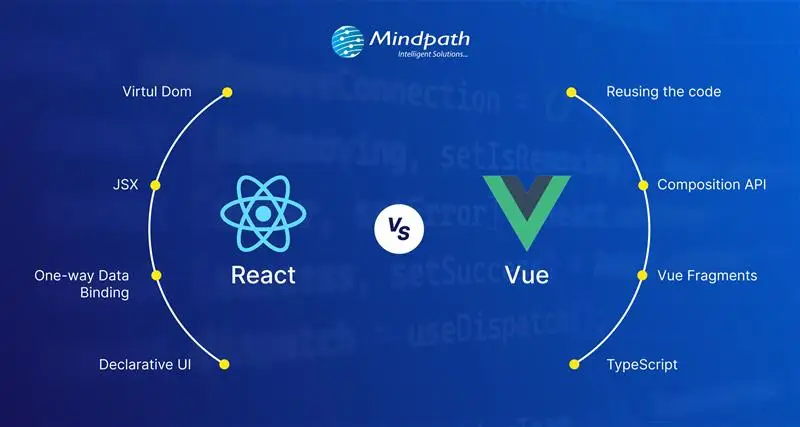
With more frontend development technologies coming to the forefront, it is difficult to make the right choice for your project. React and Vue are the most preferred JavaScript technologies for web development. Both of them have become the strongest competitors among frontend development frameworks for their unique features. Let us learn the differences between React.js and Vue.js to choose the ideal pick according to your requirements.

Struggling to choose the right frontend framework for building fast and interactive web applications? Mindpath offers expert ReactJS development services to help you create scalable, high-performance solutions that align with your growth goals.

Understanding the Fundamentals of React and Vue

If you take a look at the top apps you use in everyday lives, most of them have either React.js or Vue.js in their tech stack. Choosing one of the ideal frameworks for software development can pose significant challenges. You must know what each of them has to offer for frontend development before making a decision. The following sections will provide insights on the fundamental details of React and Vue that can help you compare them.

Quick Overview of React

React.js is a well-known javascript framework for frontend development that delivers promising edge in creating interactive user interfaces (UI). Remarkable features of this tool include its origin which – it was created by Facebook in 2011 for internal purposes. Although most of us frequently refer to React as a framework, it’s an open-source javascript library for frontend development. One of the notable aspects in the Vue vs React debate is the use of JSX in React.js syntax. The role of JSX (JavaScript Syntax Extension) is very important in writing HTML elements in JavaScript code without making use of JavaScript functions.

React is among popular, dynamic, and versatile JavaScript frontend libraries used for developing frontend applications. It is most preferably used to create scalable applications with dynamic user interfaces and cross-platform capabilities. React developer tools also provide the support to identify performance issues and ensure a faster debugging process. Another striking feature of React is the flexibility to develop single-page applications and server-side apps as well as mobile apps.

Quick Overview of Vue

While React is a JavaScript library, Vue is an open-source JavaScript framework for frontend development. Vue.js grabbed headlines upon its arrival in 2014 for the shorter and simpler learning curve. As a matter of fact, the React vs Vue vs Angular comparison reflects on the fact that the design of Vue draws inspiration from Angular. The creator of Vue, a former Google engineer, picked the best components of Angular and the same approach as React.js to create a versatile framework.

Developers choose Vue for its easy-to-use interface and efficiency in developing web apps with a component-based model. The framework also includes a large library that empowers developers to create apps with better performance. Many developers prefer Vue over React for its simpler approach to coding with a less complex structure and plain syntax. On top of it, the collection of plugins available with Vue ensures efficient incorporation of additional functionalities in the app.

Looking to build a high-performance frontend that scales with your business and delivers real ROI? Learn from our ReactJS for App Development guide to understand how React empowers business owners to make smarter, future-ready technology decisions.

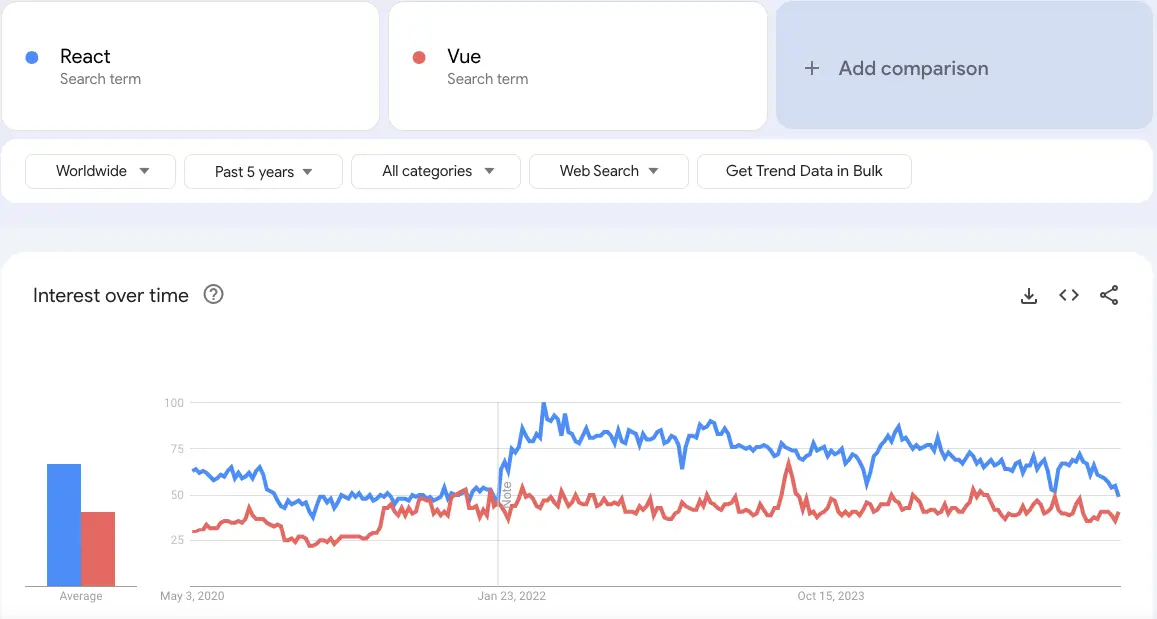
Let’s have a look at the React vs Vue comparison with Google Trends:

react vs vue google trends

Unraveling the Differences between React and Vue

While React is a JavaScript library, Vue is an open-source JavaScript framework for frontend development. Vue.js grabbed headlines upon its arrival in 2014 for the shorter and simpler learning curve. As a matter of fact, the React vs Vue vs Angular comparison reflects on the fact that the design of Vue draws inspiration from Angular. The creator of Vue, a former Google engineer, picked the best components of Angular and the same approach as React.js to create a versatile framework.

Developers choose Vue for its easy-to-use interface and efficiency in developing web apps with a component-based model. The framework also includes a large library that empowers developers to create apps with better performance. Many developers prefer Vue over React for its simpler approach to coding with a less complex structure and plain syntax. On top of it, the collection of plugins available with Vue ensures efficient incorporation of additional functionalities in the app.

1. App Size and Performance

The size of app in each framework speaks a lot about the ReactJS performance they can offer in the development process. You can use the Vue vs React performance benchmark to discover how Vue.js is the better pick to create small and faster apps. Vue allows you to compress the code so that it can consume significantly less space. As a matter of fact, applications created in Vue are almost 10% to 30% smaller than React-based applications.

The smaller app size enables faster coding as you will need limited inputs, thereby providing the assurance of better performance. Vue also stands as a formidable contender in terms of performance with its efficient default library. The testing library of Vue.js makes applications run quickly and more efficiently. On the other hand, React requires you to download additional libraries to introduce new features that increase app size and reduce performance.

2. Scalability

Another noticeable factor in the comparison between React.js and Vue.js is scalability as businesses seek ways to expand their apps with new functionalities. Which JavaScript frontend framework can come to your rescue when your app attracts more customers? React and Vue have efficient scalability solutions, albeit for different categories of apps. While React is the best pick to create large and complex apps, Vue is suitable for faster and simpler apps.

However, Vue and React both works on the same infrastructure and relies on a unidirectional data flow. In addition, Vue also offers support for two-way reactive data binding that allows simpler data management. The reactivity system of Vue ensures that you can track changes and introduce updates in the DOM. While React has a larger developer ecosystem and more templates and tools, Vue provides the guarantee of better scalability.

Where does React fail when it comes to scalability? You can find smart components in React.js that feature state management library functions. On the other hand, the dumb components help in executing simple functions and presenting things to the virtual DOM.

Must Read: ReactJS Web Development Guide

3. Operational Performance

The next important point of the difference between React and Vue will focus on their performance in different operations. Vue has been the favourite of companies as it offers exceptional performance in less complex and smaller projects. According to recent tests conducted on both frameworks, the operational performance depends on type of tasks where you can apply them. The tests focused on important metrics such as memory usage, rendering time and row creation speed for operations like clearing large tables or introducing updates.

React.js leverages a virtual DOM to ensure efficient management of UI updates and showcases impressive performance in all benchmarks. The operational performance of React is significantly higher in scenarios that require dynamic updates and content rendering. On the other side of the debate, Vue.js also leverages a virtual DOM alongside offering a reactive data-binding system. Vue has consistently shown competitive performance at par with React in different test scenarios.

4. Syntax and Learning Curve

You should also review the React js vs Vue js debate from the perspective of their syntax. React uses the JSX syntax while Vue uses the template syntax for developing user interfaces. Vue uses HTML templates by default albeit with the option to write code in JSX. On the other hand, React relies solely on JSX for the syntax. The isolation of HTML, JS and CSS in Vue ensures that beginners can also create web application frontends with ease. Developers with limited experience in JavaScript or the ones who have been using HTML/CSS will love working with Vue.

React presents a steeper learning curve as developers need in-depth understanding of JavaScript to work with the framework. Even if JSX offers more power and flexibility, beginners will find it more complex for frontend development.

5. Official Documentation

The documentation for React and Vue also play a crucial role in the React vs Vue comparison. Official documentation of any framework or library provides guidance on their components and the best ways to use them. Tools with clear and comprehensive documentation can also attract businesses which need clear directions for usage and troubleshooting. Vue has always maintained well-organized documentation that serves as its formidable strength. The decision to choose from React or Vue becomes simpler with the assurance of the simpler learning process and troubleshooting in Vue. On top of it, the latest improvements in official Vue documentation provide more comprehensive resources to help developers.

React is far behind Vue in terms of documentation because it focused only on basic concepts and advanced uses. The updated version of React documentation promises some changes such as better accessibility, clear explanations and real-world examples. With time, React will also have documentation that will help developers learn about its functionalities and best practices.

Wondering what separates a good ReactJS project from a truly successful one? Read the essential ReactJS Developer Skills for successful web projects to make smarter hiring and development decisions.

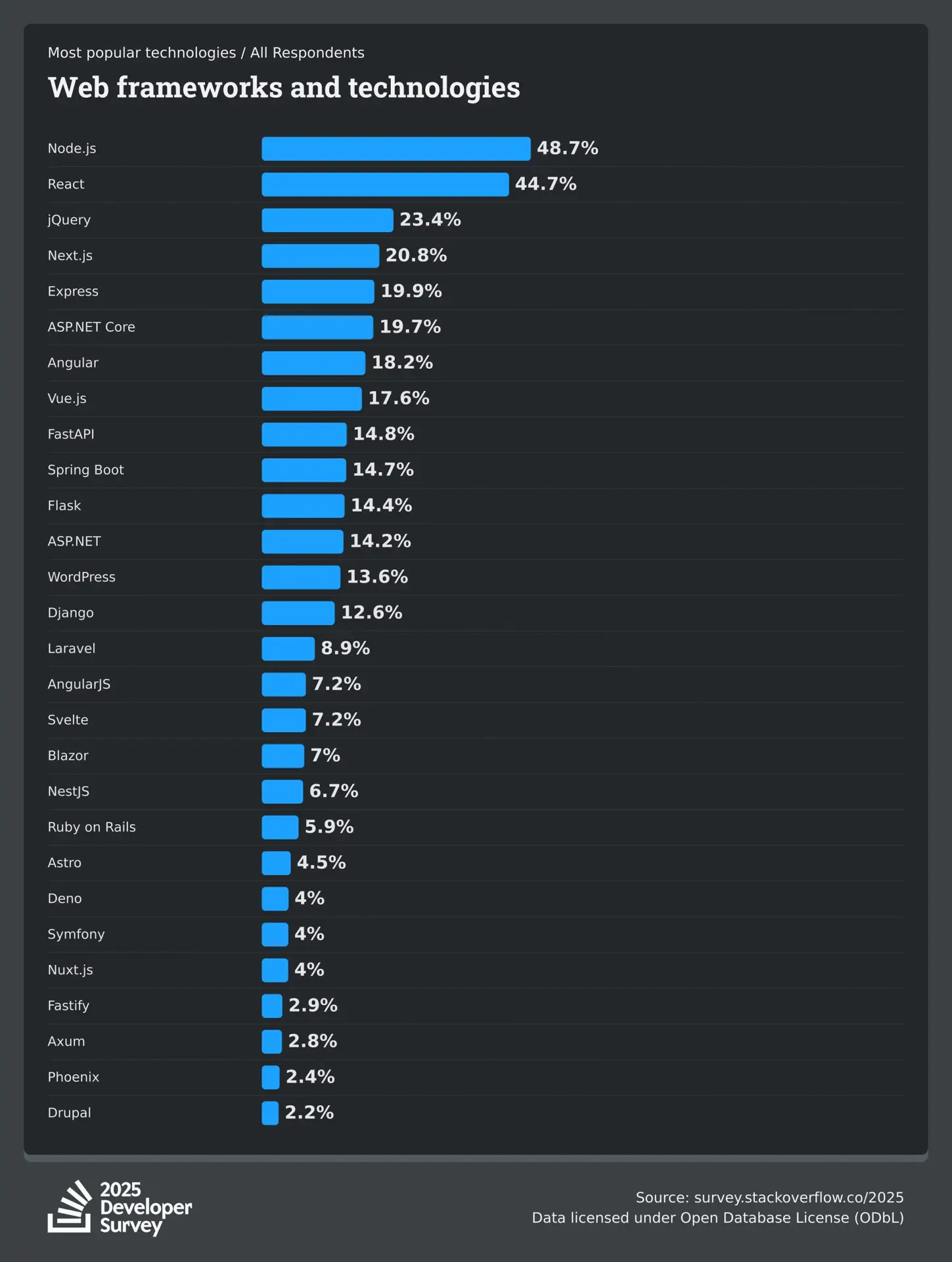
2025 Developer Survey by Stack Overflow

The 2025 Developer Survey by Stack Overflow, recorded the responses of over 65,000 developers about the technologies, coding, and tools they are interested to learn and use, and experience at work. Here’s the outcome of 38,132 (58.3%) responses received by professional developers on the popularity of web frameworks and technologies.

Stack Overflow Developer Survey

ReactJS vs VueJS: Which is Better for Your Project?

The differences between React and Vue mentioned above depict that each one of them has some distinguishing pulses and minuses. It is important to use the example of a React-based application and the example of a Vue-based application at the same time to understand their adoption in the real world. Some of the noteworthy companies that use React.js are instagram, Netflix, and Uber.

On the other side of the spectrum, industry giants like GitLab, Zoom, Upwork use Vue.js. Therefore, the choice of a frontend development framework depends completely on your needs. Still confused about choosing the right framework for your next project? No worries, Mindpath offers ReactJS development services and is ready to help you make the right decision. Take the first step now to choose the right framework for your dream project.

Frequently Asked Questions

1. How do I decide between React and Vue for a long-term project? 

When comparing React vs Vue, consider your project size, team expertise, and future scalability plans. React is often chosen for enterprise-level applications with complex requirements, while Vue works well for faster development cycles. Maintenance needs, ecosystem maturity, and community support also influence long-term sustainability.

2. Is React or Vue better for hiring developers?

React has a larger global talent pool, which can make hiring developers easier for growing businesses. Vue developers are also in demand, but React’s widespread adoption often gives companies more hiring flexibility. The decision depends on project complexity and long-term technical strategy. 

3. Can React and Vue be integrated with existing backend systems?

Yes, both frameworks integrate smoothly with REST APIs, GraphQL, and modern backend technologies. They work well with backend stacks like Node.js, Python, and PHP, as well as cloud services. This flexibility allows businesses to upgrade the frontend without rebuilding their entire backend system. 

4. How does state management differ in React and Vue?

In the React vs Vue comparison, React typically uses external libraries like Redux or the Context API for complex state handling. Vue provides built-in reactivity with structured tools such as Vuex or Pinia. Vue feels more guided, while React offers greater flexibility for large-scale applications. 

5. Which framework performs better in server-side rendering?

Both frameworks support server-side rendering to improve SEO and performance. React commonly uses Next.js, while Vue relies on Nuxt.js. Performance mainly depends on project architecture and optimization strategies. The implementation approach plays a bigger role than the framework choice itself. 

web scraping with node js

Web scraping with Node.js allows developers to collect and use website data quickly and efficiently. It is useful to make smarter decisions, automate tasks, and enhance digital projects. The process is easy and feasible as Node.js is speedy and is compatible with JavaScript. Mastering this skill will create new prospects of dealing with real-time information and putting it into practical use in the contemporary web development projects.

This blog describes the concept of web scraping and how web scraping works in a step-by-step manner. You will get to know what web scraping is, why you should use Node.js, and how to begin using it in your projects. All ideas are simple to comprehend and straightforward. At the end, you will have a clear background on how to effectively gather, store and utilize web data for real-life applications.

Planning to gather web data efficiently for your business? Mindpath offers expert Node.js development services to create fast, scalable scraping solutions.

What is Node.js Web Scraping?

Web scraping with Node.js lets developers collect website data automatically and use it for real projects. Node web scraping refers to the creation of scripts that will retrieve web documents. These scripts read their contents and retrieve information such as prices, contacts, or news. It is easy to process static sites with such tools as Axios or Cheerio. The interactive websites can be managed with the aid of Puppeteer. The speed and efficiency of Node.js ensure a more scalable and faster scraping.

The Node web scraping operates by making requests, retrieving HTML, and extracting data on the page. JavaScript is used to handle both the static and dynamic sites. Using Node.js, developers have the ability to automate the process of logging in to a website. They can click buttons and gather information on numerous websites simultaneously. This strategy makes the process effective, valid, and prepared to apply it in the real world.

Curious why developers choose Node.js for large-scale web scraping? Explore the advantages of Node.js to see how its performance and event-driven model simplify data extraction.

Key Benefits of Web Scraping with Node.js

High-speed and efficient web scraping with Node.js provides developers with a quick and efficient tool to deal with web data. It assists teams to process vast information without any additional effort. These are the best advantages that make Node.js a robust option in the collection and use of data in real projects.

1. Fast and Efficient Processing

A Node.js scraper does not have to wait to make a number of web requests. Node.js web scraping will allow you to gather massive data within a short time.

2. Handles Modern Websites

It is common to use dynamic JavaScript loading content on websites today. Such tools as Puppeteer or Playwright allow developers to see a complete page and obtain data correctly.

3. Single Language Development

JavaScript can be utilized by developers to perform front-end and backend scraping. This makes coding easier and allows the workflow to be similar.

4. Wide Range of Tools

Node.js scraper may utilize such libraries as Axios to make requests, Cheerio to process them, and Puppeteer to automate. These are the tools that can make web scraping using Node.js flexible to any project.

Must Read: NodeJS Libraries for AI 

5. Scalable for Growth

The ability to work with large number of data streams simultaneously makes Node.js relevant to the large-scale web scraping project. It is capable of expanding along with your data requirements.

6. Easy Integration

Scraped information is often included in the form of JSON, which is automatically processed by the Node.js. This information may be inputted directly into web applications, databases, or analytics pipelines.

7. Automates Repetitive Tasks

Web scraping with Node.js provides an ability to log in, click on buttons, and scroll the pages automatically. A scraper made with Node.js saves time and makes the data collection regular.

8. Real-Time Data Monitoring

Using a Node.js scraper, it is possible to make continuous updates on the sites. This assists in the collection of new information within a short time to analyze or report.

Looking to ensure your Node.js scraping applications run fast and efficiently? Check out web performance with Node.js to learn how optimization techniques improve speed, scalability, and reliability.

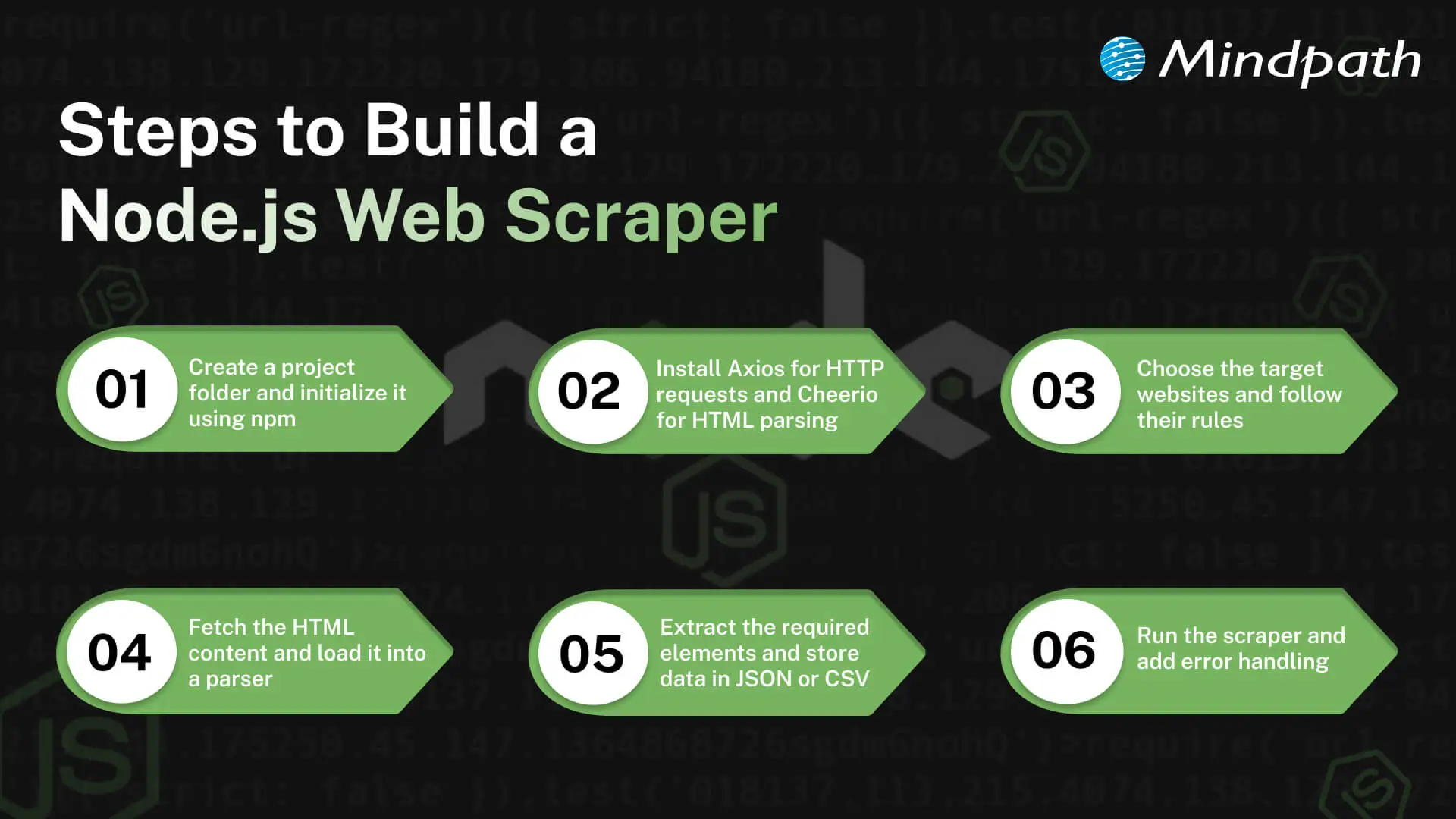
Steps to Build a Node.js Web Scraper

Web scraping with Node.js lets developers collect data efficiently and apply it to real projects. A scraper to build needs the right planning and procedures. The key actions to develop a Node.js web scraper and begin the data extraction process successfully include the following.

Steps to Build a Node JS Scraper

1. Set Up Your Project

Make a new project folder and get it started using npm. This prepares your Node.js environment for web scraping with Node.js. The project will manage all dependencies through a package.json file.

2. Install Necessary Libraries

Install such tools as Axios to make the HTTP requests and Cheerio as the HTML parsing tool. The libraries simplify the creation of a Node.js scraper. They give you the core tools for web scraping with Node.js.

3. Choose Target Websites

Choose the sites that you would like to scrape. Ensure that you are obeying their rules and law. Target selection helps to make sure your web scraping of Node.js is safe and effective.

Must Read: Full-Stack Development with Node.js

4. Fetch and Parse Pages

Get the HTML of the page using Axios or any other HTTP library. Load it into Cheerio or other similar to navigate and choose elements. The next thing that needs to be done is to prepare your data that your Node.js scraper will extract.

5. Extract and Organize Data

Even define the information you require, such as prices, titles, or links. It should be collected using CSS selectors. Export the data that has been extracted in a simple, easy-to-use format: JSON, CSV, or database.

6. Execute and Improve

Install and run your Node.js scraper and verify the output. Include error management and rate limiting to prevent problems. Refining your process ensures web scraping with Node.js runs smoothly and efficiently.

Looking to simplify web scraping with Node.js? Explore essential Node.js libraries to make data extraction faster and more reliable.

Ready to Unlock the Power of Web Scraping with Node.js?

Web scraping with Node.js allows developers to collect and use data efficiently, making it easier to support smarter decisions, automation, and digital innovation. By understanding the right tools, techniques, and workflows, businesses that hire Node.js developer can work seamlessly with both static and dynamic websites, manage large datasets, integrate data into applications, and gain real-time insights to enhance project prosperity

Mindpath is a trusted Node.js development company offering expert web and Node.js development services to build fast, scalable, and secure applications. Their team creates custom solutions for web scraping, data integration, and automation. With experience in modern technologies, they deliver efficient and reliable results. Choosing Mindpath ensures your Node.js projects run smoothly, save time, and meet your business goals with high-quality support.

WordPress Security Plugins

Operating a website means managing constant threats that are trying to invade your data and ultimately ruin all of your hard work. This brings us to selecting the perfect WordPress security plugins, which is a necessary action for anyone who owns a website. Instead of taking risks, it’s always better to be one step ahead and protect your site with the best tools available to you that won’t compromise site performance. Ultimately, your site should have strong protection that does not detract from performance.

There is no doubt that, with intelligent attacks being developed and stronger defences put in place in 2026, there is an urgent need for updated solutions. You cannot just depend on old methods and expect them to still work. So again, the smarter choice is to explore plugins and services that professionals worldwide test, prove, and depend on. By using the best plugins and services, you will protect your site and continue its growth without interruption. In this blog, we are going to discuss some of the best security plugins for WordPress, which can protect your website in the best way.

Want to strengthen your WordPress site’s security and performance? Mindpath offers WordPress development services, providing expert assistance in building a safe and high-performing website. 

What are WordPress Security Plugins?

WordPress security plugins are tools that you install on your website to protect it from common internet threats. These tools perform functions such as scanning for malware, preventing harmful traffic, and blocking brute-force attempts. These plugins add a layer of protection to your site from malicious behavior and can help prevent serious security issues for WordPress.

These plugins enhance security by providing login protection, firewall capabilities, and monitoring for suspicious activity. The plugins protect websites in real time to interrupt hackers before they cause damage to your website. Using the right plugin can mitigate WordPress security problems early to ensure the site is running smoothly.

Worried about exploits that bypass basic WordPress security plugins? Discover safeguarding common WordPress vulnerabilities to check out best practices for stronger site defense.

Best WordPress Security Plugins in 2026

When it comes to ensuring the safety of your site, the proper security tools can make a huge difference. Here are the best WordPress security plugins in 2026 that effectively combine advanced defense with consistent performance for meeting today’s increasing online threats.

1. Wordfence Security

Wordfence Security provides protection for your site against the most common WordPress security issues by offering powerful features like a firewall, malware scanner, and brute force protection. It allows you to monitor your site by having live traffic information, login logs, and detecting suspicious activity, so you can identify and stop a threat before it can become an issue. Developers will also like Wordfence for its multi-site licenses, and other helpful features like comment spam filters and login security, which make it easy to keep all of your sites secure.

2. MalCare Security

MalCare Security is among the top WordPress security plugins that secures your site with cloud-based malware scanning, bot protection, and login security. It enables you to remove malware with a single click and blocks suspicious traffic to protect your WordPress security. The plugin monitors uptime, sends alerts when you have a problem, and does this while staying light so your website remains fast and fully secured.

Want to ensure your WordPress site is accessible to every user while staying secure? Explore our blog on web accessibility guidelines to learn how inclusive design strengthens user trust.

3. All In One WP Security & Firewall

The All-In-One WP Security & Firewall protects your website against many common WordPress security problems by enhancing the security of user accounts, login pages, and database files. The plugin has transparent graphs, which show the strength of your site’s security, and makes recommendations for improvement, so it’s useful for both novice and advanced users. As a free WP security plugin, it also blocks intruders, hides sensitive information from your site, and allows an emergency lockdown by making your site unavailable.

4. SecuPress

SecuPress is one of the best security plugins for WordPress that protects your site against malware, viruses, and suspicious activity. It offers protection against brute-force logins, blocking IP addresses, and bot protection to add layers to your website’s security. It is user-friendly, gives you security alerts when something is wrong, and scans your website in detail. In short, this plugin gives you the best control over your website’s protection.

5. BulletProof Security

BulletProof Security is a feature-rich WordPress security solution that adds a layer of security to your site with login security, database backups, malware scanners, and anti-spam features. Additionally, unique features such as folder hiding, intrusion detection, and maintenance mode expand the protection of your website. There are free and premium features that allow developers and site owners to effectively handle security.

Concerned about plugin conflicts caused by WordPress and PHP version mismatches? Check out WordPress and PHP compatibility to learn how proper alignment keeps your site secure and stable.

6. Sucuri Security

Sucuri Security is among the most reliable plugins for WordPress security, shielding your website with malware scanning and integrity checks, as well as security hardening. It observes activity and alerts you in real-time about issues that could affect your website or business. The plugin includes premium features in conjunction with your free download such as advanced firewalls, DDoS protection, and post-cleanup reports as all-encompassing tools for the management and protection of your website, regardless of the attack scenario.

7. Shield Security

Shield Security is a trustworthy WordPress security solution that protects your web from hacks, bots, and intrusions. It activates immediately to protect your site and provides features such as brute-force protection, firewalls, and two-factor authentication. Shield actively repairs any threats it detects, monitors traffic, and gives professionals advanced scans for deeper security.

8. WP Activity Log

WP Activity Log is a WordPress security plugin that monitors and records all actions on your website in real time. It keeps a record of all changes made to posts, pages, user profiles, and plugins allowing you to identify irregular activity and solve problems fast. The plugin tells you who made each change, notifies you when an issue arises, and allows you to keep your site secure by managing your users easily.

Ready to move beyond plugins for stronger and more flexible WordPress security? Discover custom WordPress development to check out how custom builds enhance site protection.

9. WP Fail2ban

WP fail2ban is a WordPress security plug-in that protects your site against brute force attacks by monitoring and logging all login attempts and blocking suspicious users from logging in to your site. It can ban users either hard or soft. The plug-in also integrates with Cloudflare (the only plugin on this list to do so), provides more surface area on WordPress multisite sites, and enhances security accordingly. WP fail2ban tracks spam, comments, and other user activity on your site, and helps to prevent attacks from reaching your login page.

10. VaultPress

VaultPress is a security plugin for WordPress that provides real-time and daily backups to keep your site secure. It allows you to quickly restore files with just one click. It keeps track of suspicious activity and provides detailed stats, logging every backup and restore action for better tracking. VaultPress will also make incremental backups, allow you to create multiple versions of your site’s data, and give you complete control of your site’s security and data.

Planning to move beyond basic plugins for long-term WordPress protection? Check out why it makes sense to hire a WordPress developer for stronger security.

Are You Ready to Secure Your WordPress Site?

Keeping your website safe is critical in 2026. Using the best WordPress security plugins ensures protection from malware, hackers, and suspicious activity while keeping your site fast and reliable. Choosing the right plugins helps you monitor, block, and repair threats. Also it gives you confidence that your website remains secure and operates smoothly for visitors and users.

At Mindpath, we offer expert WordPress development services to help you build secure, high-performing websites. Our team integrates reliable security solutions, custom features, and regular monitoring to prevent WordPress security issues. We focus on creating sites that are fast, scalable, and safe, allowing your business to grow confidently while keeping your data and visitors protected from online threats.</p>