The Ultimate Guide to Node js Libraries for AI Integrations

Join our Newsletter!

Featured Posts

Support Is One Click Away

Home

The Ultimate Guide to Node js Libraries for AI Integrations

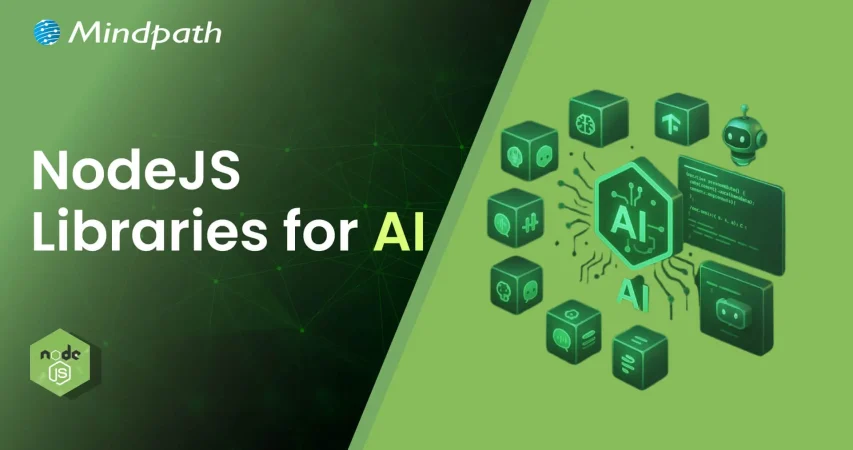
Node js libraries for AI

The Ultimate Guide to Node js Libraries for AI Integrations

 As we know, with Node.js libraries, adding AI to your projects is becoming easier. These Node.js libraries for AI can offer you the ability to develop apps that can think, respond, and learn over time. If you enjoy working in JavaScript and you are curious about the new AI features like chatbots, smart predictive features (like those in Google Assistant), and apps that recognize voice input, then now is your chance. You don’t need to begin from scratch. If you use the right libraries, you can build smarter apps at less cost and more value.

These Node.js AI libraries come with beginner-friendly options that are powerful enough for advanced applications. You can add new features such as understanding language, detecting images, or performing machine learning without deep knowledge of AI. They are built to seamlessly integrate into your existing Node.js stack, enabling you to save time and effort in your development workflows. In this blog post, we’ll discuss some of the best libraries to quickly get started with AI in Node.js applications.

Are you looking to elevate your business’s web development with the use of Node.js? At Mindpath, we offer Node.js development services that aim to grow your business by providing reliable and AI-powered web solutions tailored to your unique needs.

Importance of Integrating AI into Node.js Applications

Node.js is increasingly becoming a leading option for creating smart, dynamic applications because it is lightweight and driven by events. Thus, can Node.js be used for AI? Yes, it can! Developers are already using Node.js as an API or tool for AI with tools like TensorFlow.js and Natural. In the 2024 Developer Survey by Stack Overflow, JavaScript continued to be the most popular programming language, which means that Node.js is a great starting ground for AI initiatives.

Integrating Node.js with AI applications allows developers to make applications that change and adapt in real-time. The asynchronous nature of Node.js allows developers to execute several operations simultaneously, making it a good platform for artificial intelligence features like chatbots and live prediction tools. More and more AI libraries support Node.js, as development can happen more quickly. As demand for AI using more efficient and adaptable models rises, Node.js is a new practical, scalable programming option for any developer who wants to create smart digital experiences.

Let us have a quick look at the benefits of integrating AI in Node.js applications:
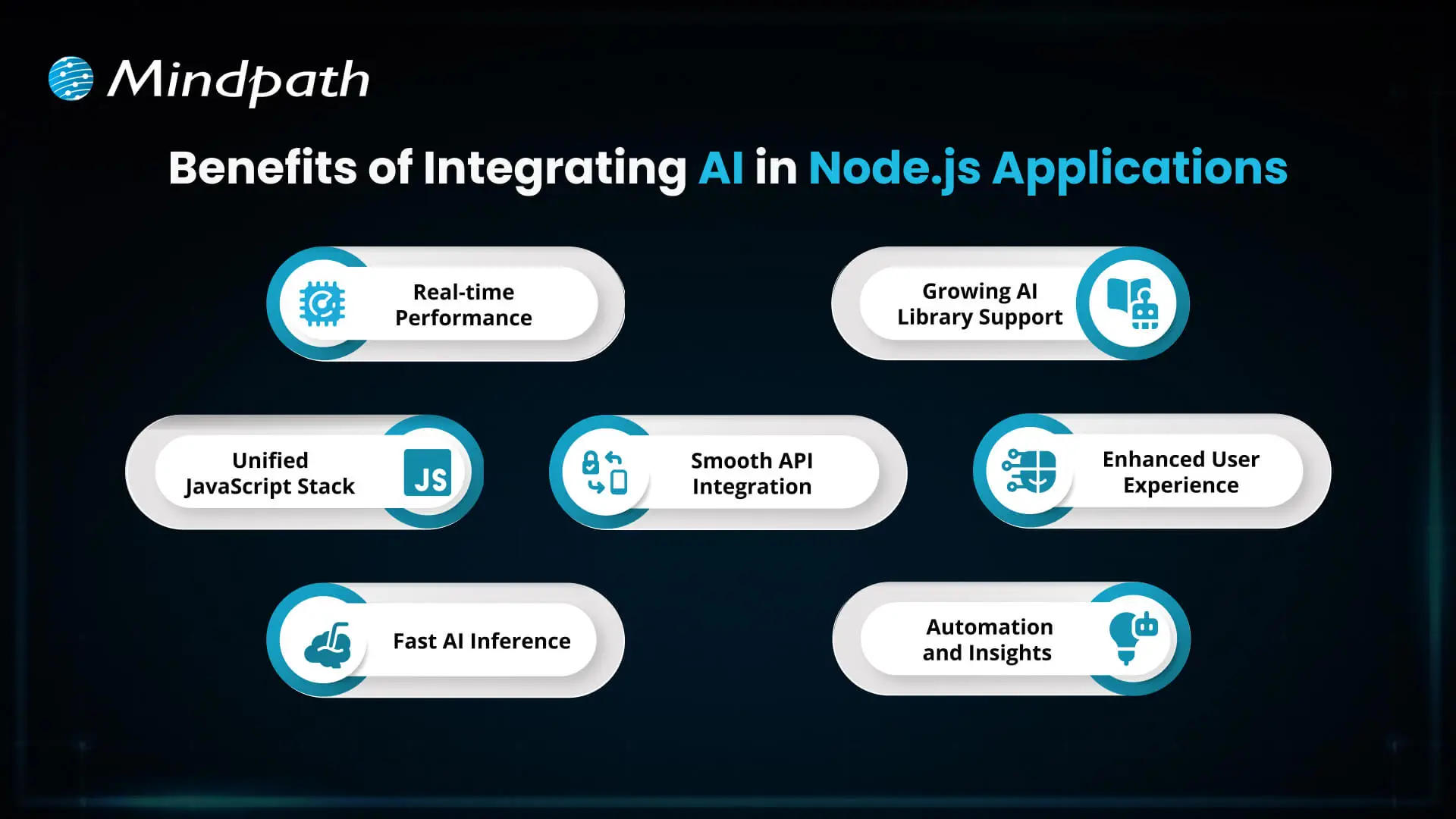
Benefits of Integrating AI in Node.js Applications

1. Real-time Performance

AI integration with Node.js handles real-time tasks like chatbots and fraud detection efficiently with its non-blocking, event-driven architecture. It supports thousands of concurrent requests, delivering quick and responsive AI features.

2. Unified JavaScript Stack

With Node.js AI integration, developers can use JavaScript for both frontend and backend, including AI features. This reduces context switching and makes the development process faster and more efficient.

3. Fast AI Inference

Node.js runs on the V8 engine, which ensures high-speed execution for AI models. This is perfect for real-time predictions like dynamic pricing or personalized recommendations.

4. Smooth API Integration

Node.js makes it easy to connect with external AI services and pre-trained models through APIs. It works well with AI built in other languages like Python, enabling flexibility in integration.

6. Growing AI Library Support

The Node.js ecosystem offers a wide range of AI libraries via npm, such as TensorFlow.js and ONNX.js. These tools allow developers to implement machine learning directly in JavaScript.

7. Enhanced User Experience

AI features like intelligent chat, personalization, and predictions improve how users interact with your app. Node.js helps deliver these features in a fast and seamless way.

8. Automation and Insights

AI in Node.js apps can automate repetitive tasks and analyze data in real-time. This leads to smarter applications that save time and improve performance.

Looking to streamline your web development in 2025? Check out our blog on Top 25 NodeJS Libraries in 2025 to find the best tools that will help you build powerful and efficient applications.

What are the Top Node.js Libraries for AI Integration?

Building intelligent apps is now simpler with the rise of Node.js artificial intelligence libraries that support machine learning, NLP, and smart automation. These powerful AI Node.js libraries help developers create responsive and data-driven features without complex setups. Here are some of the best Node.js libraries for AI integration:
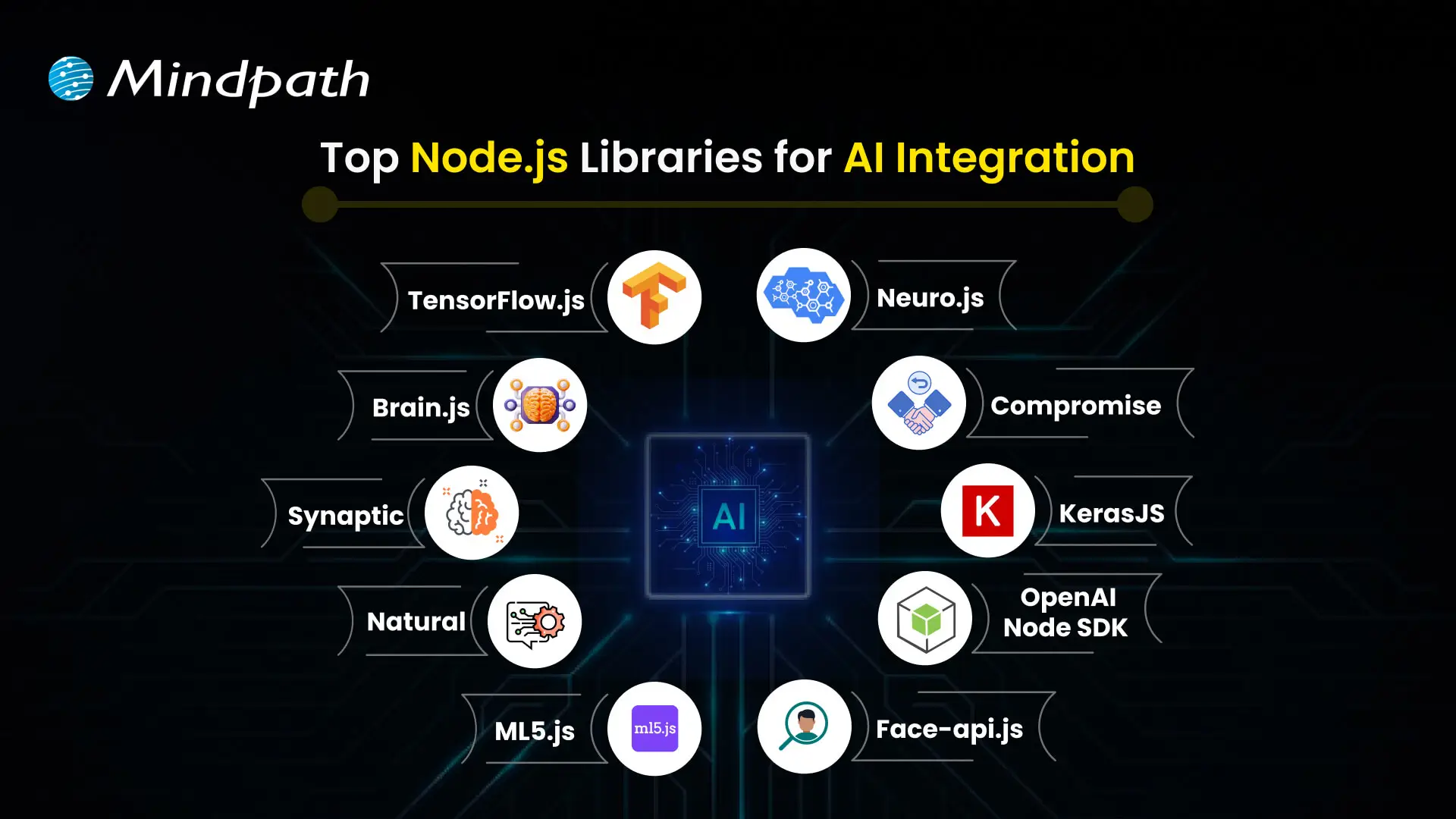
Top Node.js Libraries for AI Integration

1. TensorFlow.js

TensorFlow.js is one of the top Node.js libraries for machine learning, allowing developers to build, train, and run models entirely in JavaScript. It works both in the browser and with Node.js, making it versatile for a wide range of projects. The library is a good example of how Node.js libraries for AI can power real-world communication tools.

2. Brain.js

Brain.js is a simple neural network library that’s ideal for beginners working on small AI projects. It uses JavaScript to make machine learning accessible without complex configuration. Found in the list of useful npm libraries, it helps developers get started quickly with AI-powered features.

3. Synaptic

Synaptic offers a flexible system for creating different types of neural networks, including feedforward and recurrent ones. It supports supervised and unsupervised learning, giving developers options based on their use case. As one of the advanced Node.js libraries for AI, it works well for experimental and custom AI models.

4. Natural

Natural is a powerful Node.js natural language processing library that provides tools like stemming, classification, tokenization, and sentiment analysis. It’s great for applications that need to work with text data in real-time. This is one of the most complete Node.js libraries for AI when it comes to language-based features.

5. ML5.js

ML5.js is built on TensorFlow.js but focuses on simplicity and creative use, making it perfect for artists, designers, and beginners. It lets you easily create interactive AI experiences on the web. As part of the growing set of npm AI tools, it balances power with ease of use.

6. Neuro.js

Neuro.js focuses on building intelligent features for chatbots and virtual assistants using JavaScript. It’s tailored for tasks in NLP and conversational AI. The library is a good example of Node.js support for AI development in real-world communication tools.

7. Compromise

Compromise is a fast and lightweight library for real-time text processing. It’s designed for performance and currently supports only English, making it efficient for many use cases. As part of the JavaScript libraries used in NLP, it’s a useful choice for developers needing quick language insights.

8. KerasJS

KerasJS is a browser-based library that allows you to run deep learning models built with Keras using JavaScript. It supports several pre-trained models like Inception v3 and ResNet, useful for tasks such as image recognition and sentiment analysis. As one of the top Node.js libraries for machine learning, it offers flexibility for deploying models in web environments, with Node.js support in CPU mode.

9. OpenAI Node SDK

The OpenAI Node SDK helps developers connect easily with models like GPT and Codex for generating text, images, and code. It simplifies integration with OpenAI services using Node.js. Available among advanced npm libraries, it enables powerful generative AI in modern apps.

10. Face-api.js

Built on TensorFlow.js, face-api.js provides tools for face recognition, detection, and expression tracking. It runs on both browsers and Node.js, making it suitable for cross-platform apps. As part of modern Node.js libraries for AI, it brings computer vision capabilities to JavaScript projects.

Choosing the right libraries is just the start; you can also enhance Web Performance with Node.js Development Services, which are built to support advanced AI workflows.

Looking to Enhance Your App with Node.js and AI?

The growth of powerful Node.js libraries for AI integration is making it easier to build applications that think, learn, and adapt. AI libraries will help a developer create smarter, faster, and more sensible digital experiences, from real-time predictions, natural language processing, to so much more. With JavaScript at the core, the path to intelligent development is now more accessible.

At Mindpath, we provide professional Node.js development services for current and future applications that are powered by AI. We build intelligent backend systems, provide seamless API integrations, and build scalable features with Node.js, and when combined with AI, we are empowered to deliver increasingly smarter solutions. If you are looking to build an application soon, then we are ready to provide fast, reliable, and intelligent solutions focused on performance and innovation.

Frequently Asked Questions

1. How should the right Node.js AI library be selected for a specific project?

The choice depends on the project’s goal, complexity, and data requirements. Lightweight libraries work well for simple tasks, while advanced frameworks are better for deep learning or large-scale models. Evaluating performance, community support, and integration flexibility helps ensure the right fit.

2. Is it necessary to have strong AI knowledge to use Node.js AI libraries effectively?

Basic understanding of AI concepts is helpful, but many Node.js libraries are designed to simplify implementation. Pre-trained models, clear documentation, and API-based integrations allow developers to add intelligent features without deep expertise in machine learning algorithms.

3. How do Node.js AI integrations handle performance in real-time applications?

Node.js supports non-blocking operations, which allows multiple processes to run simultaneously. This makes it suitable for handling real-time AI tasks like predictions or interactions, ensuring fast responses while maintaining efficiency even under high user demand.

4. What are the common challenges when integrating AI into Node.js applications?

Challenges often include managing large datasets, ensuring model accuracy, handling latency, and maintaining scalability. Proper architecture, efficient APIs, and optimized models are essential to overcome these issues and ensure smooth, reliable AI functionality within applications.

5. How secure are AI integrations in Node.js applications?

Security depends on how data is handled and processed. Using secure APIs, encrypting sensitive data, and following best practices for authentication and access control are essential. Regular monitoring and updates also help maintain the integrity and safety of AI-powered systems.
Related Post

Discover the ultimate guide to hiring Node.js developers in London. Learn about the skills, benefits, and cost factors involved in finding the right talent for your project.

Related Post

Legacy modernization strategy

The technology environment that you operate in determines the rate at which your firm develops and competes. A clear legacy modernization strategy gives structure to change and turns outdated systems into growth drivers. You might feel like upgrading, but you need to know and understand. So, where do you start and how are you balancing technology objectives and business performance?

Nevertheless, modernization goes beyond updating the system. It must have a dedicated strategy that enhances scalability, security, and performance. Consequently, leaders should reason in the future and be purposeful. Innovative choices now result in robust systems in the future. In this blog, we look at how to make the correct decision that would be helpful in sustainable business growth.

Ready to turn legacy systems into growth enablers? Mindpath’s legacy modernization services guide organizations in choosing and executing strategies that unlock operational efficiency and business value.

What is a Legacy Modernization Strategy?

A legacy modernization strategy is a structured plan that transforms outdated systems into agile and scalable digital platforms. It also assists companies to minimize technical debt, enhance security, and general performance. When technology is aligned to existing objectives, businesses develop a platform that facilitates innovation and sustained development.

Legacy system modernization consists of more practical strategies, including rehosting, replacing the platform or refactoring into microservices, or replacing systems with SaaS offerings. All the methods facilitate the adoption of clouds and efficiency. Organizations will be able to modernize with the right direction and remain stable and deliver improved user experiences.

Wondering how legacy upgrades can improve security and system reliability? Explore the benefits of modernizing legacy systems to strengthen your infrastructure.

Key Strategies of Legacy System Transformation

1. Refactoring

Enhance current code to eliminate technical debt to increase the efficiency without altering the experience of users using the system.

2. Replacing

Existing system to replace the old system and install a new SaaS or commercial system.

3. Rehosting

The application can be moved to newer infrastructure such as cloud with minimal or no changes in code.

4. Encapsulation (API-enabled)

Sometimes wrap legacy code with APIs to allow them to interface well with modern applications.

5. Re-architecting

Re-design the system into a new structure, e.g. microservices, to open up new possibilities.

6. Replatforming

Change to a new platform with some slight alterations in order to enhance performance without changing the core code.

7. Rebuilding or Rewriting

Build the system with a new technology but keeping the same business logic.

Looking to improve system flexibility during your modernization journey? Learn from monolith to microservices to enable faster and easier updates.

How to Choose the Right Legacy Modernization Strategy?

To make the appropriate decision, one has to be clear, plan and well aligned with business objectives. The right legacy modernization strategy depends on your system complexity, budget, risk tolerance, and long-term growth plans.

key steps to choose the right legacy modernization strategy

1. Perform a Comprehensive Assessment

Start with an elaborate system, dependency, and technical debt audit. Trace the architecture and locate the performance bottlenecks. Isolate mission critical components and features that are old. This evaluation strengthens your legacy modernization framework and guides smart investment decisions.

2. Define Clear Business Goals

Align your Legacy modernization strategy with measurable business outcomes. Clarify the need of modernization such as cost control, agility, or improved security. Establish targets of performance and scalability. Then choose an Application modernization strategy that directly supports these goals.

3. Evaluate Risk Tolerance

Determine the extent to which your organization can cope. Few risk solutions are API encapsulation or cloud rehosting. High transformation goals may require a bold legacy modernization technique like rearchitecting. Striking a balance between innovation and operational consistency is advisable before taking the final decision.

Must Read: AI-Driven Legacy System Modernization

4. Prioritize Data Integrity and Security

Protect critical and historical data during every transition phase. Create a structured migration plan with validation checkpoints. Embed security controls while modernizing legacy systems. Adopt zero trust practices to reduce exposure to cyber threats.

5. Adopt a Phased Approach

Secure valuable and historical data at all levels of transition. Develop a systematic migration strategy that has checkpoints. Embed security controls while modernizing legacy systems. Employ the concept of zero trust in order to minimize exposure to cyber threats.

6. Assess Internal Capabilities and Partner Support

Analyze the internal knowledge of innovative tools and websites. Identify skill gaps that may delay your Legacy modernization strategy. Arrange training of the plan or external assistance where necessary. Collaborate with skilled professionals offering end to end solutions.

Looking to simplify your modernization process with a proven framework? Learn from the legacy modernization roadmap to move forward with confidence.

Ready to Build a Smarter Future with the Right Strategy?

Choosing the right legacy modernization strategy drives growth, resilience, and long-term performance. Companies that think strategically lower the risk and open other digital opportunities. Clarity, planned implementation, and good governance bring sustainable value. By combining technology with business vision, leaders enhance their agility, security, and scalability and remain competitive in a fast-changing market.

Being a reliable legacy modernization service provider, Mindpath delivers practical and growth-oriented solutions. Our specialists evaluate systems, build customized road maps, and implement contemporary modernization accurately. We assist organizations to minimize technical debt and increase innovation. Mindpath provides sustainable transformation, with immense technical know-how and strategic acumen, to strengthen operations and ensure quantifiable business success.

 FAQs

1. Why does my business need a legacy modernization strategy now?

A clear legacy modernization strategy helps your business stay competitive in a fast moving digital market. It improves agility, reduces maintenance costs, and strengthens security. Without a defined plan, outdated systems slow innovation and increase operational risk over time.

2. How do I know if my current systems require modernization?

Frequent downtime, high maintenance costs, security gaps, and difficulty integrating new tools indicate aging systems. If your technology limits growth or delays product launches, you likely need a structured modernization plan to support scalability and long term performance.

3. How can Mindpath support our modernization journey?

Mindpath’s legacy modernization services focus on assessment, roadmap creation, migration, and optimization. Our experts align technology upgrades with business goals. As an experienced partner, we help organizations modernize confidently while maintaining operational continuity and measurable growth outcomes.

4. Which technical factors influence the choice of a legacy modernization strategy?

System architecture, data complexity, integration dependencies, and cloud readiness shape your legacy modernization strategy. Teams must evaluate technical debt, scalability limits, and security posture. These factors determine if rehosting, refactoring, or rearchitecting delivers the best performance improvement.

5. How do we protect data integrity during modernization?

Technical teams must design structured migration plans with validation checkpoints and backup mechanisms. Strong encryption, access controls, and testing protocols reduce risks. Mindpath’s legacy modernization services implement secure data transition practices that protect critical business information throughout transformation.

multi cloud strategy

Modern businesses operate in a highly dynamic environment. They need to focus on resilience and flexibility while performing in the market. The high intensity of competition that they encounter in their path further complicates their situation. This is when a multi-cloud strategy comes into the picture.

A multi-cloud strategy is an ideal option for contemporary businesses. It empowers business entities by increasing their flexibility and optimizing their costs. Moreover, such a strategic approach can even enhance the resilience of businesses in the unpredictable business landscape. It is the perfect time to explore the core benefits of a multi-cloud strategy for modern enterprises.

Wanting to leverage modern cloud technologies to make your operations faster and more scalable? Mindpath provides cloud infrastructure services that help you build, deploy, and manage systems with confidence.

What is a Multi-Cloud Strategy?

Before looking at the benefits of a multi-cloud approach, you need to have a clear understanding of the specific concept. A multi-cloud strategy is when businesses do not rely on a single cloud service provider. Instead, they choose multiple cloud service providers, which helps to distribute the workload across these providers. You may be wondering why such a decision is essential. This is because a single cloud provider can restrict the full potential of the cloud strategy of a business. 

A multi-cloud strategy is perfect for businesses that operate today since it helps to overcome the challenges that may arise while relying on a single provider. As a business, you can have greater control over your business operations, and you can make sure that the operational efficiency of your business improves. 

You need to bear in mind that a multi-cloud strategy may involve private cloud, public cloud, and specialized cloud services. When businesses opt for a multi-cloud infrastructure, they are not tied to the limitations of a single cloud provider. Instead, they can exploit the strengths of diverse cloud providers and have better control over their infrastructure. This allows them to adapt to the market effectively and focus on high agility. 

Wondering which cloud technologies will shape the future of your business? Explore our blog cloud computing trends to discover the latest innovations driving scalability, efficiency, and growth.

How is the Multi-Cloud Strategy Different from the Single Cloud and Hybrid Cloud Approaches?

In order to get a comprehensive insight into multi-cloud architectures, you must know that it is different from single-cloud and hybrid-cloud approaches. In a single cloud approach, a business depends on a single cloud provider for all its workload. In the case of a hybrid cloud, businesses combine on-premise infrastructure with a private or public cloud. While talking about multi-cloud vs hybrid cloud, you need to remember that multi-cloud involves using multiple cloud providers for different workloads. 

In the case of a single cloud approach, the management is simplified. However, the issue relating to vendor lock-in may arise. It can automatically limit the overall flexibility for businesses. The hybrid cloud model, on the other hand, offers more balance between conventional IT and cloud solutions. 

However, businesses must remember that there is limited producer diversity. The multi-cloud approach offers multi-cloud benefits since it minimizes dependency on a single provider and boosts resilience for businesses. Thus, out of all these options, the multi-cloud approach creates immense value for contemporary business entities. 

Also Read: Multi Cloud vs. Hybrid Cloud 

Benefits of a Multi-Cloud Strategy

Now that you know, what is multi-cloud? It is time to look at some of the associated benefits. It is fundamental for businesses to remember that a multi-cloud strategy can give rise to a plethora of benefits. The awareness of these benefits can help them decide whether they want such a solution or not. 

1. Avoiding Vendor Lock-In

If businesses opt for the multi-cloud strategy, they can rest assured about the vendor lock-in issue. This issue mainly arises when businesses depend on a single provider; however, in the case of a multi-cloud strategy for businesses, they depend on diverse providers. Thus, the dependence on a single vendor gets reduced substantially. Thus, businesses are able to enjoy ample flexibility while operating in the dynamic and uncertain business environment.

2. Cost Efficiency

One of the main benefits of a multi-cloud strategy is related to cost efficiency. In fact, the multi-cloud strategy is ideal for businesses that intend to curb their IT spending. You need to remember that the public cloud option comes with less overhead. Moreover, it allows businesses to scale up or down as per their needs and requirements. Businesses can leverage a multi-cloud strategy and take advantage of the best pricing and performance options. 

3. High Reliability

A multi-cloud strategy undoubtedly reduces the risks relating to unplanned downtime. This is because it minimizes the risk relating to a single point of failure. An outage in a single cloud will not necessarily have an adverse impact on the services on other clouds. In case the cloud goes down, businesses can route their computing needs to another cloud. Thus, the reliability is high when businesses choose the multi-cloud strategy.  

4. Advanced Security

If businesses are looking for high security while leveraging cloud services, the multi-cloud strategy is an ideal option. This is because a multi-cloud strategy enables businesses to not only deploy and scale workloads but also implement robust security policies. You can also take advantage of compliance technologies in a consistent manner across all your workloads, irrespective of the service or vendor. In the highly unpredictable times, the role of heightened security cannot be negated for businesses.   

5. Best Feature of Each Cloud Solution

The multi-cloud approach enables business entities to choose from many cloud vendors. Thus, it offers ample flexibility in order to match the specific capabilities and features to optimize the workload of businesses. You can take into consideration diverse factors such as speed and performance, and choose the best cloud solution that perfectly aligns with your business needs.  

Looking to build applications that scale seamlessly across multiple clouds? Explore our blog cloud‑native development to discover how cloud-native architectures improve performance, flexibility, and business growth.

Disadvantages of a Multi-Cloud Approach

Businesses need to keep in mind both multi-cloud advantages and disadvantages while deciding on the multi-cloud strategy. It is necessary to be aware of the associated disadvantages so that businesses can set their expectations accordingly. 

1. Management Complexity 

One of the most common disadvantages is related to management complexity. It might not be easy for businesses to manage a multi-cloud strategy. They need to dedicate their time and effort so that the strategy can work in favor of the business. 

2. Operational Overhead

Businesses may find it challenging to coordinate between diverse platforms. Furthermore, it may increase the management overhead for the business. There is a need for sophisticated tools to manage all the platforms in a perfect manner. 

3. Heightened Cost 

Although all the services may be cheaper, the total cost may be higher. This is mainly due to the added overheads relating to the management of diverse cloud platforms. Thus, businesses need to understand the importance of careful planning as well as management. 

4. Heightened Security Risks

As each cloud provider has its own security and compliance model, ensuring consistency is not easy for businesses. The lack of consistency in terms of security can undoubtedly give rise to security risks. This is a serious disadvantage that businesses cannot ignore. 

Struggling to make informed decisions about your cloud investments? Discover our blog importance of data-driven decision making for businesses to learn how analytics and data insights improve cloud strategy outcomes.

Final Words

In the competitive business setting, businesses need to adopt a multi-cloud strategy. Before implementing the strategy, insight into the related benefits as well as disadvantages is essential. The key benefits and disadvantages relating to a multi-cloud strategy have been presented, which can guide businesses to make their cloud-related decisions. 

Mindpath’s top-notch cloud infrastructure services are ideal for modern businesses. The experts can make sure that the business can derive optimum value from their cloud approach. The strategy can certainly act as a source of competitive advantage in contemporary times. 

Discover the benefits of a multi-cloud strategy for modern enterprises, including improved security, flexibility, cost savings, and risk management.
hiring a wordpress developer

WordPress remains a top choice for website development due to its scalability, ease of use, and flexibility. However, to unlock WordPress’s true potential, it is crucial to hire the right developer- an expert who can understand your goals, the technical nuances of WordPress, and your customers. Yet, hiring a WordPress developer is a major investment.

It is not just about finding a professional who can write code; it is a strategic partnership between your business and an expert who can offer you the required solutions. Besides, it involves more than just checking technical skills. This detailed hiring WordPress developer guide will guide you through the hiring process, helping you make an ultimate hiring a WordPress developer checklist.

Are you looking for expert help to build your WordPress site? At Mindpath, you can hire WordPress developers who are highly skilled and dedicated to building high-performing websites that drive measurable results.

Top Reasons for Hiring a WordPress Developer

Before diving into the WordPress developer checklist to ensure a successful hiring, let’s understand why you should hire expert WordPress developer.

Top Reasons for Hiring a WordPress Developer

1. Customized Solutions

A professional WordPress developer can provide custom WordPress development for the site to match your unique brand identity, functional requirements, and user experience goals. Pre-built themes or plugins won’t offer you such flexibility.

2. Efficient and Clean Code

Skilled developers always prioritize writing scalable, secure, and optimized code. This ensures better SEO scores, fewer compatibility issues, and faster load times.

3. SEO Optimization

Developers know how to develop a website for search engines. For example, they use schema markup, semantic HTML, image optimization tools, and caching techniques that boost visibility and improve rankings.

4. Compliance and Security

From database protection to SSL configuration and plugin installation, professional WordPress developers deploy best security practices to protect your site from data breaches and malware. Besides, they ensure that all the plugins and elements are updated to the latest versions.

5. Advanced Functionality

Do you need a custom API integration or booking system? Well, a skilled WordPress developer knows how to integrate complex features that align with your user needs and business goals. They can also create custom plugins to expand the features of your site.

6. Strategic Insight

Apart from coding, WordPress developers help businesses to get detailed insight into conversion optimization, user behavior, latest trends, and more. All these things will help businesses in making smarter decisions.

Want to make sure your WordPress site is accessible to everyone? Check out our post on improve WordPress web accessibility to learn practical steps for making your site more inclusive and user-friendly.

Types of WordPress Experts- Which One Should You Hire

Understanding the benefits and value a developer can bring is just the beginning. To make the right decision on hiring a WordPress Developer, it is crucial to learn about the different types of WordPress developers you can hire. Remember that each brings a unique focus area and skill set.

1. Front-End WordPress Developers

These experts specialize in interactive and visual aspects of websites. They manage styling, layouts, and user experience and responsiveness using JavaScript, CSS, page builders, and HTML.

2. Back-End WordPress Developers

They focus on database management, server-side functionality, custom theme development, and plugin development. They work with WordPress core functions, MySQL, PHP, and more to create scalable websites.

3. Full-Stack WordPress Developers

Such experts handle back-end and front-end development tasks. They can create a website from scratch while ensuring seamless integration.

While hiring dedicated WordPress developer, you should choose the right type of developer to ensure your project aligns with the design goals, technical needs, and vision.

Curious about which developer’s role best suits your project? Dive into our article on Front-End vs Back-End vs Full-Stack to understand each role and decide which path aligns with your website’s needs.

WordPress Developer Checklist- Skills to Consider

Your hiring WordPress developer checklist should cover the key skills of WordPress developers. HTML, CSS, PHP, MySQL, and JavaScript rank among the key languages for WordPress development. Most developers are familiar with these languages, but knowledge of these technologies is not enough. Here are some skills that matter the most.

Hard Skills or Technical Capabilities

  • Knowledge of using core languages such as jQuery, JS, HTML5, CSS3, PHP, MySQL, React.js, and other languages.
  • Clear understanding of plugin architecture and WordPress core.
  • Building and customizing themes from scratch, and experience with various page builders like Beaver Builder, Gutenberg, Thrive Architect, Elementor, and Themify Builder.
  • Familiarity with REST API.
  • Knowledge of various optimization methods like scheme markup, image compression, caching, Core Web Vitals, minifying CSS, use of CDN, and more.
  • Understating security issues and applying fixes

Soft Skills

  • Ability to explain technical concepts in practical and simple terms.
  • Habit of making clear documentation.
  • Clarity and responsiveness in replies.
  • Ability to collaborate with backend teams and designers.
  • Familiarity with various management tools such as Jira, Trello, and Slack.
  • Willingness to accept feedback and incorporate it quickly.

Some Bonus Skills that Add Value

These skills are not that important for every project, but they can make a developer more valuable. These skills can include:

  • Experience in handling WooCommerce.
  • Knowledge about Headless WordPress configurations.
  • Use of Git or similar tools to manage collaborative workflows and code.
  • Experience in creating responsive and accessible designs to help websites meet the legal requirements of ADA.gov, etc.
  • A better understanding of the business’s goals, like lead generation, conversions, etc.

Want a more flexible and user-friendly website than a static HTML page can offer? Explore our blog on converting HTML to WordPress to see how shifting to WordPress can simplify maintenance and boost performance.

Hiring A WordPress Developer: Best Practices

Hiring a skilled WordPress developer can be a challenging process. That’s why utilizing a structured hiring a WordPress developer checklist is vital. A well-defined hiring checklist can help you save time, and you can hire the best talent for your projects. Here is how to begin your process to hire expert WordPress developer using a proven checklist.

1. Understand your Project Requirements and Goals

Before starting to search for a WordPress developer, it would be better for you to understand your project requirements. Do you want to create a new WordPress site from scratch or optimize an existing site? Are you creating a blog site, business website, or eCommerce platform?

Understanding these things will help narrow down the skills required. For instance, if you want to integrate APIs or advanced features into your site, then hiring a developer with skills in JavaScript or PHP would be a great choice.

Avoiding this step can lead to mismatched expectations. The more precise your needs, the easier your hiring a WordPress developer would be.

2. Selecting the Right Hiring Model

While hiring a WordPress developer, selecting the right engagement model is vital to aligning your development project budget, timeline, and scope. In general, WordPress developers come under three key categories these are:

  • Freelancers: Ideal for short-term and small projects due to their cost-effectiveness and flexibility.
  • Agencies: Offer complete solutions, including website design, development, SEO optimization, and maintenance. Agencies are ideal for large-scale and complex projects.
  • In-House Web Developers: They are best for organizations with ongoing development requirements. Businesses will enjoy faster turnaround and full control. However, this model requires businesses to invest in salaries, management overhead, and benefits.

Consider your budget, long-term objectives, and project size to choose the right model.

3. Developer’s Industry Experience

When using a hiring WordPress developer checklist, an important factor to consider is the developer’s industry-specific experience.

Working with a WordPress developer familiar with your business niche can significantly improve the outcomes while reducing costly trial and error. For instance, for creating an eCommerce website, hiring a developer with WooCommerce expertise will be the best option.

On the other hand, for a blog site, you should prefer to hire an expert with deep SEO and performance optimization knowledge.

This approach will accelerate development and boost functionality. And always ask developers whether they have built websites like yours.

4. Check References and Review Portfolios

Start by examining developers’ portfolios for design consistency, quality, and diversity of development projects that match your business niche. Also, check the custom developer tasks completed by developers to get an idea about their technical skills as well as problem-solving skills.

If possible, assess site performance, usability, and responsiveness to understand the developer’s attention to detail. Also, go through client references to confirm the developer’s support quality, professionalism, and reliability.

5. Conduct Technical Tests and Interviews

Don’t just rely on resumes. Conduct thorough practical tests and interviews. Start by creating targeted interview questions. For instance, you can ask, “How do you solve plugin conflicts”? Or “How do you check a site’s responsiveness?”

Practical tests can include fixing a site speed problem or creating a custom feature or post type. Such tests show developers’ technical skills, efficiency, and creativity. Besides, it helps you to know whether they can work under pressure. This step is pivotal for confident hiring decisions.

Stuck deciding whether WordPress or Drupal is a better match for your business? Our WordPress vs Drupal guide breaks down key differences to help you pick the perfect solution.

Common Mistakes to Avoid

Even with a solid WordPress checklist, mistakes can happen. Here are some common mistakes that you should avoid during the hiring process.

1. Don’t hire an expert based on just low rates. Focusing on the cost factor over quality can lead to poor site performance, missed deadlines, and you may end up with a site that may not meet your business goals.

2. Avoid developers who don’t want to sign confidential agreements. After all, keeping your business data, personal information, and intellectual property safe is important, especially when sharing sensitive details and backend access.

3. Don’t overlook maintenance service and ongoing support offered by the developer. Without this, your site may become vulnerable to bugs and security issues, affecting user experience, speed, and scalability.

4. Don’t ignore red flags such as lack of references, unclear communication, or vague answers.

5. Don’t make your hiring process long and complicated. Excessive interview rounds and lengthy assessments can frustrate candidates, and you may lose top talent.

6. Developers can only create and customize your site. They are not content strategist or designers. So, expecting them to handle everything would be a big mistake, leading to missed opportunities and misaligned results.

Want to ensure your WordPress site is running on the right PHP version for top performance and security? Check out our guide on WordPress PHP compatibility to keep your site efficient, stable, and future-ready.

Hire Smart and Built Better with Mindpath

Hiring a WordPress developer is a major investment that you make in your business. This can greatly influence your business’s digital future. By following this detailed WordPress developer checklist, you can avoid common mistakes and find a WordPress developer who can create a website that will boost your online presence.

If you are searching for a trusted platform to hire an experienced WordPress developer, you may not find a better option than Mindpath. We specialize in providing the industry’s best WordPress developers, who combine creative design skills, deep technical knowledge, and commitment to quality to develop a perfect solution. Your website needs creative vision, thoughtful design, and expert attention that can bring your brand to life. And for this, you can always count on Mindpath.

Discover the essential factors for hiring a top WordPress developer. Learn about expertise, communication, experience, cost, and finding the right platform.