Home

Energy-Efficient Computing: Building Sustainable IT Solutions for Enterprises

Energy-Efficient Computing: Building Sustainable IT Solutions for Enterprises

Join our Newsletter!

energy efficient computing

In every digital action and decision we make, from storing information to running software, energy is consumed. The more companies leverage technology, the more they are transitioning to energy-efficient computing to lower their power usage, while reducing their environmental impact. This approach is looking at technology used in business from an energy usage standpoint but still achieving the same performance. This will help companies save money and become more responsible corporate citizens.

With pressure mounting for organizations to meet their sustainability commitments, companies are becoming greener within their technology strategies. Whether utilizing data center migrations to improve performance or selecting devices with lower energy usage, every decision counts toward a more sustainable future. This blog is going to detail how energy-efficient computing allows for long-term business success and creates technology solutions for both the environment and performance.

Ready to make your business more sustainable and cost-effective? Partner with Mindpath today to explore how our energy-efficient solutions can transform your operations!

What is Energy Efficiency in Computing?

Energy efficiency in computing is when technology is used in a way that lowers power consumption while continuing to offer good performance. Energy efficiency is often used interchangeably with the term green computing, which refers to the design and use of systems that can perform a task with less energy to lower overall electrical consumption.

In a way, energy efficiency improves the management and use of IT resources. Energy efficiency supports sustainable development through the mitigation of energy waste, reduced operating costs, and reduced environmental impact of digital systems. Green computing has a significant role in building more sustainable and responsible technology ecosystems for the future.

Principles of Energy-Efficient Computing

To build sustainable IT solutions, it’s important to follow key principles that reduce energy use without affecting performance. These principles guide the design and management of systems that are both powerful and smart.

1. Algorithm Optimization

Writing efficient code helps computers do tasks faster using less power. When algorithms are simple and well-structured, they reduce processing time and save energy naturally.

2. Efficient Hardware Design

Using devices that need less power but still work well is a big part of saving energy. This includes better-designed chips, improved memory, and smarter storage systems.

3. Power Management

Smart systems can lower energy use by adjusting power based on what the computer is doing. For example, they slow down the processor or turn off parts when they’re not needed.

4. Sustainable Practices

Using eco-friendly materials and cleaner processes helps reduce the impact of making devices. Recycling old equipment, working from home, and checking energy use regularly also support energy-efficient goals.

Curious how small businesses can leverage technology to boost efficiency and sustainability? Check out emerging technologies for small businesses to discover tools and strategies that can transform your IT operations.

Benefits of Energy-Efficient Computing

Energy efficiency in computing is becoming a key focus as digital systems continue to grow. It supports a smarter approach to technology by encouraging responsible energy use in everyday operations. Here are some of the key benefits it can offer:

1. Reduces Energy Use and Power Bills

Sustainable computing helps lower the amount of electricity used across devices and systems. By using energy-efficient computing systems and optimized processes, businesses can cut down on unnecessary energy waste. This directly leads to lower electricity bills over time. It also supports a more sustainable and cost-aware IT environment.

2. Supports a Healthier Environment

When technology uses less energy, it puts less pressure on natural resources. Responsible device use helps reduce carbon emissions and limit electronic waste. These practices also help conserve fuel and raw materials needed for power. As a result, green computing has become a key step toward protecting the planet.

3. Builds a Responsible Brand Image

Companies that follow green practices show their commitment to sustainability. Using energy-efficient computing systems sends a positive message to customers and employees. It shows the company cares about the environment and long-term impact. This can improve brand loyalty and attract people who value responsible businesses.

4. Saves Money with Smarter Solutions

Choosing energy-efficient solutions means spending less on electricity and cooling. Using energy-efficient algorithms and virtual systems helps reduce the need for extra hardware. Over time, this leads to fewer devices, lower maintenance costs, and less electronic waste. All of this adds up to significant long-term savings for companies.

5. Helps Meet Environmental Rules

Governments are putting strict rules in place to reduce energy waste and pollution. By using energy-efficient data centers and low-energy devices, companies stay in line with environmental laws. This helps them avoid fines and builds a more trustworthy business. Following energy efficiency practices also prepares companies for future regulations.

Want to stay ahead in optimizing IT infrastructure while reducing energy consumption? Explore cloud computing trends to learn how the latest cloud innovations are driving efficiency and sustainability in enterprise computing.

Want to Make Your Technology Smarter and Greener?

Energy-efficient computing is becoming essential for companies that want to grow responsibly. It helps reduce power use, cut costs, and lessen the environmental impact of digital systems. By improving how we design and manage technology, companies can still achieve high performance while using fewer resources. This shift supports long-term success and builds a stronger foundation for growth. As more organizations focus on sustainability, energy-efficient computing becomes a smart and necessary step toward a cleaner and more efficient future for everyone.

At Mindpath, we specialize in sustainable software development that helps businesses reduce energy use while keeping systems fast and reliable. We create sustainable IT solutions by using efficient coding practices, smart architecture choices, and scalable technologies that use fewer resources. Our approach helps clients lower operating costs, reduce their carbon footprint, and meet environmental goals with ease.

Whether you’re upgrading systems or starting from scratch, we design digital solutions that support both your business growth and the planet. Let us help you build software that’s future-ready and environmentally responsible.

Want Leaner, Lower-Energy Systems?

We design infrastructure that uses less compute for the same work.

Frequently Asked Questions

Energy-efficient computing helps businesses run systems smoothly while using less power. This leads to lower operating costs, better system performance, and reduced downtime. Over time, it supports consistent growth by making IT operations more reliable, cost-effective, and aligned with sustainability goals.
Energy-efficient computing can start with small steps like using energy-saving devices, optimizing software, and turning off unused systems. Moving to cloud-based solutions and monitoring power usage regularly also helps businesses gradually reduce energy consumption without affecting daily performance.
Energy-efficient computing is designed to maintain or even improve performance while reducing energy usage. Optimized algorithms, smart hardware, and better power management ensure systems run efficiently without slowing down, making it possible to achieve both sustainability and high performance together.
Businesses can measure impact by tracking energy usage, system performance, and cost savings over time. Tools that monitor power consumption and efficiency levels provide clear insights. These metrics help companies understand improvements and make better decisions for future technology investments.
Energy-efficient computing supports long-term sustainability by reducing environmental impact and operational costs. As regulations and awareness grow, businesses that adopt efficient practices stay ahead. It helps build a responsible image while ensuring systems are prepared for future technological and environmental challenges.

Support Is One Click Away

Featured Posts

Related Post

hiring a wordpress developer

WordPress remains a top choice for website development due to its scalability, ease of use, and flexibility. However, to unlock WordPress’s true potential, it is crucial to hire the right developer- an expert who can understand your goals, the technical nuances of WordPress, and your customers. Yet, hiring a WordPress developer is a major investment.

It is not just about finding a professional who can write code; it is a strategic partnership between your business and an expert who can offer you the required solutions. Besides, it involves more than just checking technical skills. This detailed hiring WordPress developer guide will guide you through the hiring process, helping you make an ultimate hiring a WordPress developer checklist.

Are you looking for expert help to build your WordPress site? At Mindpath, you can hire WordPress developers who are highly skilled and dedicated to building high-performing websites that drive measurable results.

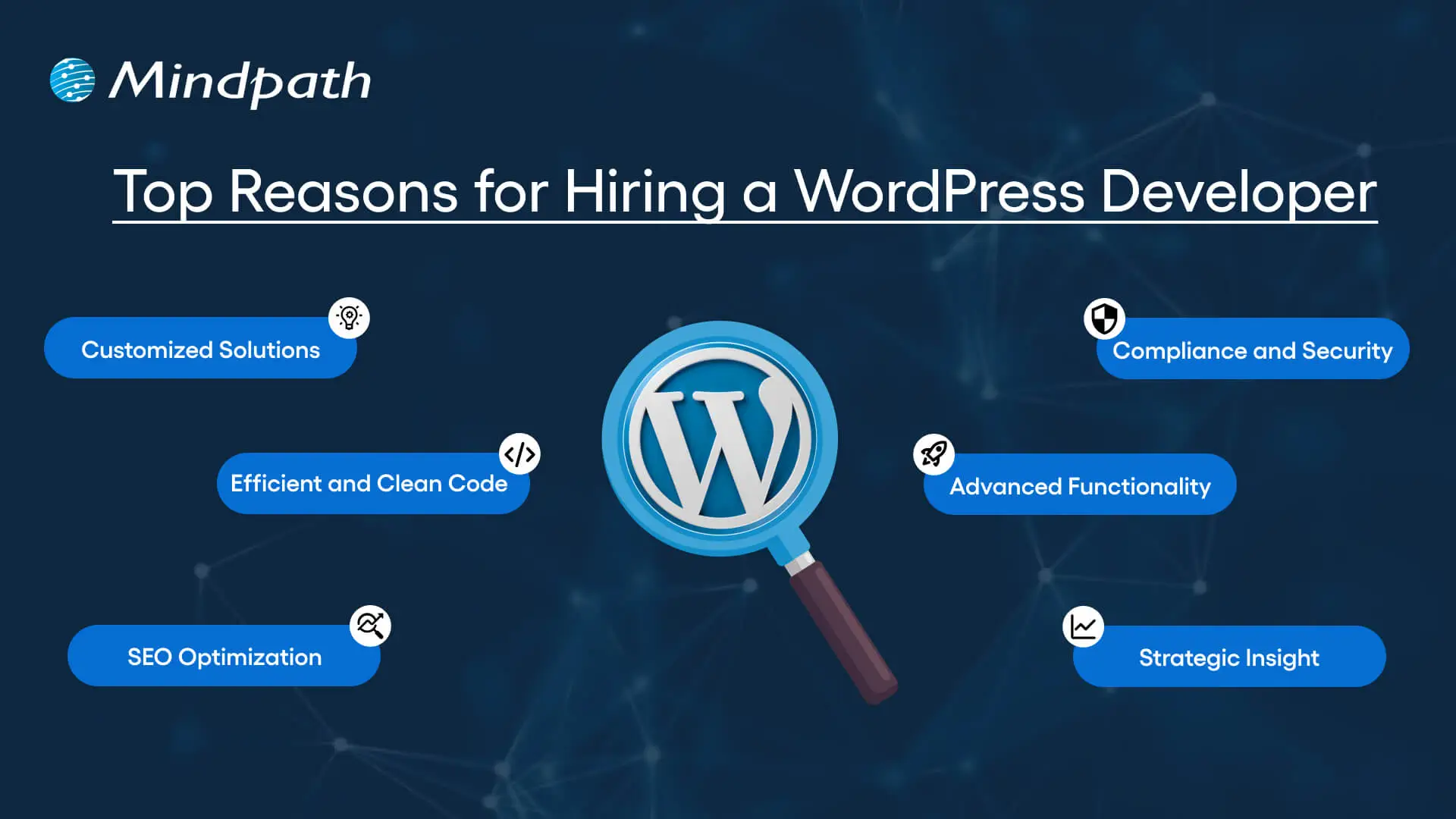
Top Reasons for Hiring a WordPress Developer

Before diving into the WordPress developer checklist to ensure a successful hiring, let’s understand why you should hire expert WordPress developer.

Top Reasons for Hiring a WordPress Developer

1. Customized Solutions

A professional WordPress developer can provide custom WordPress development for the site to match your unique brand identity, functional requirements, and user experience goals. Pre-built themes or plugins won’t offer you such flexibility.

2. Efficient and Clean Code

Skilled developers always prioritize writing scalable, secure, and optimized code. This ensures better SEO scores, fewer compatibility issues, and faster load times.

3. SEO Optimization

Developers know how to develop a website for search engines. For example, they use schema markup, semantic HTML, image optimization tools, and caching techniques that boost visibility and improve rankings.

4. Compliance and Security

From database protection to SSL configuration and plugin installation, professional WordPress developers deploy best security practices to protect your site from data breaches and malware. Besides, they ensure that all the plugins and elements are updated to the latest versions.

5. Advanced Functionality

Do you need a custom API integration or booking system? Well, a skilled WordPress developer knows how to integrate complex features that align with your user needs and business goals. They can also create custom plugins to expand the features of your site.

6. Strategic Insight

Apart from coding, WordPress developers help businesses to get detailed insight into conversion optimization, user behavior, latest trends, and more. All these things will help businesses in making smarter decisions.

Want to make sure your WordPress site is accessible to everyone? Check out our post on improve WordPress web accessibility to learn practical steps for making your site more inclusive and user-friendly.

Types of WordPress Experts- Which One Should You Hire

Understanding the benefits and value a developer can bring is just the beginning. To make the right decision on hiring a WordPress Developer, it is crucial to learn about the different types of WordPress developers you can hire. Remember that each brings a unique focus area and skill set.

1. Front-End WordPress Developers

These experts specialize in interactive and visual aspects of websites. They manage styling, layouts, and user experience and responsiveness using JavaScript, CSS, page builders, and HTML.

2. Back-End WordPress Developers

They focus on database management, server-side functionality, custom theme development, and plugin development. They work with WordPress core functions, MySQL, PHP, and more to create scalable websites.

3. Full-Stack WordPress Developers

Such experts handle back-end and front-end development tasks. They can create a website from scratch while ensuring seamless integration.

While hiring dedicated WordPress developer, you should choose the right type of developer to ensure your project aligns with the design goals, technical needs, and vision.

Curious about which developer’s role best suits your project? Dive into our article on Front-End vs Back-End vs Full-Stack to understand each role and decide which path aligns with your website’s needs.

WordPress Developer Checklist- Skills to Consider

Your hiring WordPress developer checklist should cover the key skills of WordPress developers. HTML, CSS, PHP, MySQL, and JavaScript rank among the key languages for WordPress development. Most developers are familiar with these languages, but knowledge of these technologies is not enough. Here are some skills that matter the most.

Hard Skills or Technical Capabilities

  • Knowledge of using core languages such as jQuery, JS, HTML5, CSS3, PHP, MySQL, React.js, and other languages.
  • Clear understanding of plugin architecture and WordPress core.
  • Building and customizing themes from scratch, and experience with various page builders like Beaver Builder, Gutenberg, Thrive Architect, Elementor, and Themify Builder.
  • Familiarity with REST API.
  • Knowledge of various optimization methods like scheme markup, image compression, caching, Core Web Vitals, minifying CSS, use of CDN, and more.
  • Understating security issues and applying fixes

Soft Skills

  • Ability to explain technical concepts in practical and simple terms.
  • Habit of making clear documentation.
  • Clarity and responsiveness in replies.
  • Ability to collaborate with backend teams and designers.
  • Familiarity with various management tools such as Jira, Trello, and Slack.
  • Willingness to accept feedback and incorporate it quickly.

Some Bonus Skills that Add Value

These skills are not that important for every project, but they can make a developer more valuable. These skills can include:

  • Experience in handling WooCommerce.
  • Knowledge about Headless WordPress configurations.
  • Use of Git or similar tools to manage collaborative workflows and code.
  • Experience in creating responsive and accessible designs to help websites meet the legal requirements of ADA.gov, etc.
  • A better understanding of the business’s goals, like lead generation, conversions, etc.

Want a more flexible and user-friendly website than a static HTML page can offer? Explore our blog on converting HTML to WordPress to see how shifting to WordPress can simplify maintenance and boost performance.

Hiring A WordPress Developer: Best Practices

Hiring a skilled WordPress developer can be a challenging process. That’s why utilizing a structured hiring a WordPress developer checklist is vital. A well-defined hiring checklist can help you save time, and you can hire the best talent for your projects. Here is how to begin your process to hire expert WordPress developer using a proven checklist.

1. Understand your Project Requirements and Goals

Before starting to search for a WordPress developer, it would be better for you to understand your project requirements. Do you want to create a new WordPress site from scratch or optimize an existing site? Are you creating a blog site, business website, or eCommerce platform?

Understanding these things will help narrow down the skills required. For instance, if you want to integrate APIs or advanced features into your site, then hiring a developer with skills in JavaScript or PHP would be a great choice.

Avoiding this step can lead to mismatched expectations. The more precise your needs, the easier your hiring a WordPress developer would be.

2. Selecting the Right Hiring Model

While hiring a WordPress developer, selecting the right engagement model is vital to aligning your development project budget, timeline, and scope. In general, WordPress developers come under three key categories these are:

  • Freelancers: Ideal for short-term and small projects due to their cost-effectiveness and flexibility.
  • Agencies: Offer complete solutions, including website design, development, SEO optimization, and maintenance. Agencies are ideal for large-scale and complex projects.
  • In-House Web Developers: They are best for organizations with ongoing development requirements. Businesses will enjoy faster turnaround and full control. However, this model requires businesses to invest in salaries, management overhead, and benefits.

Consider your budget, long-term objectives, and project size to choose the right model.

3. Developer’s Industry Experience

When using a hiring WordPress developer checklist, an important factor to consider is the developer’s industry-specific experience.

Working with a WordPress developer familiar with your business niche can significantly improve the outcomes while reducing costly trial and error. For instance, for creating an eCommerce website, hiring a developer with WooCommerce expertise will be the best option.

On the other hand, for a blog site, you should prefer to hire an expert with deep SEO and performance optimization knowledge.

This approach will accelerate development and boost functionality. And always ask developers whether they have built websites like yours.

4. Check References and Review Portfolios

Start by examining developers’ portfolios for design consistency, quality, and diversity of development projects that match your business niche. Also, check the custom developer tasks completed by developers to get an idea about their technical skills as well as problem-solving skills.

If possible, assess site performance, usability, and responsiveness to understand the developer’s attention to detail. Also, go through client references to confirm the developer’s support quality, professionalism, and reliability.

5. Conduct Technical Tests and Interviews

Don’t just rely on resumes. Conduct thorough practical tests and interviews. Start by creating targeted interview questions. For instance, you can ask, “How do you solve plugin conflicts”? Or “How do you check a site’s responsiveness?”

Practical tests can include fixing a site speed problem or creating a custom feature or post type. Such tests show developers’ technical skills, efficiency, and creativity. Besides, it helps you to know whether they can work under pressure. This step is pivotal for confident hiring decisions.

Stuck deciding whether WordPress or Drupal is a better match for your business? Our WordPress vs Drupal guide breaks down key differences to help you pick the perfect solution.

Common Mistakes to Avoid

Even with a solid WordPress checklist, mistakes can happen. Here are some common mistakes that you should avoid during the hiring process.

1. Don’t hire an expert based on just low rates. Focusing on the cost factor over quality can lead to poor site performance, missed deadlines, and you may end up with a site that may not meet your business goals.

2. Avoid developers who don’t want to sign confidential agreements. After all, keeping your business data, personal information, and intellectual property safe is important, especially when sharing sensitive details and backend access.

3. Don’t overlook maintenance service and ongoing support offered by the developer. Without this, your site may become vulnerable to bugs and security issues, affecting user experience, speed, and scalability.

4. Don’t ignore red flags such as lack of references, unclear communication, or vague answers.

5. Don’t make your hiring process long and complicated. Excessive interview rounds and lengthy assessments can frustrate candidates, and you may lose top talent.

6. Developers can only create and customize your site. They are not content strategist or designers. So, expecting them to handle everything would be a big mistake, leading to missed opportunities and misaligned results.

Hire Smart and Built Better with Mindpath

Hiring a WordPress developer is a major investment that you make in your business. This can greatly influence your business’s digital future. By following this detailed WordPress developer checklist, you can avoid common mistakes and find a WordPress developer who can create a website that will boost your online presence.

If you are searching for a trusted platform to hire an experienced WordPress developer, you may not find a better option than Mindpath. We specialize in providing the industry’s best WordPress developers, who combine creative design skills, deep technical knowledge, and commitment to quality to develop a perfect solution. Your website needs creative vision, thoughtful design, and expert attention that can bring your brand to life. And for this, you can always count on Mindpath.

Html to Wordpress

Anyone who has a HTML website might feel left out in the era of websites that load within seconds. Did you know that HTML websites were a thing when there was not content management system in the market? The transition from HTML to WordPress is no longer an option in an extremely competitive digital market. With static HTML pages, you would have to struggle to get the top ranks in search engine results.

Key Takeaways

  • 01
    WordPress loads faster and ranks better than static HTML websites today.
  • 02
    Anyone can manage a WordPress site without needing advanced coding skills.
  • 03
    Regular security updates and plugins keep WordPress websites well protected.
  • 04
    Mobile responsive themes ensure websites perform well across all devices.
  • 05
    Plugins let businesses add new features without relying on developers.

The biggest problem with HTML websites is that they come with duplicate code on every page, thereby making them slow. On the other hand, WordPress is faster, more secure and offers more flexibility to build any type of website. As a matter of fact, more than 43% of websites in the world run on WordPress. Let us find out why you should ditch HTML and switch to WordPress now.

Want to convert your static HTML site into a fully functional WordPress site with enhanced features and performance? Mindpath offers WordPress development services to help you build a custom website according to your business demands.

The Rise of WordPress in Website Building

WordPress started off as a blogging platform and the open source nature empowered it to transform into a website builder. Before WordPress, you would need a technical team to create a website and manage it. The search for a HTML to WordPress converter tool has been growing because WordPress has made it easier to build websites. You can now install the WordPress software and use the desired themes or plugins to develop websites with sophisticated functionalities and updated designs.

If you have been wondering whether switching to WordPress is a good decision, then you must take a look at websites powered by WordPress. Big names in the world of business such as Disney, Times Magazine, Sony Music and many others use WordPress. The versatile mix of power and simplicity with WordPress has been one of the biggest reasons for its widespread adoption.      

Is WordPress a Reliable CMS for Website Building?

Giving up on HTML, which has been a trusted ally of website developers for a long time, can be difficult. However, the need to convert HTML to WordPress is growing as WordPress is the top content management system in the world right now. It works as an open-source ecosystem that offers benefits for beginners as well as experienced developers.

WordPress offers a user-friendly interface in its dashboard, which you can use to create websites from scratch. The best thing about the WordPress dashboard is that you don’t need advanced technical expertise to use it. In addition, you can also find thousands of themes and plugins in WordPress that help you customize your website the way you want.

Want to build a website that truly reflects your brand’s unique identity and goals? Explore our guide to custom WordPress development to discover how tailored solutions can enhance your site’s performance and impact.

Why Should You Choose WordPress Over HTML?

With so many powerful features, it is hard to ignore the urge to switch to WordPress right away. You should search for a HTML website to WordPress converter that makes it easier to embrace the benefits of WordPress. Don’t you know how WordPress will enhance your HTML website? An overview of the advantages of transitioning to WordPress can offer some help in finding the answer to such questions.

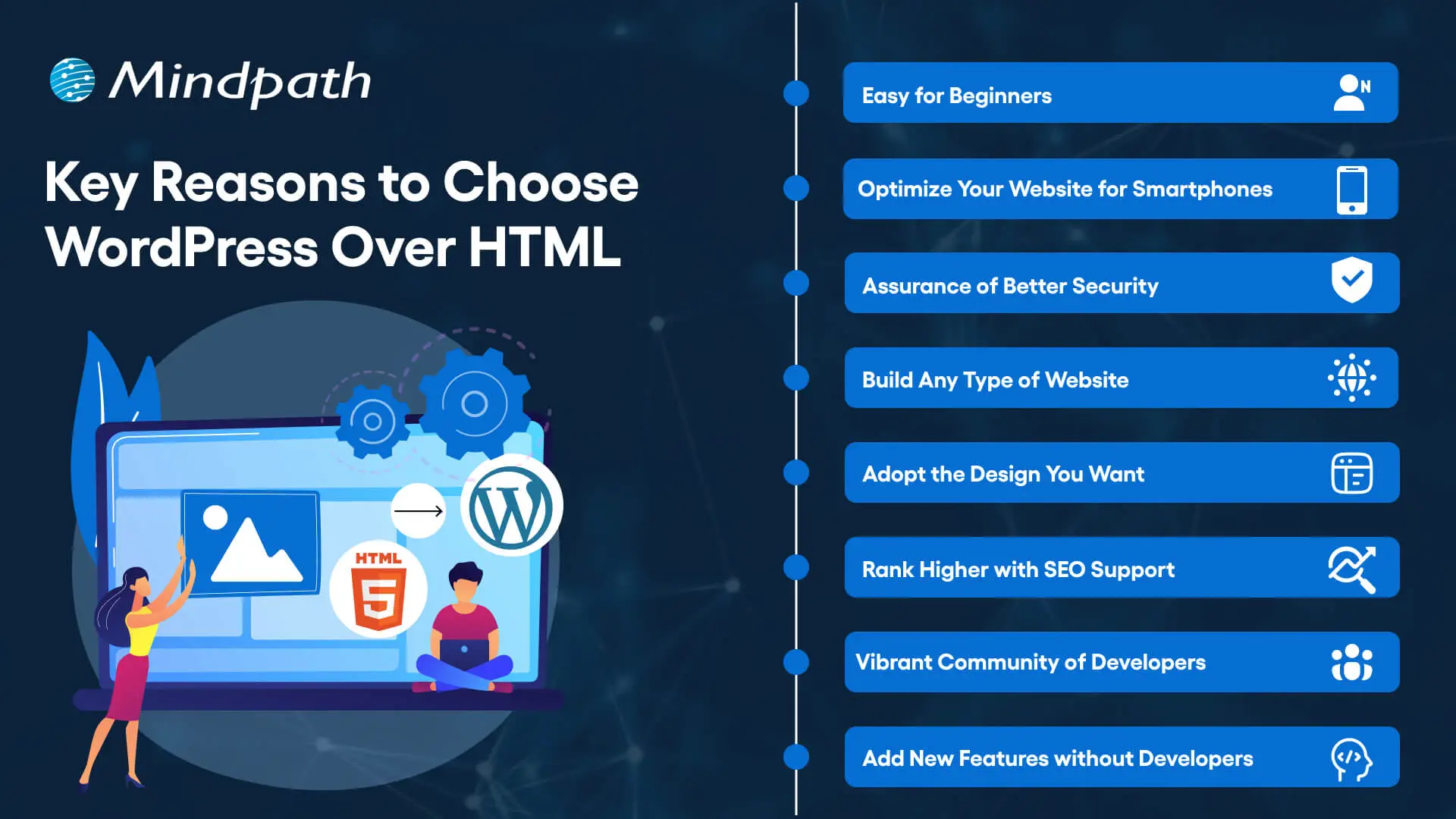
Key Reasons to Choose WordPress Over HTML

1. Easy for Beginners

The best thing about WordPress is that beginners will find it easy to use without any technical complexities. You don’t need coding skills to create your website and manage it on WordPress. The intuitive dashboard of WordPress allows you to create customized layouts, add more pages and update menus at one place. 

WordPress offers better flexibility than traditional website development approaches with more control over design, content management and functionality. Furthermore, the themes and plugins offered by WordPress help you add new features without waiting for developers. In other words, anyone can build a website without technical skills when they know how to use WordPress.   

2. Optimize Your Website for Smartphones

Do you know that most of the traffic to your business will come from mobile users? Many of you would need a HTML to WordPress converter online when you discover that WordPress offers mobile responsiveness. Most of the WordPress themes are tailored to function seamlessly on different screen sizes and device types. 

The interesting part of mobile responsiveness with WordPress is that your website will have the same aesthetic appeal on all devices. Apart from the consistent user experience on different devices, mobile responsiveness also makes your website rank higher on Google. With a few modifications to theme files and some new WordPress plugins, your static HTML website will run seamlessly on all mobile devices.

3. Assurance of Better Security

Businesses should also trust WordPress for its commitment to safeguarding any website hosted on the platform. You will get regular security updates on WordPress, which help in combating new security threats. On top of it, WordPress also offers additional security plugins and SSL certificates to enhance your website’s security. The biggest benefit of converting HTML to WordPress is visible in the efforts made by WordPress to address emerging vulnerabilities.

You must understand that modern approaches to website security need multiple layers of protection. For instance, you will need data encryption, backup systems and malware scanning to maintain the security of your website. WordPress offers the complete package to safeguard your website from hackers and unprecedented security breaches.

4. Build Any Type of Website

In its initial days, WordPress served as a useful tool for blogging alone. The transition of WordPress to a powerful driving force behind some of the biggest websites shows how it has evolved over the course of time. You should know how to add HTML to WordPress for switching from an outdated format to a versatile toolset. You can use WordPress for any type of website, whether it is for a small business or a large corporation.

WordPress is capable of hosting e-commerce websites, communities or social media networks. Businesses can always find WordPress plugins that will make their website better. Most important of all, you don’t have to worry about adaptability when your website needs to grow alongside your business. It is definitely a huge advantage for websites in an extremely competitive business landscape.

Unsure whether your WordPress project is following the right development standards and best practices? Check out our WordPress developer checklist to make sure every essential step is covered for a smooth and successful build.

5. Adopt the Design You Want

The problem with a static HTML website is that you don’t have any control over the design once it’s published. WordPress does not let you worry about changing the design of your website according to emerging trends. When you convert a website to WordPress, you get the advantage of capitalizing on its extensive theme library. You can have a business site, blog or an ecommerce site and still ensure that their design matches with your needs and style. 

The theme library of WordPress offers free and premium themes that you can choose for your website. You can also find additional themes from third-party developers and design marketplaces that bring unique features and layouts. The live previews of each theme help you check each design without affecting website functionality or content.  

6. Rank Higher with SEO Support

WordPress stands out as the most popular option to create websites now because of its SEO support. What will you gain from a website that never shows up on the first page of search results? You can download WordPress and capitalize on its strong SEO foundation to ensure a higher rank on search engines. The advantages of WordPress for SEO revolve around its strict coding guidelines that call for clean and structured code.

The code is not the only thing that makes WordPress websites easier to rank on Google and other search engines. You will also find user-friendly URLs, meta-descriptions and titles to gain more visibility in search engines. On top of it, the SEO plugins on WordPress will provide a lot of support in optimizing your website.

7. Vibrant Community of Developers

The biggest strength of WordPress is its large and active community of developers. As an open-source platform, WordPress continues growing with the contributions of multiple users and developers. The community not only introduces updates to the source files but also makes WordPress more secure and updated along the lines of latest trends. 

Another promising reason to convert HTML to WordPress theme for your website is the accessibility to website creation tools offered by the community. It ensures that developers alone don’t have the exclusive rights to use WordPress tools. Even a blogger or business owner can be a part of the WordPress community and capitalize on its diverse offerings.

8. Add New Features without Developers

Websites have to evolve and add new features to accommodate the emerging requirements of users. WordPress allows you to add new features to your website without the intervention of developers. The collection of powerful plugins available with WordPress can help you introduced advanced features without code changes. 

Plugins are the ideal tools for adding shopping carts, contact forms and other features on WordPress websites. You can also explore custom WordPress plugins by third-party developers to enhance their websites. On top of it, you can activate or deactivate plugins as required, which offers the flexibility for customizing a website to your needs. 

Final Thoughts

The decision to convert your website from HTML to WordPress should not be a difficult one, considering the benefits of WordPress. It allows anyone to create a website without technical knowledge alongside offering the flexibility to add new features. In addition, you cannot ignore the benefits of regular security updates, a supportive community and control over website design. 

Mindpath specializes in converting HTML websites to WordPress for any type of website. We have years of experience in WordPress development that brings more credibility to our services. Our services for switching your website to WordPress also offer the assurance of an easy conversion procedure. If you want a website that is easier to update and maintain, then Mindpath is here to help you.

nodejs trends
Ever wondered how the digital world is advancing with incredibly rapid speed? One of the central performers in that play will be Node.js. So, are you curious about the trends that are pushing the potential of Node.js to the very front of technology? In this blog, we will explore the Node.js trends that are shaping the future of digital technology.  Node.js is a very powerful tool that aids the running of fast and efficient web applications running outside of browsers. It is great for real-time updates and server-side programming because it does not get stuck waiting for one task to finish before moving on to the next. According to the V8 engine of Google Chrome, Node.js is open source—that is, free to use and constantly improved by developers all around the world. Unlike traditional frameworks or libraries, Node.js is a runtime environment. It enables a developer to get all the required things for writing code and running it as fast as possible in one place.   Knowing the trends of Node.js is important in using the latest tools and methodologies to construct better and faster web applications. Knowing what is new will help you create more efficient and modern projects, keeping ahead of your competitors and ensuring that your skills are relevant. Besides, application of the newest trends will help you to work more efficiently and save a lot of time.  So, let’s dive in as we explore the top Node.js trends that are shaping the tech landscape and redefining how we interact with the digital world! 

Top 10 Node.js Trends in 2024  

1. AI in Node.js Development  

AI is making a high impact in technology, and Node.js is no exception. Combining AI and Node.js empowers developers to build smart and efficient applications. For example, AI could help automate tasks to make your applications run smoothly and fast. You can use TensorFlow.js to bring AI capabilities natively into your Node.js applications. This could be a chat application where AI helps answer questions, or a website that uses AI to change content based on user behavior. In short, AI and Node.js are quite a powerful combination, and enable new use cases for more advanced, more highly automated applications. 

2. TypeScript Adoption  

TypeScript is an advanced version of JavaScript, extending it with some extra features to make coding easier. It features classes and optional type checking, which has made it excellent at managing complex code. Many Node.js developers love TypeScript because it enables them to develop more reliable applications that can scale easily. TypeScript works very well with Node.js, offering improvements in code quality while reducing mistakes. Thus, it makes building and maintaining a project easy for the developer. 

3. Real-time Applications  

Real-time applications are finding their way into many industries, from gaming to retail, due to the ability of their users to act in real time and be updated live. Node.js is an excellent choice for developing these apps since it enables a developer to handle several requests at a time with speed. As the global real-time communication market is projected to grow by 43.4% from 2020 to 2027, it is likely that more companies will turn their backs on Node.js to fulfill their real-time requirements. Real-time technologies, like social media and messaging applications, gain their importance from being so well accepted. For example, AI-powered chatbots can be integrated into websites and mobile applications for customized experiences and smoother interactions with users. Other typical Node.js uses in real-time applications include gaming online, video conferencing, instant messaging, e-commerce transactions, document sharing, and VoIP calls. A professional Node.js developer can help in the development of such complex applications, enhancing user experience, and meeting the growing demands for real-time features. 

4. Serverless Architecture Development  

Serverless architecture is the modern pattern for building and running applications that do not require server management or infrastructure. You only pay for the computing time used, and you are freed from handling scaling and managing servers on your own. Big business names like Amazon, Google, and Microsoft propose tools that make it easier for developers to use this architecture. Node.js helps to take the lead in this tendency because it enables developers to easily write anywhere-run codes without the hassle of maintaining a server. One of the major reasons for the popularity of serverless architecture is that it speeds up time to deploy and simplifies scaling. You can put up an application within minutes, and scale to surging demand without additional resources or complex configuration changes. Basically, it lets developers focus on enhancing applications rather than managing infrastructure. 

5. Microservices  

Microservices is a modern approach in designing software where it must be broken down into small, independent services, each handling a specific function. All these services are run independently and communicate through straightforward methods—for instance, HTTP APIs. Such design offers software development at a quicker and more flexible pace since each service is developed, tested, and updated independently. Node.js is very suitable for microservices, as it supports the creation of such small, efficient services. Nest and Express are tools for smoothing the handling of microservices with Node.js and thus help the developer to effectively construct and maintain applications. Other advantages of using microservices include faster development—which is now possible as different services can be developed by developers simultaneously, better reliability, and reduced costs by allowing to outsource complex features to the best experts. In general, combining microservices with Node.js yields an application which could be scalable, strong, and cheap. 

6. GraphQL Deployment in Node.js apps  

GraphQL is a query language developed by Facebook in 2012 and published in 2015. It gives clients a much greater ability to reach databases more effectively, using a single endpoint rather than several and returning data in a single format. Such an approach helps clients to request exactly the data they need, thereby reducing excessive data transfer. Node.js contributes an important role to the GraphQL ecosystem by providing great support for a fast and scalable runtime environment for running GraphQL servers. Most developers use Node.js to build GraphQL APIs because it handles concurrent requests pretty well and has flawless integration with different GraphQL libraries, such as Apollo Server. This makes setting up and managing GraphQL servers easier. 

7. MEAN and MERN Stack  

Due to the very ease of building powerful applications, MEAN and MERN stacks are very popular in web development.  The MEAN stack constitutes MongoDB, Node.js, Express.js, and AngularJS. It is one of the most used cross-platform development tools for many startups and large companies, since it bundles all server-side and client-side development into one package. The MERN stack is the same, with React instead of AngularJS. MERN stands for MongoDB, Express.js, React, and Node.js. Both are easy and clear to use, making them great for any complex app. Companies like Netflix use the MERN stack to make their websites fast and user-friendly. Either way, you will be given a full set of perfectly fitted tools for web development, hence making it easier and quicker. 

8. Internet of Things (IoT) 

The IoT is growing in terms of its deployment, with more devices connected to the internet, including home appliances, wearable technology, and health sensors. These devices can communicate and exchange data over the internet, making the system efficient and not necessarily in need of human intervention. IoT also includes innovations such as smart homes and smart cities, where devices endowed with sensors and actuators work together to provide unique functions and cooperate within the existing internet infrastructure. Node.js is suitable for IoT application development since it is light, speedy, and convenient. It’s equally popular among developers, so it will not be difficult to find professionals with experience in skillful operations.  

9. Cloud Computing  

Cloud computing simply means the use of computer resources and data over the Internet without a personal investment in hardware or software. A movement away from traditional mainframe computing toward cloud-based services provides cost savings and efficiency by allowing users to log on to applications and files from anywhere. As more and more businesses are turning to cloud computing because of its cost-effectiveness and efficiency, Node.js is rapidly becoming one of the most preferred options in cloud solutions, like AWS Lambda and Azure Functions. Its lightweight nature and speed in execution make scaling an application easy and hassle-free. If you are developing new products or services, considering Node.js for your cloud projects can keep you flexible and efficient. 

10. DevOps 

DevOps is a process aimed at increasing the level of interaction between software developers and IT operations teams. It concerns better communication, collaboration, and integration that makes the process of coding and deploying software faster and more efficient. By automating tasks like setting up infrastructure and deploying code, DevOps shortens the time from development to production. Node.js fits well in the DevOps environment since it supports scalable and cloud-based applications. Node.js has been developed in such a way that it would enable collaboration between different developers by allowing them to use the same JavaScript source code for server-side and client-side applications. This hence implies that using one language would allow developers to collaborate much more during the development process. 

 Curious about the power of Node.js for your next project?

At Mindpath, we deliver cutting-edge solutions that propel your business forward with precision and speed.

Node.js Development Services at Mindpath 

Mindpath designs powerful digital solutions using professional Node.js development services. With our vast experience, the team develops powerful, high-performance, scalable, and real-time applications that cater to your business. Here is the list of our services:  

  1. Node.js Web App Development: We design and develop fast, lightweight web applications using Node.js. 

  2. Node.js CMS Development: We create easy-to-use and manageable content management systems. 

  3. Node.js API Development: Develop APIs that make different software systems operate flawlessly together. 

  4. Node.js Consulting Services: Offer expert advice and aid you in maximizing the use of Node.js in your projects. 

  5. Node.js Maintenance & Support: We support your applications on an ongoing basis to keep them up and running. 

  6. Node.js Migration Services: We help migrate your existing applications over towards Node.js for enhanced performance. 

Conclusion 

Within the fast-moving digital world, Node.js is a force, a multi-purpose tool driving innovations in areas such as enhanced real-time communication, microservices that scale, and artificial intelligence integration. Remaining conversant with such trends will keep the developer at full power with Node.js in making state-of-the-art applications that can fulfill all requirements of the dynamic market today. Embracing them will not only ensure one is efficient in projects and ready for the future but also help stay ahead in a competitive tech environment. 

At Mindpath, we are keen on putting the best Node.js trends into practice when developing digital solutions for our customers’ needs. High-performance, scalable, and real-time applications enable your business. We have years of experience and expertise in delivering web app development, API integration, cloud solutions, and other solutions that assure you, as our client, that our team is deeply committed to offering innovative and effective services in Node.js. 

Wondering how Node.js can transform your digital strategy?

At Mindpath, our expertise in Node.js ensures scalable and innovative applications tailored to your needs.

Discover the top Node.js trends shaping digital technology in 2024, from AI and TypeScript to IoT and cloud computing. Explore how Node.js drives innovation!