Home

Top Benefits of Converting HTML to WordPress

Top Benefits of Converting HTML to WordPress

Join our Newsletter!

Html to Wordpress

Anyone who has a HTML website might feel left out in the era of websites that load within seconds. Did you know that HTML websites were a thing when there was not content management system in the market? The transition from HTML to WordPress is no longer an option in an extremely competitive digital market. With static HTML pages, you would have to struggle to get the top ranks in search engine results.

Key Takeaways

  • 01
    WordPress loads faster and ranks better than static HTML websites today.
  • 02
    Anyone can manage a WordPress site without needing advanced coding skills.
  • 03
    Regular security updates and plugins keep WordPress websites well protected.
  • 04
    Mobile responsive themes ensure websites perform well across all devices.
  • 05
    Plugins let businesses add new features without relying on developers.

The biggest problem with HTML websites is that they come with duplicate code on every page, thereby making them slow. On the other hand, WordPress is faster, more secure and offers more flexibility to build any type of website. As a matter of fact, more than 43% of websites in the world run on WordPress. Let us find out why you should ditch HTML and switch to WordPress now.

Want to convert your static HTML site into a fully functional WordPress site with enhanced features and performance? Mindpath offers WordPress development services to help you build a custom website according to your business demands.

The Rise of WordPress in Website Building

WordPress started off as a blogging platform and the open source nature empowered it to transform into a website builder. Before WordPress, you would need a technical team to create a website and manage it. The search for a HTML to WordPress converter tool has been growing because WordPress has made it easier to build websites. You can now install the WordPress software and use the desired themes or plugins to develop websites with sophisticated functionalities and updated designs.

If you have been wondering whether switching to WordPress is a good decision, then you must take a look at websites powered by WordPress. Big names in the world of business such as Disney, Times Magazine, Sony Music and many others use WordPress. The versatile mix of power and simplicity with WordPress has been one of the biggest reasons for its widespread adoption.      

Is WordPress a Reliable CMS for Website Building?

Giving up on HTML, which has been a trusted ally of website developers for a long time, can be difficult. However, the need to convert HTML to WordPress is growing as WordPress is the top content management system in the world right now. It works as an open-source ecosystem that offers benefits for beginners as well as experienced developers.

WordPress offers a user-friendly interface in its dashboard, which you can use to create websites from scratch. The best thing about the WordPress dashboard is that you don’t need advanced technical expertise to use it. In addition, you can also find thousands of themes and plugins in WordPress that help you customize your website the way you want.

Want to build a website that truly reflects your brand’s unique identity and goals? Explore our guide to custom WordPress development to discover how tailored solutions can enhance your site’s performance and impact.

Why Should You Choose WordPress Over HTML?

With so many powerful features, it is hard to ignore the urge to switch to WordPress right away. You should search for a HTML website to WordPress converter that makes it easier to embrace the benefits of WordPress. Don’t you know how WordPress will enhance your HTML website? An overview of the advantages of transitioning to WordPress can offer some help in finding the answer to such questions.
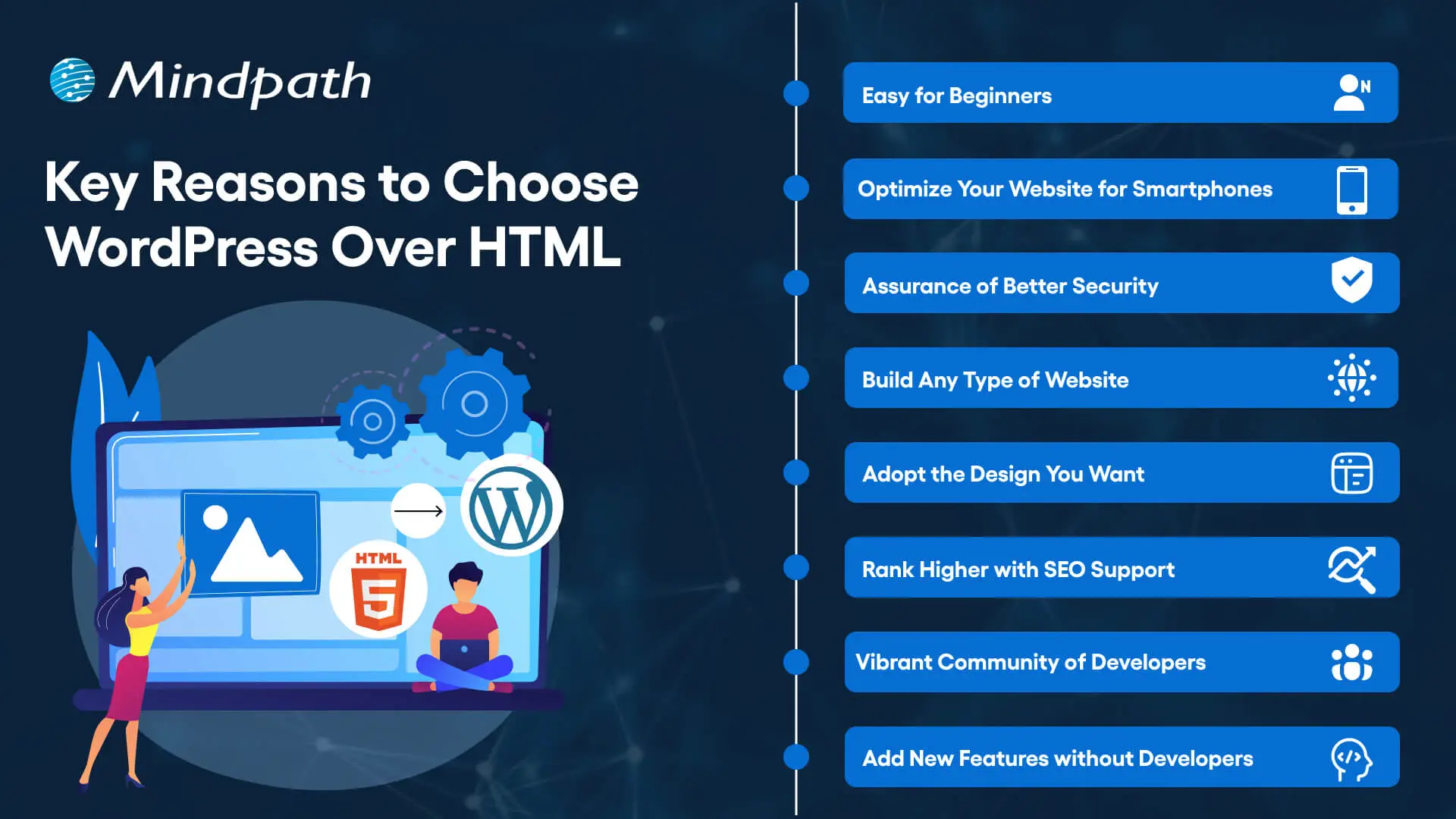
Key Reasons to Choose WordPress Over HTML

1. Easy for Beginners

The best thing about WordPress is that beginners will find it easy to use without any technical complexities. You don’t need coding skills to create your website and manage it on WordPress. The intuitive dashboard of WordPress allows you to create customized layouts, add more pages and update menus at one place. 

WordPress offers better flexibility than traditional website development approaches with more control over design, content management and functionality. Furthermore, the themes and plugins offered by WordPress help you add new features without waiting for developers. In other words, anyone can build a website without technical skills when they know how to use WordPress.   

2. Optimize Your Website for Smartphones

Do you know that most of the traffic to your business will come from mobile users? Many of you would need a HTML to WordPress converter online when you discover that WordPress offers mobile responsiveness. Most of the WordPress themes are tailored to function seamlessly on different screen sizes and device types. 

The interesting part of mobile responsiveness with WordPress is that your website will have the same aesthetic appeal on all devices. Apart from the consistent user experience on different devices, mobile responsiveness also makes your website rank higher on Google. With a few modifications to theme files and some new WordPress plugins, your static HTML website will run seamlessly on all mobile devices.

3. Assurance of Better Security

Businesses should also trust WordPress for its commitment to safeguarding any website hosted on the platform. You will get regular security updates on WordPress, which help in combating new security threats. On top of it, WordPress also offers additional security plugins and SSL certificates to enhance your website’s security. The biggest benefit of converting HTML to WordPress is visible in the efforts made by WordPress to address emerging vulnerabilities.

You must understand that modern approaches to website security need multiple layers of protection. For instance, you will need data encryption, backup systems and malware scanning to maintain the security of your website. WordPress offers the complete package to safeguard your website from hackers and unprecedented security breaches.

4. Build Any Type of Website

In its initial days, WordPress served as a useful tool for blogging alone. The transition of WordPress to a powerful driving force behind some of the biggest websites shows how it has evolved over the course of time. You should know how to add HTML to WordPress for switching from an outdated format to a versatile toolset. You can use WordPress for any type of website, whether it is for a small business or a large corporation.

WordPress is capable of hosting e-commerce websites, communities or social media networks. Businesses can always find WordPress plugins that will make their website better. Most important of all, you don’t have to worry about adaptability when your website needs to grow alongside your business. It is definitely a huge advantage for websites in an extremely competitive business landscape.

Unsure whether your WordPress project is following the right development standards and best practices? Check out our WordPress developer checklist to make sure every essential step is covered for a smooth and successful build.

5. Adopt the Design You Want

The problem with a static HTML website is that you don’t have any control over the design once it’s published. WordPress does not let you worry about changing the design of your website according to emerging trends. When you convert a website to WordPress, you get the advantage of capitalizing on its extensive theme library. You can have a business site, blog or an ecommerce site and still ensure that their design matches with your needs and style. 

The theme library of WordPress offers free and premium themes that you can choose for your website. You can also find additional themes from third-party developers and design marketplaces that bring unique features and layouts. The live previews of each theme help you check each design without affecting website functionality or content.  

6. Rank Higher with SEO Support

WordPress stands out as the most popular option to create websites now because of its SEO support. What will you gain from a website that never shows up on the first page of search results? You can download WordPress and capitalize on its strong SEO foundation to ensure a higher rank on search engines. The advantages of WordPress for SEO revolve around its strict coding guidelines that call for clean and structured code.

The code is not the only thing that makes WordPress websites easier to rank on Google and other search engines. You will also find user-friendly URLs, meta-descriptions and titles to gain more visibility in search engines. On top of it, the SEO plugins on WordPress will provide a lot of support in optimizing your website.

7. Vibrant Community of Developers

The biggest strength of WordPress is its large and active community of developers. As an open-source platform, WordPress continues growing with the contributions of multiple users and developers. The community not only introduces updates to the source files but also makes WordPress more secure and updated along the lines of latest trends. 

Another promising reason to convert HTML to WordPress theme for your website is the accessibility to website creation tools offered by the community. It ensures that developers alone don’t have the exclusive rights to use WordPress tools. Even a blogger or business owner can be a part of the WordPress community and capitalize on its diverse offerings.

8. Add New Features without Developers

Websites have to evolve and add new features to accommodate the emerging requirements of users. WordPress allows you to add new features to your website without the intervention of developers. The collection of powerful plugins available with WordPress can help you introduced advanced features without code changes. 

Plugins are the ideal tools for adding shopping carts, contact forms and other features on WordPress websites. You can also explore custom WordPress plugins by third-party developers to enhance their websites. On top of it, you can activate or deactivate plugins as required, which offers the flexibility for customizing a website to your needs. 

Final Thoughts

The decision to convert your website from HTML to WordPress should not be a difficult one, considering the benefits of WordPress. It allows anyone to create a website without technical knowledge alongside offering the flexibility to add new features. In addition, you cannot ignore the benefits of regular security updates, a supportive community and control over website design. 

Mindpath specializes in converting HTML websites to WordPress for any type of website. We have years of experience in WordPress development that brings more credibility to our services. Our services for switching your website to WordPress also offer the assurance of an easy conversion procedure. If you want a website that is easier to update and maintain, then Mindpath is here to help you.


Ready to Move to WordPress?

Make your website easier to manage and scale.

Frequently Asked Questions

The timeline depends on website size and complexity. Simple sites can be converted within a few days, while larger websites with custom features may take a few weeks to ensure everything transfers smoothly without losing existing content or functionality.
A proper conversion process actually tends to improve rankings over time. WordPress offers stronger SEO support through clean code and optimization plugins. However, redirects and URL structures need careful handling during migration to avoid any temporary ranking drops.
Yes, the existing design can often be recreated or closely matched using custom WordPress themes. Developers can convert the original HTML layout into a WordPress theme, keeping the same look while adding the flexibility WordPress offers for future updates.
WordPress provides solid security through regular updates, SSL support, and dedicated security plugins. Businesses handling sensitive data should still follow best practices like strong passwords, backups, and trusted plugins to maintain a secure and reliable website environment.
Some maintenance is recommended, such as updating plugins, themes, and the WordPress core regularly. However, WordPress is designed to be manageable even for non-technical users, making routine upkeep far simpler compared to maintaining a static HTML website.

Support Is One Click Away

Featured Posts

Related Post

wordpress-react-combine project
Are you curious about how to elevate your web app to the next level? Imagine combining React’s cutting-edge user interfaces with WordPress’s robust content management. Interesting right? In this blog, we’ll guide you through the process of merging these technologies to build a web app that’s both visually stunning and highly functional. So, let’s dig in! 

Overview of React 

React is a JavaScript library that enables the building of user interfaces, mostly single-page applications. It gives a possibility to create interactive elements and dynamic web pages by breaking their content into smaller, re-usable components. It helps in managing updates to the user interface and hence makes applications faster and more responsive. React is essential to today’s digital makeup since it will help in the creation of a much faster, interactive, and dynamic web application that would go a long way in enhancing user experience. Due to its component-based architecture, React simplifies the development process and supports complex applications with high performance, making it a preferred choice for modern web development, where user engagement and responsiveness count the most. 

Overview of WordPress 

WordPress is an extremely popular content management system, and millions of websites are running on it worldwide. Its user interface is very simple, so users can easily create, edit, and manage website content without needing to know how to code. With high flexibility in themes and various plugins, WordPress can be put to any purpose—from personal blogging to the most complicated business sites. WordPress is important due to the flexibility and user-friendliness in creating and managing websites efficiently for any kind of user. It provides access to unlimited customization because of its extended base of themes and plugins, hence becoming a mainstay tool in the modern world for web developers and content creators. 

Why Combining React and WordPress Can Be Beneficial for Developers.   

Integration of React with WordPress enriches development by putting the power of both together. React is empowered for reusing the components, which means simplicity in terms of coding and speed in development. Fast rendering with efficient state management means web applications work harmoniously and respond as the user expects. JSX syntax, with its combination of JavaScript and HTML, enables easier writing and readability of codes. WordPress complements React by taking care of the content and providing a clear user interface. The fact that React can keep data away from the presentation and manage it nicely helps not to lose data under any conditions. Taken together, React and WordPress make the building process much faster and more convenient for creating powerful and extremely dynamic web apps. 

Key Considerations When Building Your Web App with React and WordPress    

1. Existing Infrastructure  

Your existing infrastructure does affect how well React and WordPress work together. If your current system is compatible, the integration of React will go through smoothly and more quickly. For example, a headless setup where React is doing the front end and WordPress the back end could be best for modern needs. This, however, requires more development work, changes in your back-end system, and special expertise to do it correctly. 

2. Maintenance And Updates  

Regular updating and maintenance are vital in the case of a React and WordPress site. In case you do not update them regularly, your site will eventually have performance issues, it will be vulnerable to security exploits, or even crash. When it’s headless—in a setup where React and WordPress run separately—the updates become easier; one could independently update the front end and back end, which will be helpful in keeping the site’s stability and safety. 

3. Developer Skillset  

It requires a wide skill set to build a website with React and WordPress. One needs to be proficient in JavaScript, to understand JSX, and to use state management tools like Redux. One would also want to be familiar with modern development tools like Webpack and Babel and know how to work with APIs. If these competencies are missing in your team, including an expert on a project basis will make the development process smoother and more efficient. 

4. SEO Considerations 

SEO is critical to have your website show up in search results and bring in visitors. Using React with WordPress, SEO can be a little more complex. As its client-side rendering, React may make it hard for search engines to index your content. You can either implement SSR or SSG to make it easier for search engines to crawl and rank your site. Besides, meta, sitemaps, and canonical URLs should be properly set up for effective SEO within a headless WordPress setup. 

Ready to elevate your website to new heights?

At Mindpath, we seamlessly integrate React with WordPress to create dynamic, responsive web experiences.

Configuring React to Work with WordPress      

1. Write Modular Code 

Breaking your code into smaller, self-contained parts makes it easier to handle and reuse. This is like keeping your workspace organized: when everything has its place, it’s much easier to find anything that you may need and use it. Small, reusable components in React are ways by which you can keep your code neat, making changes or fixes on parts of your site without affecting the other parts. 

2. Use A State Management Library   

A state management library, like Redux, that keeps every bit of information of your app in one place. This is good for complicated websites where you deal with a great deal of information. This way, it becomes easy to handle changes and updates for your website to run smoothly and in the desired manner. 

3. Optimize Performance   

Performance optimization of the website enables quick and enjoyable usability by the user. This is achieved through caching, breaking down the code into smaller pieces that load only when needed, or lazy loading—parts of the website only load after becoming visible to the user. Doing this will get your site up and running quickly; this will also improve responsiveness. 

4. Implement A Consistent API   

A good API—like WordPress REST API or GraphQL—will help your React app and WordPress site to communicate smoothly. A consistent API would mean that data flows between the two without any problems. REST APIs offer flexibility, but their design is often varied. GraphQL APIs are more homogeneous and predictable, so it helps in use and understanding. 

5. Plan For Extensibility   

Make a site that will expand and evolve over time without a problem. That means keeping ahead by finding out ways to add new features or update existing ones without breaking the rest of the site. Having an extensible design means it will let your site easily change to meet future needs without having to start from square one. 

6. Automated Testing 

Automated testing means running your code for errors using tools automatically. This will ensure that mistakes are noted and cured in the beginning, thus ensuring that your website does what you want it to. Automated testing saves time and keeps your site stable; this reduces the chances of problems frustrating users. 

Build Your Web Using React and WordPress with Mindpath    

The experienced team at Mindpath uses React to improve user experience and WordPress as the foundation for creating powerful websites. With its incredibly strong and practical content management system, editing and managing website material is effortless. By integrating React, we can increase your site’s speed and amount of interaction while engaging users on a deeper level. Create a dynamic frontend for your website using React to make it load quickly and react to user input as smoothly as possible.

Mindpath offers the best of both worlds: the ease and versatility of WordPress paired with the contemporary, dynamic capabilities of React. We take care of the technical setup and customization so you can have an outstanding website experience and concentrate on your content and business objectives. 

Conclusion  

Combining React and WordPress gives synergy to your Web application, offering a digital experience that is at once impressive and compelling. Being able to interact with dynamically displayed interfaces from React and a robust content management system like WordPress, you are assured of having a site that is at once engaging, powerful, yet very easy to manage. Inherently, this automatically ensures the improvement of user interaction and performance while also making it seamless to update content and manage sites. Embrace this mix of technologies to develop a web app which would be fast, functional, and future-ready. This way, your web presence will always be at the top of its game.
Mindpath excels at bringing this integration to life. Our expert team combines the power of React with WordPress to deliver an ultra-fast, interactive site that is also easy to maintain and update. With Mindpath, you can confidently navigate the complexities of modern web development, ensuring your digital presence is both cutting-edge and effortlessly managed. 

Looking to enhance your WordPress site with cutting-edge React features?

Mindpath is your go-to partner! We specialize in integrating React’s dynamic capabilities with WordPress’s robust CMS to deliver stunning web experiences.

Combine WordPress and React for powerful web apps. Discover how to leverage robust content management with dynamic interfaces for enhanced user experience.
react architecture 

Strong react architecture is the first step in building powerful digital products. It is also on a daily basis that the modern apps require speed, flexibility, as well as clean structure. So, what makes the complex applications continue to run smoothly as they increase? Intelligent architecture decisions determine performance, maintainability, and future growth. Thus, the need to know this basis becomes critical to serious business success.

Since user demands are increasing, the dispersed development is costly to roadblock and restrict innovation. A scalable approach ensures that the components are organized, data flows are clear, and teams are productive. Then, what is the secret to successful businesses creating React applications that can actually be maintained? In this blog, we will explore the react components architecture strategies behind scalable React applications. So, keep reading further!

Ready to turn your React architecture knowledge into a live, high-performing application built for scale? Explore Mindpath’s React development services and see how our expert team builds clean, modular, and future-ready solutions tailored to your business goals.

What is React Architecture and Why Does It Matter?

The react architecture is the intelligent architecture of a React application. It structures the code into reusable units that perform particular duties. This design ensures that the interface is clean, modular and simpler to construct. Having a clear data flow and logical design, developers build apps that remain organized as the complexity increases.

The significance of react scalable architecture is that it informs scalable and maintainable development. In the absence of adequate structure, large projects usually get confusing and difficult to operate. Proper architectural planning enhances performance, facilitates teamwork, and minimizes errors. It assists companies to create trusted applications that are easily adapted with changes in user requirements and capabilities.

Core Principles of React Architecture for Scalable Development

Developing scalable applications requires very solid structural foundations. Having clear principles enables teams to build faster, still keep quality, and reduce complexity.

Now, let’s look at the main principles that determine effective and future-proof React development.

1. Separation of Concerns

Do not mix UI, business logic, and data layers together. This results in a cleaner code base and also contributes to a more scalable react architecture that is easier to maintain.

2. Unidirectional Data Flow

Data flows from a parent component to a child component in a definite sequence. Hence making it simpler to identify changes and fix bugs.

3. Component-Based Modularity

Simply create reusable components which each have a single, well-defined responsibility. This way, you can keep your application flexible and well-organized.

4. Co-location

Keep related files together with their components. This practice not only makes the codebase clearer but also helps in managing project complexity.

5. Encapsulation via Module Boundaries

Only share the essential information between modules. This not only safeguards the structure but also makes the systems more manageable.

Key Features of a Strong React Architecture

A robust application framework is one of the great enablers of expansions, speed, and long-term stability. In fact, the proper basis goes hand-in-hand with boosting a team’s productivity and the quality of code.

Check below for the major characteristics that render feature-based architecture react a bigger scale and easier to handle.

1. Feature-Based Structure

Organizing code based on business features instead of file types is a good approach. Besides keeping projects nicely structured, it also allows easy scaling. React architecture patterns are more efficient when members of different teams can work on features independently.

2. Smart File Placement

Teams can locate related files very close to their main components to improve clarity and save on development time. With less confusion, programmers can work faster by navigating projects easily.

3. Clear Module Access

Have a single public entry point for each feature. This not only safeguards your internal code but also keeps your modules well-ordered. Besides that, it will make the whole system easier to maintain over time.

4. Layered State Management

Manage state according to its purpose and scope. For better control, keep local, server, and global data very separate. React clean architecture naturally leads to lesser complexity.

5. Separate Logic and UI

Separating business logic from visual components makes testing easier and improves code reusability. It will also result in neat development workflows.

6. Custom Hooks for Logic

Custom hooks are a good idea to implement reusable logic effectively. With components primarily responsible for rendering, hooks can handle the behavior part. This leads to simpler code overall.

7. Container and UI Split

There are two layers: one is responsible for data, and the other is oriented towards the presentation. The former deals with the application logic, and the latter is primarily focused on the look and feel. As a result, applications become cleaner and more flexible.

8. Centralized Service Layer

Separate API calls into one specific service section. This will enhance security, error management, and uniformity. Besides, it will help to keep the components cleaner.

React Architecture Best Practices for Scalable Applications

Developing scalable applications successfully entails doing a lot more than simply writing good code. Well-thought-out and intelligent ways of doing things lead to more robust systems, better performance, as well as easier expansion.

Below are the best practices that assist developers in creating dependable and scalable React applications.

1. Use Feature-Based Folder Structure

Instead of categorizing code based on file types, organize it according to business features. This helps in making the large applications scalable and easier to maintain.

2. Follow Single Responsibility Principle

A component is ideal for handling only one aspect of the task. This leads to cleaner, simpler and more reliable code.

3. Separate Logic and UI

Avoid mixing business logic with UI components. As a result, it will be easier to test, reuse, and have long-term flexibility.

4. Keep State Local

Put state in the nearest place to its actual user. Doing so lowers the complexity and prevents unnecessary global dependencies.

5. Apply Code Splitting

Load only the components required for your task at the moment. It will make the application faster and cut down the initial loading time drastically.

6. Use Type Safety

TypeScript aids in identifying bugs at an early stage of development. Thus enhancing your code quality and making really reliable applications.

Ready to Strengthen Your React Application for Future Growth?

Strong react architecture creates the foundation for scalable, maintainable, and high-performing applications. With the right structure, businesses improve development speed, reduce complexity, and build products that adapt smoothly to changing user needs.

At Mindpath, we provide ReactJS development services focused on scalable solutions, clean code, and long-term success. Our experts build powerful applications using smart react architecture strategies that support business growth.

ai automation for small businesses

Small businesses today lose countless productive hours to tasks that AI automation for small businesses can now handle faster, smarter, with around the clock intelligence, and speed. The majority of SMBs are still dealing with many morning hours spent in the inbox, updating spreadsheets by hand, or following up. AI agents have smoothly transcended the “experimental” phase. Now they take over entire business processes end to end without any human.

Key Takeaways

  • 01
    AI automation moves beyond rule-based scripts by learning, adapting, and solving problems independently.
  • 02
    SMBs that automate high-impact workflows first gain measurable results within weeks.
  • 03
    AI agents work around the clock, handling leads, support, and scheduling without human supervision.
  • 04
    Starting with one workflow is enough. You scale automation gradually as confidence builds.
  • 05
    The right AI tools reduce overhead, improve accuracy, and free your team for strategic work.

The question isn’t if AI can aid your business. It already assists thousands such as you. But then the question becomes, what workflows are best to streamline first that you can feel the impact right away? Certain automations can save hours each day.

Others avoid unnecessary mistakes that are expensive. Some even enhance the customer experience in a single night! So, in this blog, we will explore the 10 business workflows that every SMB should consider automating with AI agents today. Let us keep reading further to know more!

Ready to automate more than just a few tasks? Explore our AI Development Services to build custom AI agents that streamline your business workflows.

What is AI Automation? A Quick Overview

AI automation uses AI to handle tasks that require human-like decision-making, context understanding, and complex information processing. Unlike rule-based automation, it can learn, adapt, and handle exceptions.

AI-powered business automation combines technologies such as machine learning, Natural Language Processing (NLP), and computer vision to identify patterns, understand language, and process visual information.

Why Should Small Businesses Automate Business Workflows with AI Agents Right Now?

The timing has never been better. AI automation for small businesses has moved from expensive enterprise territory to accessible, plug-and-play solutions any team can adopt today. SMBs that automate now gain a serious competitive edge before the window narrows.

1. 24/7 Customer Support

AI agents for small businesses instantly respond to customer queries, qualify leads, and book appointments around the clock. You never need to manage night shifts or miss a potential sale again.

2. Massive Time Savings

Automating repetitive tasks saves professionals an average of 2.25 hours daily, freeing roughly 11 hours every week. Your team redirects that time toward strategic planning and revenue-generating work.

3. Autonomous Problem-Solving

Agentic AI handles unpredictable tasks intelligently, learns from real data, and adapts to changing workflows over time. It goes far beyond following rigid, pre-set rules.

4. Drastically Lower Overhead

AI agents transform SMBs by taking over data entry, invoicing, and scheduling without costly human errors. This directly reduces the pressure to hire additional administrative staff.

5. Data-Driven Insights

AI quickly analyzes sales trends, tracks inventory, and forecasts customer demand in real time. This helps you make smarter decisions faster than your competitors ever could.

10 Business Workflows Every SMB Should Automate with AI Agents Right Now

Not every automation delivers equal value. The smartest move is starting with workflows that drain your team’s time and directly impact revenue. Here are the ten workflows where AI agents for SMB businesses create the fastest, most measurable results.

1. Lead Qualification

When a new lead submits a form, an AI agent enriches their data, scores purchase intent, and routes them to the right sales rep instantly. Platforms like Clay or HubSpot AI make this ai agents for automating business workflow a plug-and-play reality for growing teams.

2. Support Triage

An AI agent reads incoming messages across email, WhatsApp, and social media, resolves common Tier-1 queries, and escalates complex issues to human agents. Tools like Intercom and Zendesk AI handle this autonomously, cutting response times dramatically.

3. Invoice Reconciliation

Invoices arrive in different formats, and an AI agent extracts line-item data, matches it against purchase orders, and pushes approved invoices directly into your accounting software. Make combined with AI document extractors handles this entire cycle without human intervention.

4. Cold Outreach

A sales agent researches target accounts, writes hyper-personalized cold emails referencing recent company news, and schedules follow-ups based on recipient engagement automatically. Apollo.io and Lindy.ai are strong AI workflow automation tools built precisely for this use case.

5. Meeting Intelligence

An AI agent joins your virtual meetings, transcribes conversations in real time, and creates assignable tasks directly inside your project management board. Otter.ai and ClickUp Brain eliminate the need for anyone to take manual notes ever again.

6. Reputation Management

Every time a customer leaves a review on Google, Yelp, or Facebook, an AI agent analyzes the sentiment and crafts a context-aware response within minutes. Birdeye or Zapier-based workflows make this one of the smartest wins in AI automation for small businesses.

7. HR Onboarding

An internal AI agent answers policy questions around the clock, automates software account provisioning, and collects onboarding paperwork without HR lifting a finger. Microsoft 365 Copilot Studio and Siit handle this seamlessly across growing teams.

8. Content Repurposing

Upload a blog post, podcast, or YouTube video and an AI agent generates summaries, pulls key quotes, and formats tailored content for X, Instagram, and LinkedIn automatically. Jasper AI and Hootsuite turn one piece of content into a full week of social posts.

9. Ad Management

Marketing agents continuously analyze campaign performance across Google and Meta, reallocating budgets toward top-performing creatives and audience segments in real time. Madgicx and native ad platform AIs maximize your return on ad spend without daily manual oversight.

10. Admin Assistance

An AI agent accesses your inbox, identifies high-priority meetings, coordinates across time zones, and updates your calendar without back-and-forth emails. This workflow alone gives busy founders back hours every single week.

Ready to Put AI Agents to Work for Your Business?

The ten workflows above are not future possibilities. They are working solutions that SMBs actively use today. AI automation for small businesses is no longer optional. It is the difference between scaling efficiently and falling behind competitors who have already made the move.

At Mindpath, we provide AI development services that help small businesses design, build, and deploy intelligent agents tailored to their exact workflows. We turn complexity into clarity. Contact us today, and we will help you automate smarter and grow faster.