Home

Top Benefits of React JS Development Services for Business-Ready Web Projects

Top Benefits of React JS Development Services for Business-Ready Web Projects

Join our Newsletter!

Benefits of ReactJS for web development

The extreme levels of competition in the digital landscape call for robust online presence that aligns with user expectations. Every business wants to serve the best user experience, thereby calling for special attention to their technology stack. Therefore, discussions about the benefits of React JS have gained more traction among businesses that aspire to create high-performance web projects, packed with features that make them business-ready. React JS is an open-source JavaScript library that was created by Meta as a front-end development tool.

The special features of React JS, such as virtual DOM and component-based architecture, make it a trusted choice to build business-ready web projects. With more companies striving for a competitive edge in the digital market, tools like React JS can be your trump card. Let us learn more about the ways in which React JS revolutionizes web project development for businesses.

Want to adopt ReactJS in your next project? Mindpath’s ReactJS development services will provide expertise that will help you in building interactive web applications according to your business requirements.

Exploring the Utility of React JS in Business-Ready Web Projects

The answers to “What is React JS?” explain that it is a front-end development tool. You can build dynamic and intuitive user interfaces with React JS to enhance user experience. At the same time, businesses must also know the following advantages of choosing React for customer-facing solutions and enterprise-level applications.

1. Assurance of Speed and Performance

Websites can stand out from the competition only with better performance. Complicated interfaces and slow loading times can lead to frustration among users, thereby causing revenue loss and high bounce rates. You can find the ideal solution to questions like “Why use React JS for web development?” in the innovative features of the JavaScript library.

The most unique feature of ReactJS is the Virtual Document Object Model or DOM. Traditional web development involved direct manipulation of the real DOM of the browser, which was a slow process that consumed a lot of resources, especially for complex applications.

The list of React advantages showcases that React develops a lightweight representation of the DOM as the virtual DOM. During data changes, React updates the virtual DOM and compares it with its previous state, recognizing only the essential changes. Subsequently, it combines all the minimal updates and applies them to the actual DOM of the browser.

The primary benefit of the virtual DOM is the reduction of rendering overhead, which ensures faster updates and highly responsive user experience. For example, ecommerce websites showcase thousands of products and have to introduce real-time stock updates. Virtual DOM ensures instantaneous visual response when users add items to their cart or filters for the products.

2. Adaptability to SEO

Businesses that want a strong online presence cannot undermine the importance of search engine optimization or SEO. Among the many benefits of React JS for web development, SEO compatibility will be the most valuable. Conventional client-side rendered applications based on JavaScript presented challenges for search engine crawlers. The crawlers might experience problems in fully indexing dynamically loaded content.

Businesses should know the answers to “What is React used for?” in the modern practices of web development to understand its impact on SEO. React offers the benefit of server-side rendering, in which the initial HTML content of the application is rendered on the server before sending to the client. As a result, the crawler can receive a completed rendered HTML page that ensures easier crawling, indexing and comprehension of the content.

The ease of crawling offers a significant boost to search engine rankings of web projects, thereby attracting more organic traffic. For instance, a news website powered by React JS with server-side rendering will be more visible on the first page of search results as compared to a client-side rendered version.

Looking to future-proof your web applications with a technology that scales as your business grows? Discover the strategic top reasons to choose ReactJS for Progressive Web App development for business owners.

3. Component-Based Architecture and Scalability

The biggest reason for any business to choose React web development services is the component-based architecture of React. It is a distinctive feature that helps developers in breaking the user interface into smaller, reusable and independent components. Every component has its own user interface, logic and state, thereby introducing a modular and organized approach to web development.

The advantages of React JS for web projects due to the component-based architecture include faster development, better scalability and consistent user experience. Reusable components ensure that common UI elements can be created one time and reused for different parts of the project. The modular architecture of React also helps in adding new functionalities without changing the complete codebase.

With the help of isolated components in the modular architecture, React ensures that changes in one component do not affect other components. As a result, React reduces the risks of introducing new bugs during maintenance alongside simplifying the debugging process.

On top of it, React development also offers a consistent feel and visual appeal in web projects due to the component-based architecture. Since React allows you to use the same components across the entire project, it offers the ideal ground to offer an intuitive user experience alongside strengthening brand identity.

Want to ensure your React apps run smoothly even under heavy traffic and complex operations? Learn the best techniques to optimize ReactJS performance for scalable and efficient development.

4. Benefits of ReactJS for Cross-Platform Development

The prevalent use of React for web development also draws attention towards the use of React Native. Did you know that you can capitalize on the advantages of React for developing mobile applications with React Native? React Native allows you to reuse code across different platforms with the same skills you use to implement React JS in frontend development.

React Native also offers a consistent user experience, as you can use the same development paradigm as React JS. Airbnb is one of the biggest examples of businesses using React Native to develop mobile applications. The globally recognized startup showcases resourceful React use by capitalizing on its existing expertise in React frontend web development. Cross-platform development opens new doors for taking web projects of a business to a wider audience.

5. Cost-Effectiveness

The decision to invest in React JS development services can offer promising returns in the long run for every business. You may feel that the initial investment in a company for React development might cause losses. On the other hand, the benefits of React can help you understand why it is an attractive option for businesses. For instance, the assurance of reduced development time with component reusability can ensure lower resource costs.

The overview of React JS advantages also sheds light on how lower maintenance costs and cross-platform development can enhance the cost-effectiveness of web projects. The continuous evolution and community support of React also ensure that your web projects can adapt to future trends and technological advancements without an overhaul of your codebase.

Want to understand how much your business should invest in skilled ReactJS talent? Learn the real cost of hiring ReactJS developers to make informed financial decisions.

Reasons to Pick Professional React JS Development Services

The advantages of using React JS for web projects showcase that you should not look any further for frontend development. While front-end development with React has become an industry standard, it is important to understand how outsourcing can save you from a lot of trouble. The services of a trusted development company to create React web projects help you obtain access to expert services, diverse talent pool and cost-efficiency.

The services of a React JS development company can help you have some peace of mind. Professionals working on web projects for your business with React will allow you to focus on core business activities. However, it is important to learn how to pick the right company that will deliver the best results in web development with ReactJS.

Ready to Build High-Performance Web Projects with ReactJS?

React JS is a powerful open-source library for frontend development in web applications. The value of React JS for businesses extends beyond creating intuitive and dynamic user interfaces. You can find distinctive features in React JS, such as virtual DOM and component-based architecture, redefining the web development experience. Professional ReactJS development service providers can help you capitalize on diverse React JS benefits for creating business-ready web projects. Discover the best guides on how to pick a company for React JS web development now.

At Mindpath, our expert ReactJS development services are designed to help businesses build feature-rich and future-ready web applications. We focus on delivering scalable solutions, smooth user experiences, and flexible architectures tailored to your business goals. Partner with Mindpath to transform your ideas into powerful digital products that drive real business value.

Frequently Asked Questions

1. Is ReactJS suitable for small business websites or only large applications?

ReactJS works well for both small and large projects. Small businesses can use it to create fast and interactive websites, while larger companies benefit from its scalability and flexibility. It adapts easily as business needs grow over time.

2. How easy is it to update or expand a ReactJS application later?

ReactJS makes updates easier because of its component-based structure. Developers can modify specific parts of the application without rebuilding the entire project. This helps businesses add new features faster while keeping the application stable and consistent.

3. Does ReactJS support integration with other business tools and APIs?

Yes, ReactJS integrates smoothly with third-party APIs, payment gateways, CRM platforms, and business software. This flexibility helps businesses connect different systems and create a more connected digital experience for users and internal teams.

4. What industries commonly use ReactJS for web development?

Many industries use ReactJS, including ecommerce, healthcare, finance, education, and entertainment. Businesses choose it because it supports fast performance, interactive interfaces, and scalable applications that handle growing customer and operational demands effectively.

5. How do businesses maintain security in ReactJS applications?

Security depends on proper development practices and regular updates. Developers use secure coding methods, data validation, and authentication systems to protect applications. Keeping libraries updated and following security standards helps reduce risks and improve application reliability.

Support Is One Click Away

Featured Posts

Related Post

attention mechanism explained

In the rapid innovation of AI, there are some innovations that don’t just boost existing techniques but also completely change the field. And one such innovative breakthrough is the attention mechanism. Are you searching for the attention mechanism explained in easy words to get a better idea about it? If yes, then this is the right place for you. The attention mechanism has completely changed the process of textual sequential data handling. Besides, it increases NLP’s capabilities. The attention mechanism also has a massive impact on computer vision, along with other domains. 

In this detailed blog, we will dive deep into the attention mechanism explained through some easy examples. Besides, we will go through different types of attention mechanisms and understand why it is a game-changer for AI models.  

Want to see how the attention mechanism can transform your workflows by enabling more precise AI applications? Mindpath’s AI development services bring these advancements to life through scalable, high-performance AI solutions designed for your business goals.

What is the Attention Mechanism?

Before exploring the attention mechanism explained in detail, let’s try to decode the basics. 

Suppose you are reading a sentence that says “John is playing football”. What will be your answer if someone asks “Who is playing football?” You will instantly say “John”. If you analyze, you will understand that here you don’t through the entire sentence. You just focus on the important part, i.e., the subject or name. This is what the attention mechanism does. 

The attention mechanism in AI directs AI models to focus on only the relevant data and assign weights to input tokens. This dynamic focus lets models understand the context more accurately and generate accurate outputs. The attention mechanism has increased AI models’ performance in tasks such as question answering, image analysis, summarization, and translation. 

The Example of Attention Mechanism

To understand more about the process of attention mechanisms, consider this sentence translation task as an example. 

Let’s take the sentence “ The dog is enjoying his treat.” When a model translates the sentence, it needs to understand the subject first. Based on that, it will generate the result. An attention mechanism helps models assign scores or weights to every word. Then, it considers the score to understand the important words. “The” gets a low score as it is a determiner. Dog receives the highest weight as it is the subject. The word “Sat” mostly attends to the word “Dog” to understand the meaning clearly.  By adjusting these scores, models generate results that are more accurate. Well, it’s just like how we focus on a crucial part when describing meaning. 

What are the Different Types of Attention Mechanisms?

Now that we have discussed the attention mechanism explained with an example, let’s explore the different types of attention mechanisms. Each mechanism plays an important role in how models process, understand, and prioritise data while performing tasks such as contextual reasoning or summarisation. 

1. Additive Attention

Introduced by Bahdanau et al., this was one of the oldest attention mechanisms. It was primarily used for machine translation. It functions by combining the query of the decoder with the encoder’s hidden state or the key. After that, it passes them through a feed-forward neural network to calculate the attention score. It is a perfect option for handling input and output sequences of varying lengths. 

2. Self-Attention

This marks a major turning point in AI models. A crucial feature of Transformer models,  self-attention helps AI models focus on different parts within the same sentence. This makes the model understand the context. Self-attention enables more accurate contextual understanding. That’s why it is vital for AI models such as GPT,  T5, H20.ai, and BERT. 

3. Multiplicative Attention

This version of the attention mechanism simplifies the process. Instead of concatenation, this mechanism utilizes a dot product between the decoder and encoder’s hidden states to compute the score. It is more efficient as well as faster compared to additive attention. It is also available in two sub-variants, such as Global attention and Local attention. 

4. Cross-Attention

It is generally used to compare two input sequences. When performing tasks such as machine translation, the AI model utilizes information from the target as well as the source sequences to establish relationships between them. This mechanism enables models to focus on the relevant parts to generate new elements. Developers can use it the self-attention mechanism to make transformer models handle complex tasks. 

5. Scale Dot-Product Attention

Transformer models like GPT, come equipped with this mechanism.  It calculates the weights by taking the key vector and the dot product of the query. It eliminates sequential bottlenecks, which are common in earlier models like Recurrent Neural Networks. 

6. Multi-Head Attention

As a powerful extension of self-attention, it can run multiple operations in parallel. Each head learns various aspects of data. For instance, while one head may capture semantics, another may focus on syntax. The outputs are then combined and transformed. This makes the model create a more nuanced and richer representation of the input. 

These types of attention mechanisms demonstrate the advancement of attention techniques in AI. With these innovations, AI models have moved beyond rigid processing. 

Looking for efficient ways to optimize large AI models? Discover Low-Rank Adaptation (LoRA) to explore techniques that increase model performance with minimal resources.

The Rise of Transformer Architecture

In 2017, a paper named “Attention Is All You Need” introduced the Transformer architecture. It abandoned convolutional and recurrent layers.

You might be wondering why it is revolutionary. Here are the reasons. 

1. Elimination of Long-Range Dependencies

By computing attention between multiple data points in a sequence directly. This solves the long-standing issues of processing long-term dependencies. The distance between words will always be the same, regardless of their position in the original sentence. 

2. Parallelisation

In general, RNNs are sequential. That means you may need to use the hidden state of the previous step to compute the next. On the other hand, self-attention enables AI models to carry out computations for various parts in the sequence in parallel. This, in turn, significantly speeds up model training times. 

3. The Transformer Effect

The transformer architecture, powered by attention mechanisms, can unlock the maximum potential of transfer learning. By effectively pre-training on unlabeled datasets, models such as can learn deep language representations. 

After that, these models can be further optimised with minimal labelled data. They can offer accurate outcomes while performing various tasks. 

Wondering how transformer-based AI models work behind the scenes? Explore the Large Language Model (LLM) guide to learn how attention layers power advanced AI applications.

Applications of Attention Mechanism in AI

The attention mechanism is a core element of modern AI. It enables various AI models to focus on the input data’s relevant parts. Here is how it is driving impact. 

1. Machine Translation

Attention mechanism helps AI models analyze the right words present in source sentences. This, in turn, makes translation context-aware and more accurate. 

2. Image Captioning

Focusing on certain areas of an image helps models to create more descriptive and meaningful captions. 

3. Question Answering Systems

Attention enables AI models to focus on relevant parts of a question. As a result, they produce more precise answers with updated information. 

4. Speech Recognition

It also significantly improves how models maintain a balance between text and spoken words. The results? Improved fluency and recognition accuracy. 

Looking to implement advanced AI solutions in your business? Explore AI consulting to discover how expert guidance helps leverage attention-powered models for smarter and data-driven results.

Enabling Smart Learning in AI Models

After going through this attention mechanism explained in easy words, we can say that it marks a vital moment in AI model evolution. By giving models a context-aware way to focus on the relevant data, the attention mechanism eliminates the limitation of step-by-step processing. 

That is why today’s AI models can process images with impressive accuracy. Besides, they can offer meaningful conversations. Thinking about harnessing the power of the attention mechanism for your AI tools? Mindpath can help you with this. Our AI development services help businesses deploy, optimise, and integrate attention mechanism-powered models. We ensure you benefit from high-performance, context-rich AI. The future of smart learning is here, and we can lead you to attain the desired success. 

What is devsecops

In the digital world of the 21st century, DevSecOps has undoubtedly become the backbone of secure software delivery. It has perfectly blended DevOps and security practices in order to protect applications from cyber threats without hampering innovation. With the surge in cloud DevSecOps organizations across diverse sectors are embedding automated testing and compliance, along with continuous monitoring, directly into CI/CD pipelines.

It is the right time for you to know how DevSecOps works and why it matters for DevOps cybersecurity. DevSecOps is now essential for resilience, whether you are developing cloud-native apps or securing your software supply chain. It is time to look at how businesses can implement DevSecOps in the real world.

Curious about how DevSecOps implementation helps businesses in achieving secure and scalable pipelines? Contact us and let our experts provide you with full guidance.

An Insight into DevSecOps

In recent times, DevSecOps has certainly surfaced as an innovative approach for Development, Security, and Operations. It combines security into every single phase of the software development lifecycle to create software efficiently while curbing vulnerabilities. 

DevSecOps solutions make sure that security is shared across the development and security teams, in addition to the operations team. It is achieved through the automation of security processes and practices within CI/CD pipelines. This approach has gained massive popularity in the past few years since it fosters collaboration while empowering business entities to deliver secure and high-quality software solutions. 

Also Read: Benefits of DevOps

Key Benefits of DevSecOps

The DevSecOps concept gives rise to a host of benefits for users, including professionals as well as businesses. Now that you know what is DevSecOps, it is time to get familiar with its key benefits. 

1. Faster Delivery of Software

DevSecOps creates the opportunity for you to integrate security into the development pipeline. Thus, it allows businesses to rapidly deliver highly secure code. It is capable of addressing issues early on and while streamlining the release process. 

2. Better Agility

Automation serves as a catalyst and reduces bottlenecks relating to manual security. It allows security teams to lay emphasis on high-value tasks. Moreover, they feel empowered to respond in a prompt manner to threats and risks.

3. Diminished Time to Market

The concept of cybersecurity DevOps is capable of catching as well as fixing vulnerabilities at an early stage. It therefore minimizes the requirement for expensive as well as time-consuming remedial actions at a later stage. It is good news for software developers since it accelerates software project timelines. 

4. Top-Notch Security 

You need to leverage DevSecOps so that you can strengthen the security posture when it comes to custom software development. Security gaps can be reduced exponentially as DevSecOps embeds security into each stage of the DevOps lifecycle.

6. Better Compliance with Laws and Regulations

You need to use DevSecOps tools since they ensure compliance at all stages of software development. With security checks that are automated and compliance tools, modern businesses can rest assured about their compliance requirements.

Curious about the latest shifts reshaping how software and websites are built and deployed? Check out our blog on DevOps trends to stay ahead of the curve and make sure your projects leverage modern best practices.

Steps to Implement DevSecOps

The implementation of DevSecOps means weaving security into each and every phase of the DevOps pipeline without compromising the delivery. At present, organizations face rising cyber risks along with stricter compliance standards, which makes a structured approach essential. You need to follow the steps below in order to effectively implement DevSecOps while developing a software solution.

Step 1 – Evaluate your Current Security Practices

While implementing DevSecOps, the very first step that you need to take involves the assessment of your current security practices. You need to do a careful and comprehensive evaluation of the security tools and processes that are in place. You also need to identify gaps along with appropriate areas of improvement while taking into account the organizational goals and context.

Step 2 – Establishment of Security Goals and Objectives

Now it is time to establish security objectives. You must keep in mind to define clear and well-defined security goals and objectives that are perfectly aligned with the vision of your organization. At this stage, you can even consider involving stakeholders from the development, security, and operations teams. It is vital to prioritize shared understanding along with unified commitment. 

Step 3 – Implementation of Security Training and Awareness Programs

You need to conduct training programs at this stage of the implementation process. These training programs can play a strategic role and help the staff members to cultivate essential skills and capabilities. It is also essential to promote security awareness while fostering an accountable security culture within the organization. 

Step 4 – Integration of Security into the Software Development Lifecycle

At this stage, you need to combine security practices and controls at every phase of the software development lifecycle. You must focus on implementing tools along with automation that are capable of facilitating secure code reviews as well as vulnerability scanning. The tools must also support threat modelling. 

Step 5 – Emphasizing Continuous Security and Automation

It is vital to prioritize automation when it comes to cybersecurity DevOps. So you need to automate security testing, such as dynamic analysis and static analysis. You must also consider automating software composition analysis so that you can get feedback on an ongoing basis. It is a wise decision to integrate security into the continuous integration and deployment pipelines, as it can help ensure security checks at every stage. 

Must Read: DevOps vs DevSecOps

Step 6 – Implementation of Infrastructure as a Code Security

You must also apply the security principles to Infrastructure as a Code (IaC) scripts and templates. It is undoubtedly a critical step when it comes to DevSecOps implementation. Businesses must ensure that they leverage version control for the Infrastructure as a Code template for maintaining traceability. You can even consider applying policy as code frameworks in order to enforce security baselines for cloud resources.

Step 7 – Fostering Communication and Collaboration

You need to encourage cross-team collaboration along with transparent communication. You can ensure this through regular meetings and by using shared tools. It is essential to prioritize joint decision-making. It is equally important to set up and maintain a DevSecOps culture so that it can promote trust along with accountability within the organization.

Step 8 – Implementation of Continuous Monitoring and Incident Response

It is critical at this stage to adopt continuous monitoring of applications and infrastructure. This is because such a practice can help in detecting as well as responding to security incidents in a prompt manner. You must also establish an incident response plan that can facilitate effective and efficient mitigation in case of a security breach.

Step 9 – Focus on Regular Assessment

One cannot overemphasize the importance of regular assessment and improvement while implementing DevSecOps. You must conduct assessments to evaluate the effectiveness of the implemented DevSecOps practices periodically. It is equally essential to improve the security processes and adjust to emerging threats on an ongoing basis. Businesses must also make sure to incorporate the feedback from the key stakeholders.

Step 10 – Remaining Abreast with the Latest Security Practices

It is imperative for modern businesses to stay updated with the latest security trends and industry standards. You need to bear in mind that your business needs to engage in continuous learning. So in your organization, you need to encourage security professionals to take an active part in training programs as well as online communities.

Facing hurdles in your deployment process? Read our guide on DevOps challenges and solutions to learn actionable strategies for smoother, more efficient workflows.

Best Practices While Implementing DevSecOps

There are a number of best practices that you need to keep in mind while implementing DevSecOps within your business. You need to adopt these practices so that you can derive optimum value from DevSecOps implementation. 

1. Emphasis on Security

You need to shift security to the left. It means that the security component has to be integrated at an early stage in the software development lifecycle. Several practices, such as threat modelling and secure coding practices, need to take place during the development stage in order to reduce the risk before the production stage. 

2. Automation

The role of automation is indispensable when it comes to DevSecOps implementation. You need to embed appropriate security controls into CI/CD pipelines and ensure static as well as dynamic code analysis. 

3. Importance of Continuous Testing

Continuous testing is an essential component of DevSecOps as it allows teams to identify security gaps and vulnerabilities. You need to test code on a continuous basis so that the number of security issues can be reduced before that may reach the production stage. 

Ready to modernize your tech operations and accelerate product delivery? Explore our blog on DevOps for Businesses to learn how DevOps helps businesses build, deploy, and scale with confidence.

Final Words

DevSecOps is no longer an optional thing for businesses when it comes to developing software solutions. It serves as the ultimate foundation for building secure and resilient software applications that are compliant in today’s world. Businesses need to integrate DevOps and security practices across the entire pipeline in order to reduce security risks and uncertainties. If DevSecOps implementation is done in the right manner, it can foster innovation and business resilience. 

The top-notch DevOps services of Mindpath can ensure that your business can successfully adopt DevSecOps. With the help of expert guidance and support, your business can achieve innovation, which can give it an edge in its operational domain.

Frequently Asked Questions

convert html to Wordpress

The transition from purely text-based web experiences to interactive websites has been possible due to WordPress. It is the most powerful content management system that has made it easier for anyone to create and manage websites. Therefore, businesses want to convert HTML to WordPress websites and capitalize on its benefits. Does that mean an end to the dominance of HTML in website development?

HTML is still here, with HTML5 offering a promising tool to build high-quality websites without a content management system. However, the rising adoption of WordPress indicates that more people are switching to the CMS platform for its diverse advantages. You have arrived at the right place if you want to switch your HTML website to WordPress. 

Want to convert your HTML site to WordPress but don’t know where to start? Hire expert WordPress developers from Mindpath who assist every step of the way to ensure a smooth HTML to WordPress conversion.

Is it Right to Convert Your Website to WordPress?

The thought of converting your HTML website into WordPress might have given you sleepless nights. You can overcome all doubts regarding the utility of WordPress for your website by learning about its benefits. With a HTML to WordPress converter service, you can transition to a dynamic web presence. WordPress offers more flexibility for modifying the content and design of your website without coding skills. You have the final say in deciding the appearance and functionalities of your website with complete control over design and features.

The biggest strength of WordPress is dynamic content management which removes the burden of writing markups for each page. On top of it, you will find an extensive library of themes and plugins that allow you to change designs and introduce new features in your website. Another prominent reason to embrace WordPress over HTML is the support for search engine optimization with different SEO plugins. As a result, you can not only create and manage websites with WordPress but also ensure that they rank well on search engines.    

Still wondering why businesses prefer converting static HTML websites into WordPress?
Explore the key benefits of converting HTML to WordPress and discover how it improves scalability, performance, and content management.

How Can You Switch to WordPress from HTML?

Once you have decided to convert your HTML website to WordPress, you have three options. The primary objective in each process revolves around changing your HTML design to WordPress theme, which will give it the look and experience of a WordPress website. You can choose any process depending on the time you have, personal preferences, coding skills and amount of money you want to invest. 

1. Manually convert HTML websites to WordPress themes.

2. Use the WordPress Child Theme to convert HTML to WordPress.

3. Import content to WordPress from HTML sites with plugins.

Before finding the best HTML website to WordPress converter tool, you must keep some prerequisites in mind. The foremost things you need to take into account are the time and budget you have for the conversion process. If you want quick results, then hiring professional developers will help albeit with a burden on your budget. 

The other important requirements for the transition from HTML to WordPress include a code editor and hosting service. You must choose a suitable code editor that can help in modifying HTML code of your website according to WordPress guidelines. Similarly, you should pick a hosting service that fits your requirements and delivers credible services. 

Converting Your HTML Website to WordPress Manually

You are a traditionalist if you want to create a WordPress site for your HTML website from scratch. The traditional approach to converting HTML to WordPress may seem intimidating to many people. However, it is not that difficult once you know each step of the process, and you can get things done without advanced technical knowledge.

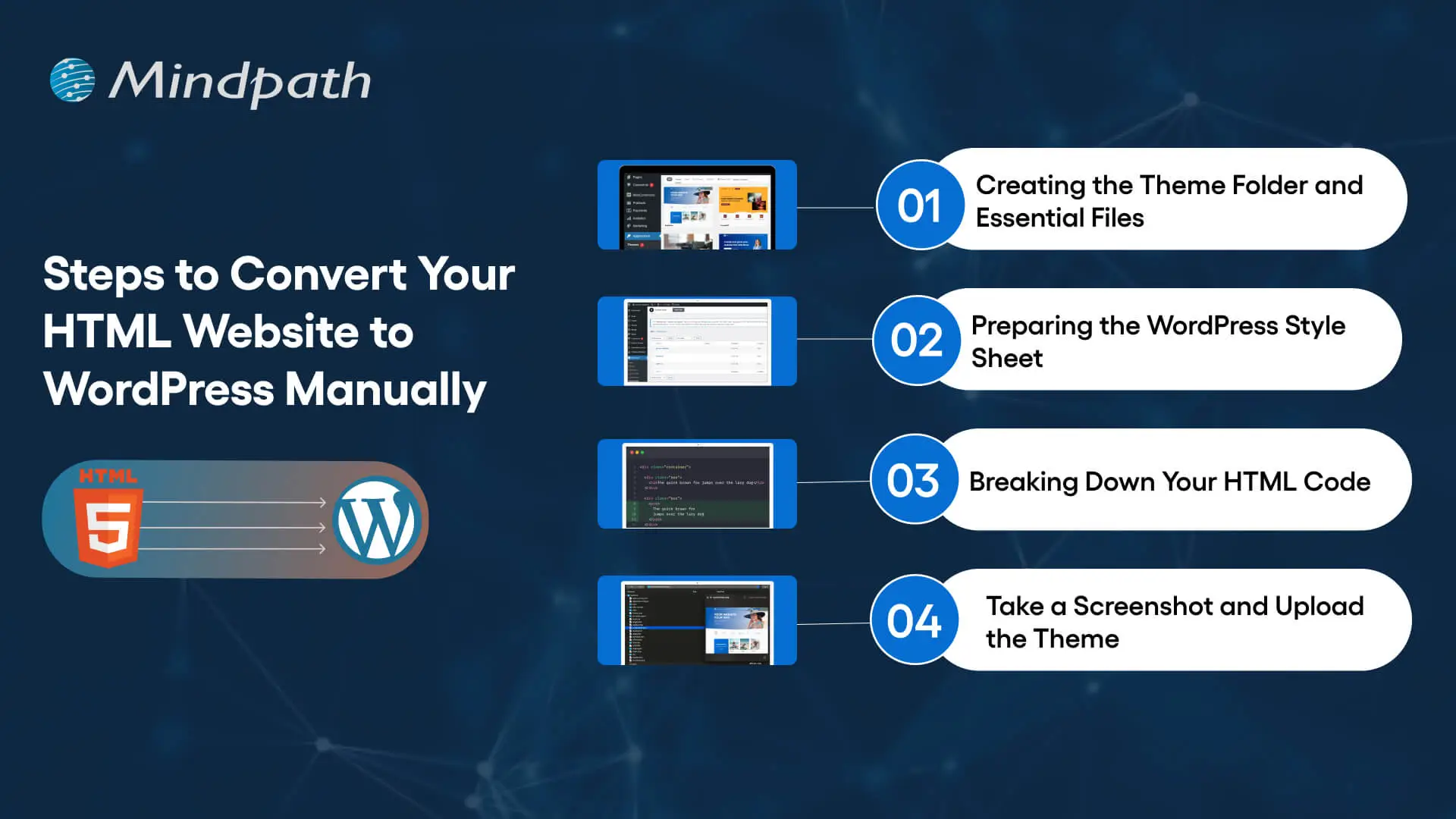
Steps to Convert Your HTML Website to WordPress Manually

Step 1: Creating the Theme Folder and Essential Files

You can begin the conversion process by creating a new theme folder on your desktop. You can follow the same process as you would for creating another directory on your system. Once you have created the theme folder, you can give it a specific name as per your requirements. 

After creating the theme folder, you must open the code editor and create different text files. You can name them as ‘style.css’, ‘index.php’, ‘sidebar.php’, ‘footer.php’, and ‘header.php’. 

The number of files you have to create in this step will depend on the features and design you want in the WordPress theme. You don’t have to do anything else with the files in the code editor now and keep the code editor open as we will need the files in the next step.

Step 2: Preparing the WordPress Style Sheet

You can start the actual preparations for converting your HTML website to WordPress with the WordPress style sheet. Do you remember the ‘style.css’ file you left open in the code editor in the first step? Open it and paste the important details in the style sheet header enclosed within “/*” and “*/”. 

Any guide on HTML to WordPress converter online will focus on the details provided in the style sheet header. The important information included in the style sheet header includes the theme name, theme URI, author name, author URI, description and version. In addition, the style sheet header must also specify license details and tags, which are crucial requirements to add your theme to the WordPress theme directory. 

After providing the essential details in the header, you have to copy and paste the CSS of your HTML website. Make sure that you save the ‘style.css’ file in the theme folder you have created and then close it. 

Is a basic WordPress setup enough to support your growing business needs?
Read more about custom WordPress development and discover how tailored solutions can enhance functionality and user experience.

Step 3: Breaking Down Your HTML Code

One of the most important things you must know about WordPress is that it leverages PHP to extract information from its database. Therefore, you have to break down the existing HTML of your website into different pieces. It will help WordPress put them together in the right way. 

This part of the process of converting HTML to WordPress may seem challenging to beginners. However, it is extremely simple as you have to copy different parts of the HTML document and paste them into different PHP files. Do you remember the PHP files created in the code editor in the first step? They will play a crucial role in this step of the HTML to WordPress conversion process.

You have to open the main file of your HTML website, or ‘index.html’, and copy its content into different PHP files. After copying, you must save the ‘index.php’ file and close it to add the theme to your WordPress website.

Step 4: Take a Screenshot and Upload the Theme

The theme screenshot is a valuable resource that offers a preview of the backend of your WordPress website. It is also important to note that the theme screenshot will also include information from the style sheet header. You cannot convert HTML site to WordPress without knowing how your website works in the WordPress backend. 

Contrary to your assumptions, you don’t have to follow a complex process to take the theme screenshot. You can open the existing HTML site in a browser and take a screenshot with any method you want. After taking the screenshot, you can use an image editing software to crop the screenshot image to 880×660 pixels. Once you save the screenshot as a ‘screenshot.png’ file in the theme folder, you can upload the theme. 

The process to upload your WordPress theme starts with the WordPress Admin Dashboard. You should access the “Appearances” section, where you will find the “Themes” option. Now, you must click on “Add New” and then choose the “Upload Themes” option. Find the theme folder and click on “Install Now,” followed by activating the theme. 

Are you unsure if your website development project is on the right track? Discover our WordPress developer checklist to ensure every critical step is covered for a smooth and successful website launch.

How Will Your WordPress Theme Become More Responsive?

Switching your HTML website to a WordPress theme alone is not enough to get the best results. Anyone who knows how to download WordPress can follow the manual process and get their website on the CMS platform. However, you must also ensure that your website will look good and function seamlessly across all devices. The solution to such problems lies in creating a responsive design, and you can make it happen with a few crucial steps.

First of all, you should choose a responsive framework like CSS or Bootstrap. These frameworks not only save your time but also ensure an effective design that aligns with tested principles. You should also use flexible images to ensure that they don’t pop out of the boxes on mobile devices. In addition, CSS media queries can help you detect small screen sizes, and you should use a mobile menu that offers clean navigation on mobile screens. 

Past the content here

Want to make sure your WordPress website runs seamlessly with the latest technology? Discover how WordPress PHP compatibility can protect your site and enhance its performance.

Final Thoughts

You have decided to convert an HTML website to WordPress to capitalize on the benefits of the most popular CMS platform. With big brands choosing WordPress for their websites, it is reasonable to pick the platform for revamping your website. The manual process of converting HTML-based websites to the WordPress theme is extremely simple and easy to follow. At the same time, you must also ensure that your new WordPress website features a responsive design and works effectively on all devices.

Mindpath has been a pioneer in helping businesses transition to WordPress from outdated formats. We are the trusted specialists in WordPress development with a successful record in empowering websites for the modern business landscape. Our expert WordPress developers conduct comprehensive site analysis and develop custom themes that align with your design needs. With Mindpath at your service, you don’t have to worry about content integration or CMS integration. Consult with our experts and switch to WordPress right now.