Home

10 Ways ReactJS Can Benefit Your Web Project

10 Ways ReactJS Can Benefit Your Web Project

Join our Newsletter!

ReactJS Can Benefit

Do you ever wonder what’s the secret sauce of creating a perfect website or web application? It is the right framework! The success of your project depends on the framework you choose in the ever-changing world of web development. ReactJS is a framework that has been more popular among developers because of its comprehensive features, adaptability, and efficiency.

ReactJS is a part of the wide JavaScript library and is quite popular amongst the developer community for its versatility. With large numbers of frameworks available and new ones coming every single year, it could be a tricky decision to choose the right one for your web project.

In this blog, we will take a deep dive into the origins of ReactJS, its key features, and ten compelling reasons to consider ReactJS for your web development needs.

Origin of ReactJS Framework

Facebook invented ReactJS, also referred to as React, in 2011 and made it available to the public in 2013. The framework was created to help developers overcome the difficulties they encountered when creating intricate, high-performing user interfaces.

The component-based design that React introduces makes development easier by enabling developers to create modular and reusable components. ReactJS is one of the most widely used web development frameworks nowadays, maintained by Facebook in collaboration with a sizable developer community.

Features of ReactJS

ReactJS is a great option for web development because of its many capabilities. Important characteristics consist of:

  1. Component-Based Architecture: React makes it possible to create independent components that are capable of independently managing their state, which makes it easier to create intricate user interfaces.
  2. Virtual DOM: React reduces rendering overhead by simply updating the UI elements that have changed, as opposed to re-rendering the entire page, thanks to the use of a virtual DOM.
  3. JSX Syntax: This JavaScript syntax extension makes it possible for programmers to write HTML-like code inside JavaScript, improving the debugging and readability of the code.
  4. Unidirectional Data Flow: Applications are simpler to debug and maintain because to React’s one-way data binding, which guarantees a consistent data flow.
  5. Rich Ecosystem: React boasts a vast ecosystem of libraries and tools that extend its functionality and streamline the development process.

10 Benefits of Using ReactJS

1. Enhanced Performance

The virtual DOM in ReactJS ensures fast and efficient updates, enabling your web application to handle high-user interactions smoothly.

2. Reusable Components

Because of React’s component-based architecture, developers may quickly and consistently create new areas of an application by reusing components across them.

3. Ease of Learning

Learning ReactJS is not too difficult, especially for people who have experience with JavaScript. It is accessible to novice and seasoned developers because of its straightforward syntax and wealth of internet resources.

4. SEO Friendly

React’s server-side rendering features make it possible to greatly improve your web applications’ SEO, which will raise their visibility and search engine ranks.

5. Strong Community Support

With a large and active community, ReactJS developers can easily find solutions, share knowledge, and stay updated with the latest developments, providing valuable support for troubleshooting and skill enhancement.

6. Rich Ecosystem

The extensive ecosystem of tools, libraries, and extensions available for React makes it highly versatile, with solutions available for state management, routing, and testing.

7. Mobile App Development

React Native, derived from ReactJS, allows developers to build mobile applications using the same principles and components, facilitating seamless extension of web projects to mobile platforms.

8. Scalability

React’s modular structure makes it highly scalable, enabling the addition of new features and components without rewriting existing code, ensuring long-term maintainability.

9. Developer Tools

React offers powerful developer tools, such as React Developer Tools for Chrome and Firefox, which help developers inspect component hierarchies, debug applications, and enhance productivity.

10. Backed by Industry Leaders

Supported by Facebook and used by major companies like Instagram and Airbnb, ReactJS is a reliable and future-proof choice, continuously evolving with strong backing from industry leaders.

Hire ReactJS Developers with Mindpath

Now that we have established that ReactJS can benefit your web project in numerous ways, the next question is where you can hire qualified ReactJS developers. Well, look no further as Mindpath can help you hire the best ReactJS developers!

At Mindpath, we understand the importance of skilled developers for the success of your web project. Our team of experienced ReactJS developers is adept at leveraging the full potential of the React framework to create dynamic, responsive, and user-friendly web applications.

Whether you’re starting a new project or enhancing an existing one, our developers can help you achieve your goals efficiently and effectively.

We are committed to delivering high-quality solutions tailored to your unique needs. Contact us today to learn more about how our ReactJS developers can contribute to the success of your web project.

So you can end your search for React developers today with Mindpath. To know more.
Looking for a ReactJS Developer for your next project?


Get In Touch

Frequently Asked Questions

Support Is One Click Away

Featured Posts

Related Post

Web design trends

In 2026, web design trends are redefining what modern websites look and feel like. Designers are moving beyond conventional layouts, blending user-centric principles with bold aesthetics — from kinetic typography and immersive 3D elements to AI-driven personalization and accessibility-first standards. The goal is to craft websites that are not just beautiful, but also interactive, human-centric, and memorable.

As technology advances and expectations of users evolve, staying ahead of new trends in web design is crucial for businesses to stand out. Whether you are optimizing your local business site or creating a new one, these top web design trends in 2026 will surely trigger ideas and enhance your digital experience. Keep reading to explore some leading web design trends that are set to define modern websites with Mindpath. 

If you are looking to implement these latest modern web design trends in your business, you require expertise. Mindpath offers web development service that helps you stay ahead of your competitors and deliver a website tailored to your business needs by turning your ideas into reality.

Focus On Smart Design For A Smarter Web

In 2026, web design is no longer a choice between personality and performance: it is a combination of both. Modern web design balances high-speed performance with immersive, human-centric storytelling. Designers are leveraging design systems and frameworks that deliver super-fast load times without sacrificing brand storytelling, visual impact, or interactive depth.

This shift has created a new era where creative expression and technical precision go hand in hand. Websites are getting smarter, emotionally resonant and leaner, resulting in a digital experience where design creates a lasting impression and functionality drives engagement. 

Wondering who can bring these design trends to life? Discover our website design company blog to see how the right team can turn trends into impactful websites.

Let’s talk about the trends that businesses need to focus on to achieve designs that deliver. 

21 Web Design Trends to Consider in 2026

Trends in web design are driven by advanced technologies and a desire to develop sites that are highly functional, interactive, memorable, and have elements to showcase a brand’s identity authentically. From sustainable designs to hyper-personalized interfaces, here are 21 web design trends to consider. 

1. Expressive Fonts and Maximalist Typography

Typography is a major visual element in every website. Businesses can expect to see layered, bold, and oversized text that will be the centerpiece of a web page. Besides, web designers are now creating playful, custom typefaces along with high-contrast pairings for a powerful statement. 

2. Micro Animations/ Interactions

Small details can make a huge impact. Micro interactions can help reinforce actions and guide users. For example, button ripples, hover effects, form feedback, or loading indicators. These are subtle yet powerful and can enhance the overall user experience.  

3. Experimental Navigation

Are you still using dropdown and hamburger menu designs? Well, it’s time to take a break. 2026’s trending web designs focus on scroll-as-navigation, gesture-based, and radial navigation styles, increasing engagement. 

4. Brutalist Designs with Some Modern Twists

A reaction template-driven, overly polished designs, brutalism is back, but with a modern twist. This modern style features unpolished, raw elements, bold typography, subtle animations, and pops of color. This design can be an ideal way to add a unique attitude and authenticity to websites. 

5. Illustration-led Web Design

This is gaining popularity among web designers in 2026 for conceptual clarity, quick load times, as well as brand originality. Utilizing illustrations offers a visually engaging alternative to heavy images, making them an excellent choice for service-based websites. 

6. Immersive Scrolling

Most websites are now becoming cinematic due to the integration of scroll-triggered animations. As users move down pages, elements zoom or fade in, crafting a narrative-like or dynamic user journey. With this, you can make a simple scrolling into an immersive experience. 

7. Dark Mode and Custom Palettes

Dark mode has become a standard design, but designers are tweaking it to add more effects. You can now see custom dark mode and palettes that utilize rich grays along with muted tones, offering a more branded and sophisticated experience while reducing strain on the eyes. 

8. Monochromatic Design

It is a simple yet powerful visual approach that utilizes a single base color and its different tones, tints, and shades throughout websites. Such designs emphasize cohesion, elegance, and simplicity. The distraction factors will be less as it creates a unified aesthetic. 

9. Hyper-Personalized Interfaces

Inclusion of machine learning and AI in web design has enabled a new level of customization. Websites will adapt their layout and content to every user, providing them with dynamic content and tailored recommendations based on their browsing history.   

10. Sustainable Web Design Trends

In 2026, the focus will be more on developing environmentally-friendly websites. While designing and developing websites, developers would prioritize eco-friendly hosting providers, accessibility, and streamlined code. These things help lower carbon emissions related to the internet. 

Curious how AI is transforming modern web experiences? Explore our AI in Web Development blog to learn how smart features enhance usability and performance.

11. Sci-Fi Gaming and Futuristic UI Aesthetics

Website interfaces inspired by sci-fi films and games are getting popular.  How about HUD-style overlays, neon glows, glitchy transitions, etc.? These designs can create high-tech and bold digital experiences. 

12. Bento Grid Layouts

Influenced by the elegance of the Japanese bento box, this design utilizes a modular grid of boxes. These layouts offer an efficient and clean way to organize information in a structured way. These website layout ideas are an ideal option for complex content websites and portfolios. 

13. Neumorphism Web Design Trends

It combines flat and skeuomorphism design using minimal contrast and soft shadows for a monochromatic and clean look. It suits web apps but requires proper handling of UX to avoid usability problems. 

14. Power of White Space in Web Design

Emphasizing negative space in a web design can enhance focus and clarity by balancing content with open, clean areas. Strategic use of typography and spacing boosts readability, creates an intuitive experience, and guides user attention. You can consider Apple.com as an example. 

15. Custom Mouse and Cursors Interactions

Custom cursors can play a major role in branding. Designers use them to instill interactive flair and personality, with responsive shapes, sparkly trails, brand logos, and more. It may look simple, but it works well in making a website look unique. 

16. 3D Elements

Another popular modern web design that can make your site look stunning is the use of 3D elements. From interactive product demonstrations to full-screen 3D backgrounds, these elements add realism and depth, making your site more immersive and captivating. 

17. Smart and Dynamic Videos

Videos on websites are becoming ambient design elements. They are generally looped seamlessly, silent, and optimized for faster performance. By using videos on homepages, you can make the website engaging without reducing the site’s speed. 

18. Gamified Designs

When talking about 2026’s web design trends, we can’t ignore these designs. These designs add game-like elements to websites, like challenges, rewards, or points, enticing visitors to spend more time on websites. 

19. Combining Photos with Graphical Elements

Web designers are getting creative by combining photography with beautiful graphical overlays. For instance, elements like arrows, doodles, or collage elements can add a unique layer of creativity. 

20. Detailed Footers in Web Design Trends

Enhanced footers are now redefining web design and development trends. A footer has evolved from a basic contact section into a content-rich, dynamic section, playing a crucial role in brand storytelling. Check out the website of 360gardalife for inspiration. 

21. Collage-Like Scrapbook Layouts

These layouts create an asymmetrical, layered, and handcrafted feel. These designs mimic a scrapbook with text and images scattered in a compelling way. With it, you can add an artistic, human touch while avoiding those rigid grid systems. 

Planning a new web application for your business? Discover our Web App Development Roadmap blog to understand each stage and avoid common pitfalls.

Top Modern Website Design Examples

Are you searching for the best web design inspiration? Well, here are some modern website design examples you should check out. 

1. Stripe

Utilizes minimal UI, geometric shapes, and interactive visuals to craft a conversion-focused and sleek website.

2. Apple

The design combines 3D product previews, cinematic storytelling, seamless transitions, etc., for better user engagement. 

3. Spotify

Combines animated CTAs, dark mode, and bold colors to provide users with an immersive and personalized music discovery platform.

4. Mantis Pro

A perfect combination of high-contrast visuals, bold fonts and amazing layouts while emphasizing speed and performance. 

5. Datel

Includes layers, visuals, scroll animations, and modern typography that clearly highlight the brand’s product innovation and tech-forward approach. 

6. Velux

The design has interactive sliders, soft gradients, and natural imagery that help the brand support its vision, i.e., promoting sustainability.

These cool website designs clearly showcase how their functionality and design can be combined to craft memorable user experiences. 

Looking to make your website more engaging and user-friendly? Read about UI/UX Design Trends to learn what design elements boost interaction and retention.

Website Design Trend: More Innovations in the Future

Whether you are creating a new website or planning to revamp the existing one, here are some future-forward website design trends that you should consider. 

1. Voice User Interface

Voice search and commands integration streamline navigation and offer users hands-free browsing, enhancing accessibility.

2. AI-Powered Design

Various AI tools personalize content, optimize UX, and automate layouts, making a website faster, and smarter.  

3. IoT

Websites connected with smart devices can offer real-time data, personalized automation and remote-control features. 

4. Accessibility-First Design

Focus on inclusive designs to ensure easy access for every user, including people with disabilities, through keyboard navigation, alt text, and readable fonts. 

5. Minimalistic Design

The best web design utilizes strategic whitespace, focused content, and a clean layout to enhance readability, mobile performance while reducing load time

6. Integration of Blockchain

This will ensure enhanced security and transparency for identity verification and transactions on modern websites. 

7. 3D Visuals

3D elements add visual depth, interactivity, and realism, especially for immersive storytelling and product showcases. 

Apart from these web design trends, collaboration between developers and designers is vital. This will help you ensure that your new website is not just visually great, but also secure, high-performing and stable. 

Looking for the right team to bring your web ideas to life? Read our Website Development Company blog to see what to look for before hiring.

Create Web Designs that Move your Business Forward

The future of web design is an exciting combination of purpose, interactivity, sustainability, and authenticity. By incorporating these 21 web design trends 2026, businesses can craft a website that will not just look incredible, but also create an effective and engaging experience. 

For businesses looking to translate trending website designs into a visually appealing and high-performing website, partnering with an expert is crucial. This is where they can count on Mindpath. We offer web development services that integrate advanced technologies, a customer-centric approach, bespoke web design solutions, and follows the latest web development trends to create websites that every business needs. Let us craft digital experiences for businesses that engage, inspire, as well as convert. 

Frequently Asked Questions

hiring a wordpress developer

WordPress remains a top choice for website development due to its scalability, ease of use, and flexibility. However, to unlock WordPress’s true potential, it is crucial to hire the right developer- an expert who can understand your goals, the technical nuances of WordPress, and your customers. Yet, hiring a WordPress developer is a major investment.

It is not just about finding a professional who can write code; it is a strategic partnership between your business and an expert who can offer you the required solutions. Besides, it involves more than just checking technical skills. This detailed hiring WordPress developer guide will guide you through the hiring process, helping you make an ultimate hiring a WordPress developer checklist.

Are you looking for expert help to build your WordPress site? At Mindpath, you can hire WordPress developers who are highly skilled and dedicated to building high-performing websites that drive measurable results.

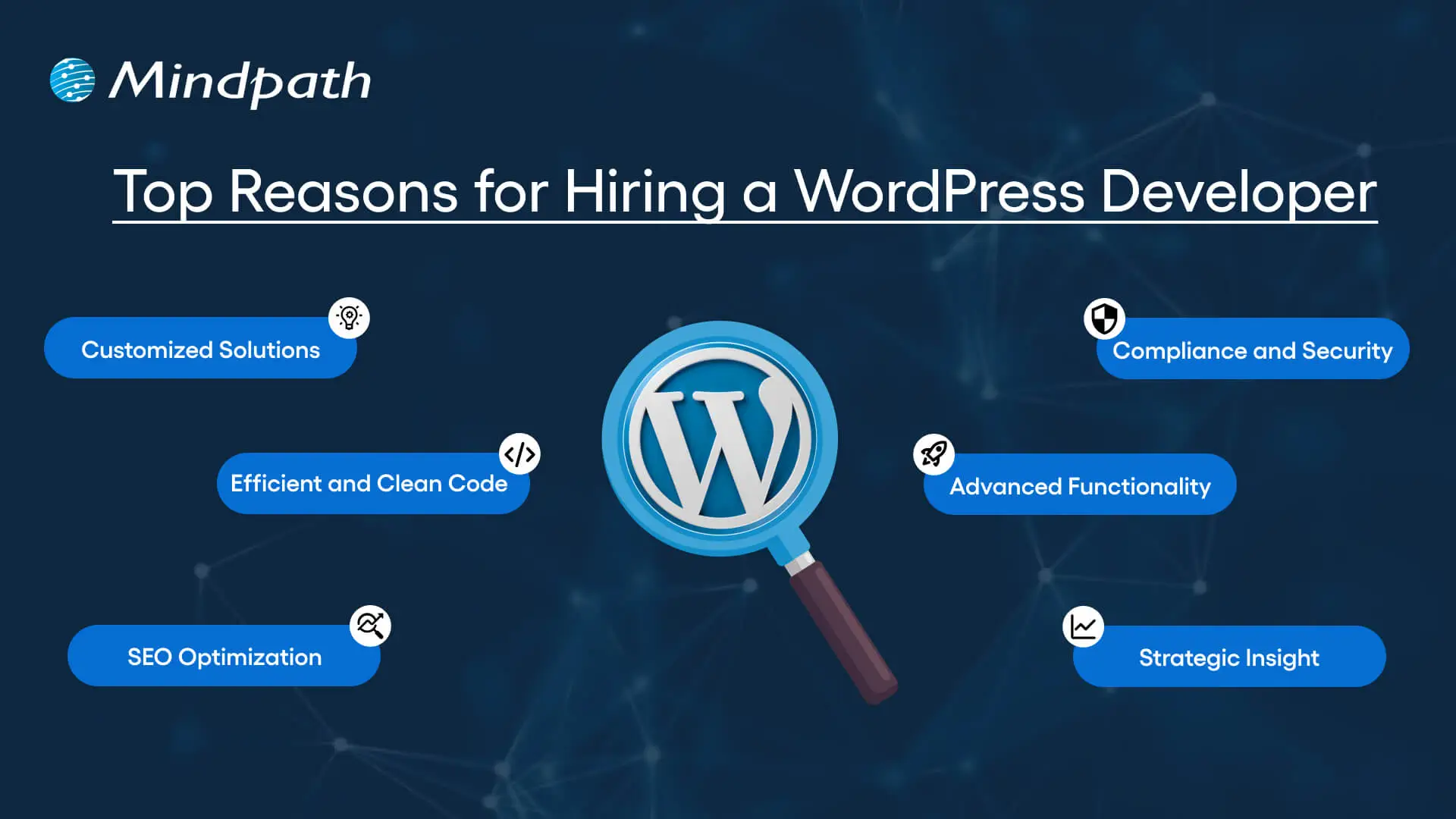
Top Reasons for Hiring a WordPress Developer

Before diving into the WordPress developer checklist to ensure a successful hiring, let’s understand why you should hire expert WordPress developer.

Top Reasons for Hiring a WordPress Developer

1. Customized Solutions

A professional WordPress developer can provide custom WordPress development for the site to match your unique brand identity, functional requirements, and user experience goals. Pre-built themes or plugins won’t offer you such flexibility.

2. Efficient and Clean Code

Skilled developers always prioritize writing scalable, secure, and optimized code. This ensures better SEO scores, fewer compatibility issues, and faster load times.

3. SEO Optimization

Developers know how to develop a website for search engines. For example, they use schema markup, semantic HTML, image optimization tools, and caching techniques that boost visibility and improve rankings.

4. Compliance and Security

From database protection to SSL configuration and plugin installation, professional WordPress developers deploy best security practices to protect your site from data breaches and malware. Besides, they ensure that all the plugins and elements are updated to the latest versions.

5. Advanced Functionality

Do you need a custom API integration or booking system? Well, a skilled WordPress developer knows how to integrate complex features that align with your user needs and business goals. They can also create custom plugins to expand the features of your site.

6. Strategic Insight

Apart from coding, WordPress developers help businesses to get detailed insight into conversion optimization, user behavior, latest trends, and more. All these things will help businesses in making smarter decisions.

Want to make sure your WordPress site is accessible to everyone? Check out our post on improve WordPress web accessibility to learn practical steps for making your site more inclusive and user-friendly.

Types of WordPress Experts- Which One Should You Hire

Understanding the benefits and value a developer can bring is just the beginning. To make the right decision on hiring a WordPress Developer, it is crucial to learn about the different types of WordPress developers you can hire. Remember that each brings a unique focus area and skill set.

1. Front-End WordPress Developers

These experts specialize in interactive and visual aspects of websites. They manage styling, layouts, and user experience and responsiveness using JavaScript, CSS, page builders, and HTML.

2. Back-End WordPress Developers

They focus on database management, server-side functionality, custom theme development, and plugin development. They work with WordPress core functions, MySQL, PHP, and more to create scalable websites.

3. Full-Stack WordPress Developers

Such experts handle back-end and front-end development tasks. They can create a website from scratch while ensuring seamless integration.

While hiring dedicated WordPress developer, you should choose the right type of developer to ensure your project aligns with the design goals, technical needs, and vision.

Curious about which developer’s role best suits your project? Dive into our article on Front-End vs Back-End vs Full-Stack to understand each role and decide which path aligns with your website’s needs.

WordPress Developer Checklist- Skills to Consider

Your hiring WordPress developer checklist should cover the key skills of WordPress developers. HTML, CSS, PHP, MySQL, and JavaScript rank among the key languages for WordPress development. Most developers are familiar with these languages, but knowledge of these technologies is not enough. Here are some skills that matter the most.

Hard Skills or Technical Capabilities

  • Knowledge of using core languages such as jQuery, JS, HTML5, CSS3, PHP, MySQL, React.js, and other languages.
  • Clear understanding of plugin architecture and WordPress core.
  • Building and customizing themes from scratch, and experience with various page builders like Beaver Builder, Gutenberg, Thrive Architect, Elementor, and Themify Builder.
  • Familiarity with REST API.
  • Knowledge of various optimization methods like scheme markup, image compression, caching, Core Web Vitals, minifying CSS, use of CDN, and more.
  • Understating security issues and applying fixes

Soft Skills

  • Ability to explain technical concepts in practical and simple terms.
  • Habit of making clear documentation.
  • Clarity and responsiveness in replies.
  • Ability to collaborate with backend teams and designers.
  • Familiarity with various management tools such as Jira, Trello, and Slack.
  • Willingness to accept feedback and incorporate it quickly.

Some Bonus Skills that Add Value

These skills are not that important for every project, but they can make a developer more valuable. These skills can include:

  • Experience in handling WooCommerce.
  • Knowledge about Headless WordPress configurations.
  • Use of Git or similar tools to manage collaborative workflows and code.
  • Experience in creating responsive and accessible designs to help websites meet the legal requirements of ADA.gov, etc.
  • A better understanding of the business’s goals, like lead generation, conversions, etc.

Want a more flexible and user-friendly website than a static HTML page can offer? Explore our blog on converting HTML to WordPress to see how shifting to WordPress can simplify maintenance and boost performance.

Hiring A WordPress Developer: Best Practices

Hiring a skilled WordPress developer can be a challenging process. That’s why utilizing a structured hiring a WordPress developer checklist is vital. A well-defined hiring checklist can help you save time, and you can hire the best talent for your projects. Here is how to begin your process to hire expert WordPress developer using a proven checklist.

1. Understand your Project Requirements and Goals

Before starting to search for a WordPress developer, it would be better for you to understand your project requirements. Do you want to create a new WordPress site from scratch or optimize an existing site? Are you creating a blog site, business website, or eCommerce platform?

Understanding these things will help narrow down the skills required. For instance, if you want to integrate APIs or advanced features into your site, then hiring a developer with skills in JavaScript or PHP would be a great choice.

Avoiding this step can lead to mismatched expectations. The more precise your needs, the easier your hiring a WordPress developer would be.

2. Selecting the Right Hiring Model

While hiring a WordPress developer, selecting the right engagement model is vital to aligning your development project budget, timeline, and scope. In general, WordPress developers come under three key categories these are:

  • Freelancers: Ideal for short-term and small projects due to their cost-effectiveness and flexibility.
  • Agencies: Offer complete solutions, including website design, development, SEO optimization, and maintenance. Agencies are ideal for large-scale and complex projects.
  • In-House Web Developers: They are best for organizations with ongoing development requirements. Businesses will enjoy faster turnaround and full control. However, this model requires businesses to invest in salaries, management overhead, and benefits.

Consider your budget, long-term objectives, and project size to choose the right model.

3. Developer’s Industry Experience

When using a hiring WordPress developer checklist, an important factor to consider is the developer’s industry-specific experience.

Working with a WordPress developer familiar with your business niche can significantly improve the outcomes while reducing costly trial and error. For instance, for creating an eCommerce website, hiring a developer with WooCommerce expertise will be the best option.

On the other hand, for a blog site, you should prefer to hire an expert with deep SEO and performance optimization knowledge.

This approach will accelerate development and boost functionality. And always ask developers whether they have built websites like yours.

4. Check References and Review Portfolios

Start by examining developers’ portfolios for design consistency, quality, and diversity of development projects that match your business niche. Also, check the custom developer tasks completed by developers to get an idea about their technical skills as well as problem-solving skills.

If possible, assess site performance, usability, and responsiveness to understand the developer’s attention to detail. Also, go through client references to confirm the developer’s support quality, professionalism, and reliability.

5. Conduct Technical Tests and Interviews

Don’t just rely on resumes. Conduct thorough practical tests and interviews. Start by creating targeted interview questions. For instance, you can ask, “How do you solve plugin conflicts”? Or “How do you check a site’s responsiveness?”

Practical tests can include fixing a site speed problem or creating a custom feature or post type. Such tests show developers’ technical skills, efficiency, and creativity. Besides, it helps you to know whether they can work under pressure. This step is pivotal for confident hiring decisions.

Stuck deciding whether WordPress or Drupal is a better match for your business? Our WordPress vs Drupal guide breaks down key differences to help you pick the perfect solution.

Common Mistakes to Avoid

Even with a solid WordPress checklist, mistakes can happen. Here are some common mistakes that you should avoid during the hiring process.

1. Don’t hire an expert based on just low rates. Focusing on the cost factor over quality can lead to poor site performance, missed deadlines, and you may end up with a site that may not meet your business goals.

2. Avoid developers who don’t want to sign confidential agreements. After all, keeping your business data, personal information, and intellectual property safe is important, especially when sharing sensitive details and backend access.

3. Don’t overlook maintenance service and ongoing support offered by the developer. Without this, your site may become vulnerable to bugs and security issues, affecting user experience, speed, and scalability.

4. Don’t ignore red flags such as lack of references, unclear communication, or vague answers.

5. Don’t make your hiring process long and complicated. Excessive interview rounds and lengthy assessments can frustrate candidates, and you may lose top talent.

6. Developers can only create and customize your site. They are not content strategist or designers. So, expecting them to handle everything would be a big mistake, leading to missed opportunities and misaligned results.

Hire Smart and Built Better with Mindpath

Hiring a WordPress developer is a major investment that you make in your business. This can greatly influence your business’s digital future. By following this detailed WordPress developer checklist, you can avoid common mistakes and find a WordPress developer who can create a website that will boost your online presence.

If you are searching for a trusted platform to hire an experienced WordPress developer, you may not find a better option than Mindpath. We specialize in providing the industry’s best WordPress developers, who combine creative design skills, deep technical knowledge, and commitment to quality to develop a perfect solution. Your website needs creative vision, thoughtful design, and expert attention that can bring your brand to life. And for this, you can always count on Mindpath.

Business Benefits of Chatbots

Suppose a customer is browsing your website during the weekend, and then asks a question related to your product, and your chatbot answers that without any delay. Won’t that benefit your business and satisfy your customers? Well, that is precisely one of the key benefits of chatbots. Yes, you heard that right. Chatbots can help businesses respond faster, guide customers smoothly, and improve the overall customer experience. Now-a-days business leaders are starting to see how chatbots can make everyday tasks easier and more efficient.

An interesting report from Tidio reveals that around 60% of B2B companies and 42% of B2C companies already use chatbot software. By 2025, this number is expected to grow by 34%. With better tools, smarter features, and clear business value, AI chatbots are turning into a must-have. If you are curious to know what are the typical benefits of AI chatbot for business, then this blog can guide you perfectly. So, what are you waiting for? Let’s dive in!

What is a Chatbot?

A chatbot is a software application that enables a user to engage in a conversation that imitates a human. In many cases, a chatbot can engage either through text or vocal conversation. By doing this, chatbots enable customers to answer questions, resolve problems, or complete tasks much quicker. Some chatbots adhere to a pre-set script. However, many modern chatbots rely heavily on artificial intelligence (AI) and natural language processing (NLP), to understand what the user is asking, and provide a thoughtful and natural response.

To put this in perspective, let’s assume you arrive at a bank’s website and begin typing your question (example: “How can I open a savings account?”). The chatbot will not only understand that you are asking about a savings account, but also guide you through the steps to take, without the help of any human agent.

The chatbot market is growing fast. According to a study by Grand View Research, the global chatbot market size was valued at USD 7.76 billion in 2024 and is projected to reach USD 27.29 billion by 2030, growing at a CAGR of 23.3% from 2025 to 2030. This rapid growth is driven by advancements in artificial intelligence and machine learning, making chatbots smarter, faster, and more valuable for businesses across industries.

What exactly is a chatbot, and why is everyone talking about them? Explore our in-depth guide: What is a Chatbot – Everything You Need to Know.

What are the Benefits of Chatbots?

If you are wondering what are the benefits of using AI chatbot, here is the answer. AI chatbots are becoming an essential part of modern business operations. Designed to assist in day-to-day tasks, they offer practical support across various business functions.

Here are some benefits of chatbots for businesses:

1. Smart Routing for Better Support

AI chatbots can handle simple questions and tasks on their own. When the issue needs a human touch, the chatbot collects key details from the customer at the beginning. It then sends the conversation to the right agent based on who is available and best suited to help. This smooth handover saves time and makes the support experience faster and more efficient.

2. Improves with Every Interaction

AI chatbots learn from each interaction to improve their responses over time. They collect data, understand patterns, and offer more accurate and personalized replies. They also recognize when to involve a human agent. By picking up on customer emotions, they provide better and more thoughtful support.

3. Enhance Sales

One of major benefits of chatbots is its ability to support sales teams by handling routine tasks. Chatbots can collect lead details, schedule demos, and guide visitors through your website. They also help move potential customers through the sales funnel by answering questions and sharing product information. This leads to higher conversions, fewer drop-offs, and better cross-sell and upsell opportunities.

4. Cost Effective Solution

Managing costs is important for any growing business. While chatbots need some setup at first, they help save money in the long run by handling common tasks and reducing the need for extra staff. They can quickly direct conversations to the right place, making support more efficient. With easy-to-use tools like no-code builders, businesses can launch chatbots faster and start seeing results sooner.

5. Generate Leads

AI chatbots can start natural conversations that feel more personal than standard forms. Instead of sending users to fill out long details, bots gather useful customer data while answering questions in real time. They use conversational AI to understand voice or text and guide the chat smoothly. This helps capture valuable information like visited pages, cart activity, location, and user preferences, making lead generation more effective.

Benefits of Chatbot For Customers

Let us also learn about the benefits of chatbots for customers:

1. Offers Omnichannel Support

Today’s customers use many platforms to reach out; like email, social media, websites, and messaging apps. They expect smooth conversations no matter which channel they choose. AI chatbots can help by answering common questions across all platforms and keeping the conversation connected. This creates a faster, more consistent experience that meets customers where they are.

2. Provides Multilingual Support

As businesses reach global audiences, language should not be a barrier to great service. AI chatbots can offer multilingual support by asking for the customer’s language or detecting it through the conversation. They can chat naturally in multiple languages through text, voice, or messaging. This helps provide clear and friendly support to every customer, no matter where they are.

3. Delivers 24/7 Customer Service

Customers expect fast and reliable service at any time of the day. AI chatbots make this possible by offering 24/7 support without delays, even during peak hours. They handle the first interaction instantly, reducing wait times and helping customers find answers quickly. This ensures a smooth and responsive experience, no matter when the customer reaches out.

4. Create More Personalized Customer Experiences

AI chatbots can offer tailored support by using customer data from tools like CRM or marketing software. They adjust messages based on where a customer is in their journey and suggest products that match their interests. Bots can also answer questions about orders or shopping carts without asking for extra details. When used thoughtfully, this creates a smooth, human-like experience that feels personal and helpful.

5. Ensure Proactive Customer Support

AI chatbots can take the first step by reaching out to customers based on their activity on your website. They can answer common questions, guide users through tricky pages, or remind them about unfinished tasks like a full cart or pending form. This kind of timely support helps reduce drop-offs and improves customer experience. When needed, chatbots can also suggest connecting with a human agent to move things forward smoothly.

Curious about the role of conversational AI in modern business strategy? Dive into Conversational AI Chatbots for Business Growth to see how companies are using them to gain a competitive edge.

Disadvantages of AI Chatbots

While AI chatbots offer many benefits, they also come with a few limitations that businesses should be aware of. Understanding these challenges can help you use chatbots more effectively and plan for the right balance between automation and human support.

1. Struggles with Complex Questions: AI chatbots may not understand sarcasm, unclear grammar, or complicated queries, leading to wrong answers.

2. Lacks Human Emotion: Chatbots can’t show empathy or handle emotional conversations the way a human can.

3. Takes Time to Set Up: Building a chatbot with the right questions, answers, and flow can take time and effort.

4. Can Risk Data Security: If not properly protected, chatbots may expose sensitive customer information to security threats.

5. Bias Responses: If trained on biased data, chatbots can unknowingly give unfair or inappropriate responses.

6. Hallucination: Chatbots can make up answers or provide incorrect details, which can confuse or mislead users.

Ready to Experience the Real Benefits of Chatbots?

Chatbots are helping businesses respond faster, cut costs, and improve customer service. From lead generation to 24/7 support, they make things easier and quicker. While they can’t replace humans fully, they’re a smart way to enhance service and give customers a better overall experience.

At Mindpath, we offer chatbot development services built to match your needs. We create smart, easy-to-use AI bots that improve support, boost engagement, and connect smoothly across platforms. Let us help you deliver faster, better service with a solution designed just for you.

Frequently Asked Questions

1. How do businesses measure the success of chatbot implementation?

Businesses usually track metrics like response time, customer satisfaction, resolution rate, and lead conversions. These insights help understand how well the chatbot is performing. Regular monitoring and improvements ensure the chatbot continues to deliver value and supports overall business goals effectively.

2. What are the benefits of chatbots for businesses beyond customer support?

The benefits of chatbots go beyond answering queries. They help automate repetitive tasks, qualify leads, assist in marketing campaigns, and improve internal workflows. By handling multiple roles, chatbots increase efficiency and allow teams to focus on more strategic and high-value activities.

3. Can chatbots be customized based on different business needs?

Yes, chatbots can be fully customized to match specific business requirements. From conversation style to features and integrations, they can be tailored to suit different goals. This flexibility ensures that businesses can create a chatbot experience aligned with their brand and customer expectations.

4. How secure are chatbots when handling customer information?

Chatbots can be secure if built with proper data protection measures. Encryption, secure APIs, and compliance with data privacy standards help safeguard user information. Regular updates and monitoring also play an important role in ensuring that customer data remains protected during interactions.

5. What are the benefits of chatbots for improving customer engagement?

The benefits of chatbots include keeping customers engaged through quick replies, proactive messages, and personalized interactions. They help maintain continuous communication, reduce waiting time, and guide users smoothly, creating a more interactive and satisfying experience that encourages users to stay connected longer.